sketchucation logo sketchucation
    • Login
    Oops, your profile's looking a bit empty! To help us tailor your experience, please fill in key details like your SketchUp version, skill level, operating system, and more. Update and save your info on your profile page today!
    Mac User? | Join the Rayscaper Beta for Mac Learn More

    How to model a guitar neck

    Scheduled Pinned Locked Moved Newbie Forum
    sketchup
    25 Posts 8 Posters 7.3k Views 8 Watching
    Loading More Posts
    • Oldest to Newest
    • Newest to Oldest
    • Most Votes
    Reply
    • Reply as topic
    Log in to reply
    This topic has been deleted. Only users with topic management privileges can see it.
    • L
      leeahoward
      last edited by

      I am starting to get the idea.

      I may continue to ask dumb questions since it seems to be faster and less frustrating than staring at my computer for hours and cussing at it for non compliance.

      Thanks a lot.

      1 Reply Last reply
      Reply Quote 0
      • B
        bjornkn
        last edited by

        If you don't already have it, make keyboard shortcuts for hide/show hidden lines and X-ray on/off.
        Then it is much easier to see what's going on.
        In that guitar neck there may be some edges inside that should be deleted?
        And the holes should probably easily be filled br drawing on top of one of the edges, if the guitar is modeled at a real scale 1:1. If it is smaller you should scale it up to avoid those problems with tiny dimensions.

        1 Reply Last reply
        Reply Quote 0
        • R
          Roger
          last edited by

          This is directed at Lee, but I welcome anyone else to jump in with a different viewpoint.

          Never make a model in one big file. Make every part as a separate file and then in your master file do nothing but assemble the pieces.

          I break this rule more times than I like to admit and I pay dearly every time. You can also lock components to protect them, but they still contribute to file size and slow response in later phases of construction. The more I do it, the better I like individual files for sub-components so that no drawing is done in the final master file, only assembly.

          http://www.azcreative.com

          1 Reply Last reply
          Reply Quote 0
          • L
            leeahoward
            last edited by

            @Roger. Learn something new every day. So you do that primarily for performance or are there other reasons? Does it speed up rendering/navigation or just saving? I use the outliner with groups pretty heavily because it just makes sense to me, but haven't done much with components yet. Not even sure how to work with components from another file or what the implications of that are. What happens if you want to send someone a copy of your sketchup file? Do you have to send all the files together?
            -Lee

            1 Reply Last reply
            Reply Quote 0
            • R
              Roger
              last edited by

              People have more problems with large complex project than small simple one. So it helps me break the project into small enough segments that nothing ever becomes overwhelmingly complex. And if I have a fatal error, I can always isolate to problem and toss the damaged component knowing I can bring in a new instance of the damaged piece. And, there is a performance boost.

              http://www.azcreative.com

              1 Reply Last reply
              Reply Quote 0
              • B
                bjornkn
                last edited by

                @unknownuser said:

                What happens if you want to send someone a copy of your sketchup file? Do you have to send all the files together?
                No. SketchUp never uses any external files AFAIK. It's all there inside the .skp file, including images and imported components/files. Makes it very simple to share, but may cause some huge files if you have a lot of textures/images.

                1 Reply Last reply
                Reply Quote 0
                • Rich O BrienR
                  Rich O Brien Moderator
                  last edited by

                  If you've got either SDS or Artisan you can create this quite quickly

                  [flash=800,600:1h6tx0uj]http://www.youtube.com/v/N9PTkscoCyc[/flash:1h6tx0uj]

                  Download the free D'oh Book for SketchUp πŸ“–

                  1 Reply Last reply
                  Reply Quote 0
                  • R
                    Roger
                    last edited by

                    Thanks Rich, convinced me I need Artisan.

                    http://www.azcreative.com

                    1 Reply Last reply
                    Reply Quote 0
                    • L
                      leeahoward
                      last edited by

                      Me too. That looks pretty sweet.

                      @roger said:

                      Thanks Rich, convinced me I need Artisan.

                      1 Reply Last reply
                      Reply Quote 0
                      • Rich O BrienR
                        Rich O Brien Moderator
                        last edited by

                        No problem. Glad to help though my suggestion is the lazy approach. It's important to know how to do this with native tools first.

                        Download the free D'oh Book for SketchUp πŸ“–

                        1 Reply Last reply
                        Reply Quote 0
                        • O
                          owatariryo
                          last edited by

                          hey guys i know this is a long dead thread but i guess i should post on since this thread contains many valuable info.

                          here's one problem i've encountered.
                          I've tried curviloft and round corner with no luck, can anyone help? 😐
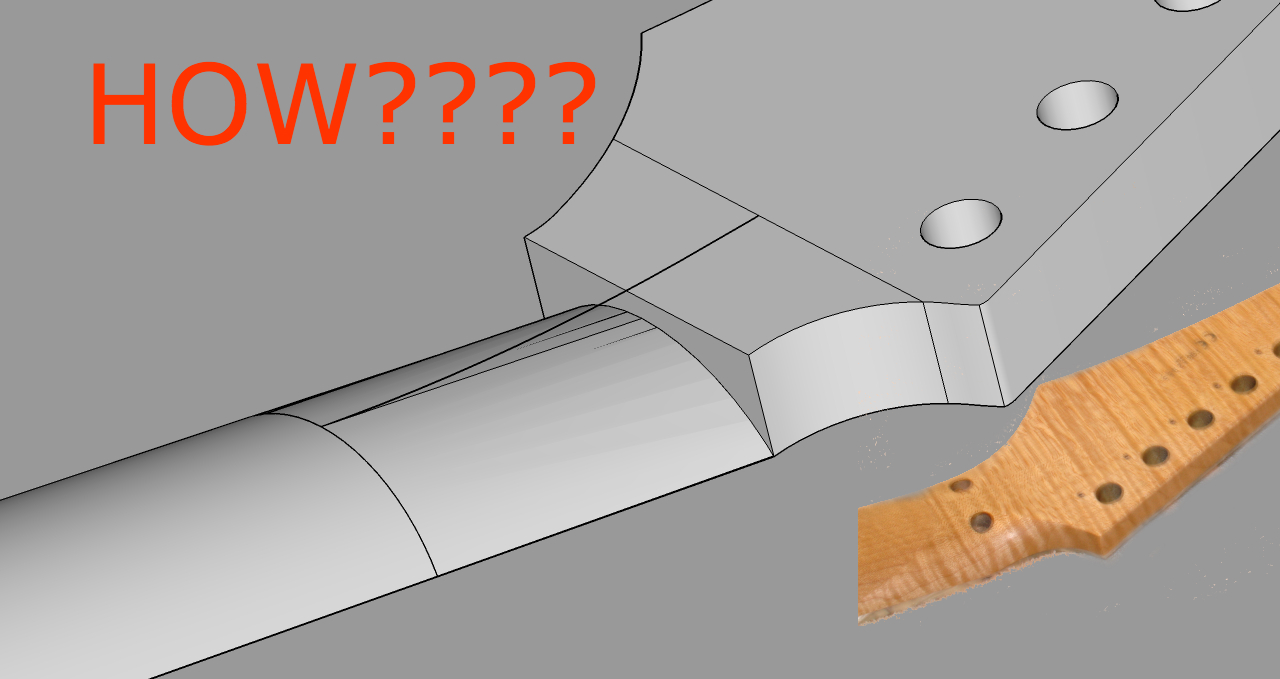

                          How to do this.jpg

                          1 Reply Last reply
                          Reply Quote 0
                          • Rich O BrienR
                            Rich O Brien Moderator
                            last edited by

                            see this gif...


                            guitar-neck.gif

                            Download the free D'oh Book for SketchUp πŸ“–

                            1 Reply Last reply
                            Reply Quote 0

                            Hello! It looks like you're interested in this conversation, but you don't have an account yet.

                            Getting fed up of having to scroll through the same posts each visit? When you register for an account, you'll always come back to exactly where you were before, and choose to be notified of new replies (either via email, or push notification). You'll also be able to save bookmarks and upvote posts to show your appreciation to other community members.

                            With your input, this post could be even better πŸ’—

                            Register Login
                            • 1
                            • 2
                            • 2 / 2
                            • First post
                              Last post
                            Buy SketchPlus
                            Buy SUbD
                            Buy WrapR
                            Buy eBook
                            Buy Modelur
                            Buy Vertex Tools
                            Buy SketchCuisine
                            Buy FormFonts

                            Advertisement