sketchucation logo sketchucation
    • Login
    Oops, your profile's looking a bit empty! To help us tailor your experience, please fill in key details like your SketchUp version, skill level, operating system, and more. Update and save your info on your profile page today!
    Mac User? | Join the Rayscaper Beta for Mac Learn More

    Large Terrain Mesh

    Scheduled Pinned Locked Moved SketchUp Discussions
    sketchup
    105 Posts 11 Posters 24.3k Views 11 Watching
    Loading More Posts
    • Oldest to Newest
    • Newest to Oldest
    • Most Votes
    Reply
    • Reply as topic
    Log in to reply
    This topic has been deleted. Only users with topic management privileges can see it.
    • D
      dbwv69
      last edited by

      @solo said:

      I used an old faithful.... Truespace, made the first save to .cob and then DE for the rest.

      I had never heard of Truespace until now but after looking at their website I am definitely intrigued. And the best part is that according to their website Truespace is free.

      Someday if you have the time, I'd definitely like to pick your brain and hopefully learn how to replicate your results myself.

      1 Reply Last reply
      Reply Quote 0
      • B
        bjornkn
        last edited by

        I'm surprised that trueSpace was the solution. I was using (and beta testing) trueSpace for 10 years (93-03) before I switched to SU and LW, and I really liked the program. But I can't see how it helped handling the giant dxf mesh?
        Could you really load that giant dxf into tS and save as a .cob?
        I still have tS 6.6 installed BTW.

        BTW, those DE problems may come from different versions? There were many problems with some of the DE versions.
        My DE is v 3.5, and it handles/reduces the sample mesh OK, but makes the borders very ugly (very few vertices around the edges).

        1 Reply Last reply
        Reply Quote 0
        • TIGT
          TIG Moderator
          last edited by

          Try 'NOT preserving the origin' of the imported data - it's probably zillions of meters away from [0,0,0]...
          Then when it's loaded zoom extents ?

          TIG

          1 Reply Last reply
          Reply Quote 0
          • charly2008C
            charly2008
            last edited by

            Dear specialists,

            I have a question again. I have created in Global Mapper contour lines. Then I export the vector data as a DXF. When I import it into SketchUp, the layer are displayed, but the model is not visible. What am I doing wrong? I thank you in advance for your help.

            Charly


            11.jpg


            2.jpg


            12.jpg


            4.jpg


            1.jpg

            He who makes no mistakes, makes nothing

            1 Reply Last reply
            Reply Quote 0
            • charly2008C
              charly2008
              last edited by

              Hi TIG,

              then I see a very small piece. Only when I scale it I see it is only a grid. Now what I've discovered! The problem I had once before. I can not remember the solution.

              Charly


              5.jpg


              6.jpg


              6.jpg

              He who makes no mistakes, makes nothing

              1 Reply Last reply
              Reply Quote 0
              • GaieusG
                Gaieus
                last edited by

                Could it be a scaling issue? Is the import scale and the original scale the same? If it is very tiny, it would explain the missing faces.

                Gai...

                1 Reply Last reply
                Reply Quote 0
                • charly2008C
                  charly2008
                  last edited by

                  Hi Gaieus,

                  If I knew that! I only know that I yesterday tried it with the contour lines (same Options in Global Mapper) of the Vesuv and it worked.

                  Charly

                  He who makes no mistakes, makes nothing

                  1 Reply Last reply
                  Reply Quote 0
                  • charly2008C
                    charly2008
                    last edited by

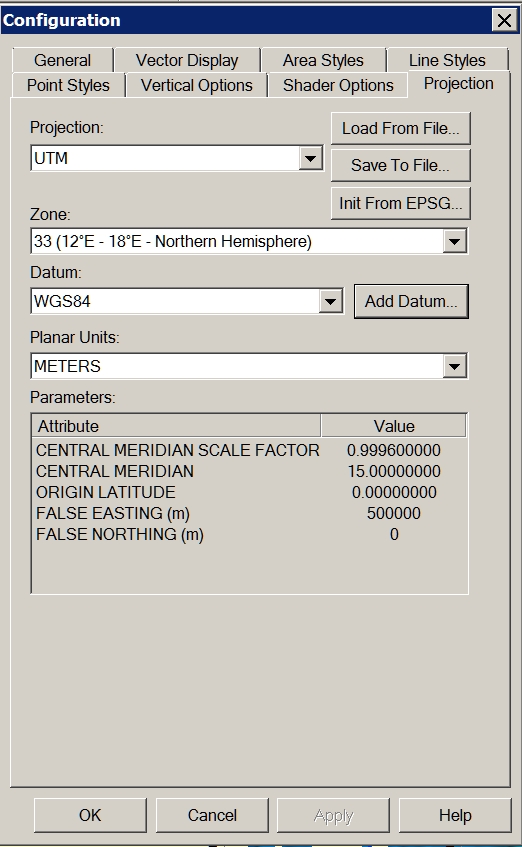
                    Problem solved! I forgot to change the projection to UTM Datum WGS84.

                    Charly

                    1.jpg


                    2.jpg


                    3.jpg

                    He who makes no mistakes, makes nothing

                    1 Reply Last reply
                    Reply Quote 0
                    • GaieusG
                      Gaieus
                      last edited by

                      Cool. And now let's see some nice eruption!
                      😄

                      Gai...

                      1 Reply Last reply
                      Reply Quote 0
                      • D
                        dbwv69
                        last edited by

                        Through some experimentation and the help of someone who has a newer version of DE, I was able to determine that the problem I was having is related to the way the DE reduces files of different types.

                        Solo was importing the DXF file into Sketchup and saving it as Sketchup version 6 prior to reducing the mesh in DE. I was unable to import the DXF file into Sketchup due to it's size so I was opening the DXF file directly with DE.

                        After sending a sample DXF file to a friend with a newer version of DE and hearing that he was seeing the same problem, I began to suspect that it must have something to do with the file type so I tried converting the DXF file to another type, OBJ I think, then opened that with DE and reduced the terrain mesh. After doing this, I was finally able to obtain acceptable results at 90% reduction.

                        1 Reply Last reply
                        Reply Quote 0
                        • charly2008C
                          charly2008
                          last edited by

                          Hi,

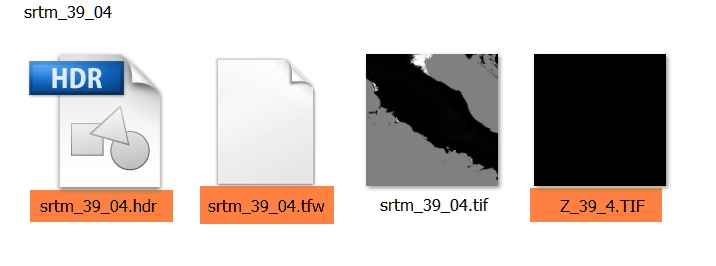
                          I have a additional question to the downloaded SRTM. For what purpose is served by the tagged files. Thanks in advance.

                          Charly

                          2011-05-16_201330.jpg

                          He who makes no mistakes, makes nothing

                          1 Reply Last reply
                          Reply Quote 0
                          • nokluN
                            noklu
                            last edited by

                            I have used Global Mapper quite a bit to generate contours for import to SU. The largest I have done was about 2000 acres. You may want to play with the contour interval to speed up SU. I generated a terrain model with 2' contours on 2000 ac. SU ran all night. When It was complete, I had to zoom WAY back (really far). Good Luck, sounds like a cool project.

                            1 Reply Last reply
                            Reply Quote 0

                            Hello! It looks like you're interested in this conversation, but you don't have an account yet.

                            Getting fed up of having to scroll through the same posts each visit? When you register for an account, you'll always come back to exactly where you were before, and choose to be notified of new replies (either via email, or push notification). You'll also be able to save bookmarks and upvote posts to show your appreciation to other community members.

                            With your input, this post could be even better 💗

                            Register Login
                            • 1
                            • 2
                            • 3
                            • 4
                            • 5
                            • 6
                            • 6 / 6
                            • First post
                              Last post
                            Buy SketchPlus
                            Buy SUbD
                            Buy WrapR
                            Buy eBook
                            Buy Modelur
                            Buy Vertex Tools
                            Buy SketchCuisine
                            Buy FormFonts

                            Advertisement