sketchucation logo sketchucation
    • Login
    Oops, your profile's looking a bit empty! To help us tailor your experience, please fill in key details like your SketchUp version, skill level, operating system, and more. Update and save your info on your profile page today!
    ⚠️ Update | Sketchucation Tools 5.0.8 released with licensing improvements and bugfixes Download

    [Plugin] CleanUp

    Scheduled Pinned Locked Moved Plugins
    974 Posts 217 Posters 1.2m Views 217 Watching
    Loading More Posts
    • Oldest to Newest
    • Newest to Oldest
    • Most Votes
    Reply
    • Reply as topic
    Log in to reply
    This topic has been deleted. Only users with topic management privileges can see it.
    • R
      risoto1978
      last edited by

      Hi,

      I tried to install the cleanup ruby file on my mac. But then starting sketchup I got this error message: "no such file to load -- TT_Lib2/core.rb" but this one was not part of the download.

      somebody can help?

      Thanks
      risoto

      1 Reply Last reply
      Reply Quote 0
      • GaieusG
        Gaieus
        last edited by

        Hi Christian (and welcome),

        Please, go back to the first post and follow the link to that TT_Libray (and additional plugin package) you also need for this (and some other) plugin(s) to work.

        Gai...

        1 Reply Last reply
        Reply Quote 0
        • TIGT
          TIG Moderator
          last edited by

          Christian
          Follow Gaieus's advice and mine in the post just before yours πŸ˜• http://forums.sketchucation.com/viewtopic.php?p=316703#p316703 that shows the link... πŸ˜’

          TIG

          1 Reply Last reply
          Reply Quote 0
          • R
            risoto1978
            last edited by

            Thanks for the hint. Reading makes things easier. Now it works.

            cheers
            risoto

            1 Reply Last reply
            Reply Quote 0
            • J
              JasonDoggart
              last edited by

              Thanks so much for this tool! All your hard work is greatly appreciated!

              1 Reply Last reply
              Reply Quote 0
              • Bob JamesB
                Bob James
                last edited by

                I wound up in a complex model with several instances of a component having two or three different names. I want to change it so that all of the components that are physically the same become just one component and one name.

                I tried the "similar" tool but that didn't seem to do anything (that I could tell).

                I can't manually fix it because SU requires unique names.

                Any advice?

                i7-4930K 3.4Ghz, 2x GTX780 6GB, 32GB DDR3-1600 ECC, OCZ Vertex 4 500GB, WD Black 3TB, 32TB NAS, 4x 27" Monitors, SpaceMouse Pro, X-keys XK-60

                1 Reply Last reply
                Reply Quote 0
                • thomthomT
                  thomthom
                  last edited by

                  @bob james said:

                  I tried the "similar" tool but that didn't seem to do anything (that I could tell).

                  It doesn't currently handle nested components etc. It's very experimental and I've not had time to work more on it. 😞

                  @bob james said:

                  I can't manually fix it because SU requires unique names.

                  Select the component you want in the model - then type into the Ruby Console:
                  prototype = Sketchup.active_model.selection[0].definition

                  Select one or more of the instances of the definition you want to replace - then:
                  Sketchup.active_model.selection.each{|e|e.definition=prototype}

                  (Make sure the components axis are place identically.)

                  Thomas Thomassen β€” SketchUp Monkey & Coding addict
                  List of my plugins and link to the CookieWare fund

                  1 Reply Last reply
                  Reply Quote 0
                  • R
                    rocorona
                    last edited by

                    --Select the COMPONENT you want to replace;
                    --Go to the Components Browser:
                    --Right-click on the preview of the replacing component;
                    --Choose the "Replace selection" command;

                    Was this your goal?

                    1 Reply Last reply
                    Reply Quote 0
                    • Bob JamesB
                      Bob James
                      last edited by

                      @rocorona said:

                      --Select the COMPONENT you want to replace;
                      --Go to the Components Browser:
                      --Right-click on the preview of the replacing component;
                      --Choose the "Replace selection" command;

                      Was this your goal?

                      Thank you for your idea, but I've used the workflow you describe, but it still leaves the names different.

                      Goal: Several identical components have different names: I want consolidate all of them into one component and one name.

                      i7-4930K 3.4Ghz, 2x GTX780 6GB, 32GB DDR3-1600 ECC, OCZ Vertex 4 500GB, WD Black 3TB, 32TB NAS, 4x 27" Monitors, SpaceMouse Pro, X-keys XK-60

                      1 Reply Last reply
                      Reply Quote 0
                      • D
                        dedmin
                        last edited by

                        I have a problem with this file - when running Cleanup it's says cleaned 12 edges and the next run is the same. Saved, reopened and again - every time Cleanup cleans 12 edges.
                        clenaup.skp

                        1 Reply Last reply
                        Reply Quote 0
                        • thomthomT
                          thomthom
                          last edited by

                          @dedmin said:

                          I have a problem with this file - when running Cleanup it's says cleaned 12 edges and the next run is the same. Saved, reopened and again - every time Cleanup cleans 12 edges.
                          [attachment=0:1ztpects]<!-- ia0 -->clenaup.skp<!-- ia0 -->[/attachment:1ztpects]

                          What settings did you use?

                          Thomas Thomassen β€” SketchUp Monkey & Coding addict
                          List of my plugins and link to the CookieWare fund

                          1 Reply Last reply
                          Reply Quote 0
                          • D
                            dedmin
                            last edited by

                            @thomthom said:

                            @dedmin said:

                            I have a problem with this file - when running Cleanup it's says cleaned 12 edges and the next run is the same. Saved, reopened and again - every time Cleanup cleans 12 edges.
                            [attachment=1:1nonbopm]<!-- ia1 -->clenaup.skp<!-- ia1 -->[/attachment:1nonbopm]

                            What settings did you use?

                            [attachment=0:1nonbopm]<!-- ia0 -->Capture.PNG<!-- ia0 -->[/attachment:1nonbopm]
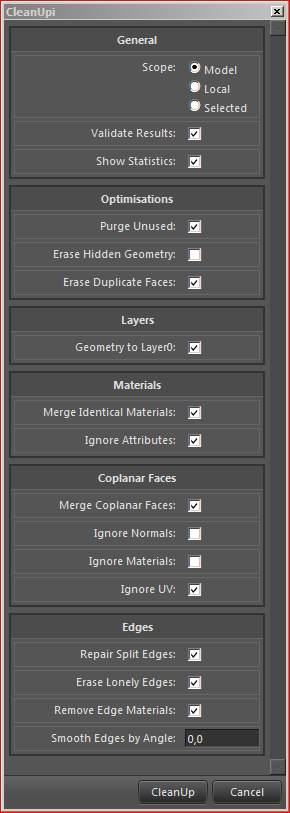

                            Capture.PNG

                            1 Reply Last reply
                            Reply Quote 0
                            • thomthomT
                              thomthom
                              last edited by

                              It's the repair edges feature. Some times it tries to repair edges where they don't seem to remain repaired. It's some oddity I've not worked out why it occurs yet. Might be due to small edges or small accuracy issues. The Repair Broken Edges plugin do the same thing.

                              Thomas Thomassen β€” SketchUp Monkey & Coding addict
                              List of my plugins and link to the CookieWare fund

                              1 Reply Last reply
                              Reply Quote 0
                              • D
                                dedmin
                                last edited by

                                Thanks - unchecked Repair Split Edges and now it's fine!

                                1 Reply Last reply
                                Reply Quote 0
                                • thomthomT
                                  thomthom
                                  last edited by

                                  @dedmin said:

                                  Thanks - unchecked Repair Split Edges and now it's fine!

                                  Note that it's not an error or anything. It's just some edges that SketchUp doesn't heal properly.

                                  Thomas Thomassen β€” SketchUp Monkey & Coding addict
                                  List of my plugins and link to the CookieWare fund

                                  1 Reply Last reply
                                  Reply Quote 0
                                  • Bob JamesB
                                    Bob James
                                    last edited by

                                    @bob james said:

                                    Goal: Several identical components have different names: I want consolidate all of them into one component and one name.

                                    Is there a solution to this goal?

                                    i7-4930K 3.4Ghz, 2x GTX780 6GB, 32GB DDR3-1600 ECC, OCZ Vertex 4 500GB, WD Black 3TB, 32TB NAS, 4x 27" Monitors, SpaceMouse Pro, X-keys XK-60

                                    1 Reply Last reply
                                    Reply Quote 0
                                    • thomthomT
                                      thomthom
                                      last edited by

                                      @bob james said:

                                      @bob james said:

                                      Goal: Several identical components have different names: I want consolidate all of them into one component and one name.

                                      Is there a solution to this goal?

                                      Work in progress: http://forums.sketchucation.com/viewtopic.php?f=323&t=30143
                                      Not sure if it's exactly what you're looking for... ?

                                      Thomas Thomassen β€” SketchUp Monkey & Coding addict
                                      List of my plugins and link to the CookieWare fund

                                      1 Reply Last reply
                                      Reply Quote 0
                                      • S
                                        shoeb_cars
                                        last edited by

                                        till recently i was using cleanup3 in SU7 but it was a bit slow so i stuck to ur first version which is mighty fast and doesnt ask too many questions. but i recently migrated to SU8 in which cleanup1 doesnt work so then i tried cleanup3... and i just bloody fell in love with it. it is fast and damn, is it clean. as always thom thom "U da MAAAN"

                                        1 Reply Last reply
                                        Reply Quote 0
                                        • thomthomT
                                          thomthom
                                          last edited by

                                          @shoeb_cars said:

                                          till recently i was using cleanup3 in SU7 but it was a bit slow so i stuck to ur first version which is mighty fast and doesnt ask too many questions. but i recently migrated to SU8 in which cleanup1 doesnt work so then i tried cleanup3... and i just bloody fell in love with it. it is fast and damn, is it clean. as always thom thom "U da MAAAN"

                                          I'm guessing you had "Erase Duplicate Faces" checked - which is very slow.

                                          Thomas Thomassen β€” SketchUp Monkey & Coding addict
                                          List of my plugins and link to the CookieWare fund

                                          1 Reply Last reply
                                          Reply Quote 0
                                          • marleusM
                                            marleus
                                            last edited by

                                            Thanks ThomThom 😎

                                            I do a lot of 3ds-import and conversions and your ruby really
                                            speeds up my work and reduces file size 😍

                                            I ove you one πŸ˜„

                                            Markus Sillander
                                            Vantaa, Finland
                                            I'm on FormFonts now
                                            http://www.formfonts.com

                                            1 Reply Last reply
                                            Reply Quote 0

                                            Hello! It looks like you're interested in this conversation, but you don't have an account yet.

                                            Getting fed up of having to scroll through the same posts each visit? When you register for an account, you'll always come back to exactly where you were before, and choose to be notified of new replies (either via email, or push notification). You'll also be able to save bookmarks and upvote posts to show your appreciation to other community members.

                                            With your input, this post could be even better πŸ’—

                                            Register Login
                                            • 1
                                            • 2
                                            • 15
                                            • 16
                                            • 17
                                            • 18
                                            • 19
                                            • 48
                                            • 49
                                            • 17 / 49
                                            • First post
                                              Last post
                                            Buy SketchPlus
                                            Buy SUbD
                                            Buy WrapR
                                            Buy eBook
                                            Buy Modelur
                                            Buy Vertex Tools
                                            Buy SketchCuisine
                                            Buy FormFonts

                                            Advertisement