sketchucation logo sketchucation
    • Login
    Oops, your profile's looking a bit empty! To help us tailor your experience, please fill in key details like your SketchUp version, skill level, operating system, and more. Update and save your info on your profile page today!
    Mac User? | Join the Rayscaper Beta for Mac Learn More

    When you Make a Component, How Do You Access It?

    Scheduled Pinned Locked Moved SketchUp Discussions
    sketchup
    16 Posts 6 Posters 1.1k Views 6 Watching
    Loading More Posts
    • Oldest to Newest
    • Newest to Oldest
    • Most Votes
    Reply
    • Reply as topic
    Log in to reply
    This topic has been deleted. Only users with topic management privileges can see it.
    • C
      cmartin
      last edited by

      When I make something a component, how do I access it?

      I went to Window | Components, but it wasn't there.

      1 Reply Last reply
      Reply Quote 0
      • pilouP
        pilou
        last edited by

        Maybe this can help you 😉
        component.jpg

        Frenchy Pilou
        Is beautiful that please without concept!
        My Little site :)

        1 Reply Last reply
        Reply Quote 0
        • TIGT
          TIG Moderator
          last edited by

          As Pilou beat me to it 😮
          Did you click the Component Browser's 'Model' icon [the 'small house'... to show all available 'loaded' Components in the Model] ?
          Are you sure it was a Component ? and not a Group ?
          If your 'Make Component' settings don't convert selection to an Instance, the 'Component' you still be left as 'raw geometry'.
          What does the Outliner show ??
          😕

          TIG

          1 Reply Last reply
          Reply Quote 0
          • mitcorbM
            mitcorb
            last edited by

            Don't you have to check the box Replace selected geometry with component in the interface window also?

            I take the slow, deliberate approach in my aimless wandering.

            1 Reply Last reply
            Reply Quote 0
            • Dave RD
              Dave R
              last edited by

              @mitcorb said:

              Don't you have to check the box Replace selected geometry with component in the interface window also?

              You do need to do that if there is unselected geometry attached to the selection from which you want to make the component. If there isn't any unselected, connected entities, though, the box is automatically checked.

              Etaoin Shrdlu

              %

              (THERE'S NO PLACE LIKE)

              G28 X0.0 Y0.0 Z0.0

              M30

              %

              1 Reply Last reply
              Reply Quote 0
              • mitcorbM
                mitcorb
                last edited by

                Thanks, Dave:
                Now, where else is that written so nicely and succinctly? 😄 (I didn't go to Autocad school, either.) That was one of those things I had only a fuzzy, intuitive understanding about.

                I take the slow, deliberate approach in my aimless wandering.

                1 Reply Last reply
                Reply Quote 0
                • Dave RD
                  Dave R
                  last edited by

                  You're welcome. I suppose it is written somewhere but I came across it on my own a long time ago. now, in my workflow, I almost never have to worry about it anyway because I make a component of what I've drawn before moving on to the next part. That practice makes it much easier to avoid mistakes.

                  Etaoin Shrdlu

                  %

                  (THERE'S NO PLACE LIKE)

                  G28 X0.0 Y0.0 Z0.0

                  M30

                  %

                  1 Reply Last reply
                  Reply Quote 0
                  • C
                    cmartin
                    last edited by

                    I just clicked the house icon. Never thought to click that.

                    Thank you very much. I see it now.

                    Ok, question.

                    Let's say I make a window. Lets say its a rectangle shape window that is divided in half. I've attached a pic. When I make that a component and try to use it again, the wall appears where the window is knocked out.

                    Should I make windows components?

                    I uploaded a new image....you can see the new window on the right (I used the component I made to do that one). But you can see the new window made from he component doesn't have the openings. And its actually kind of difficult to punch the openings through on the new window.
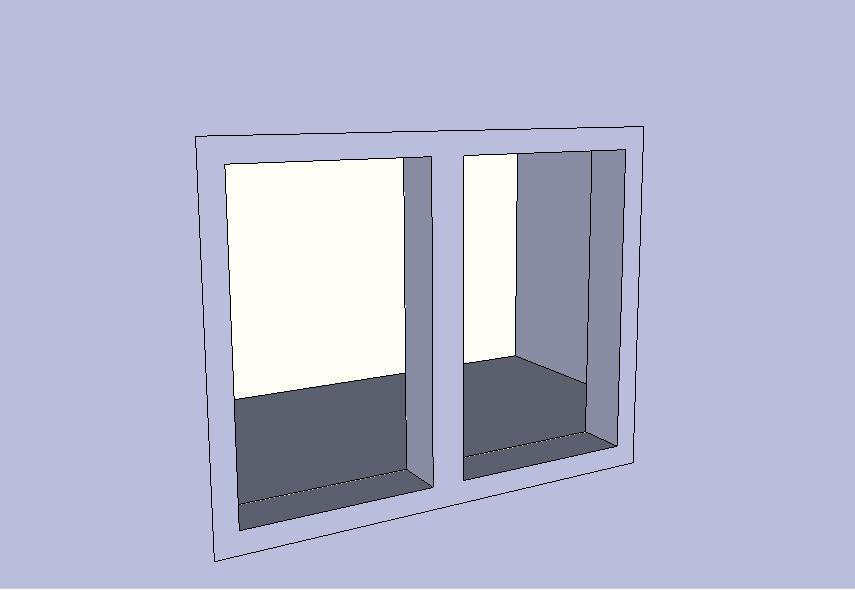
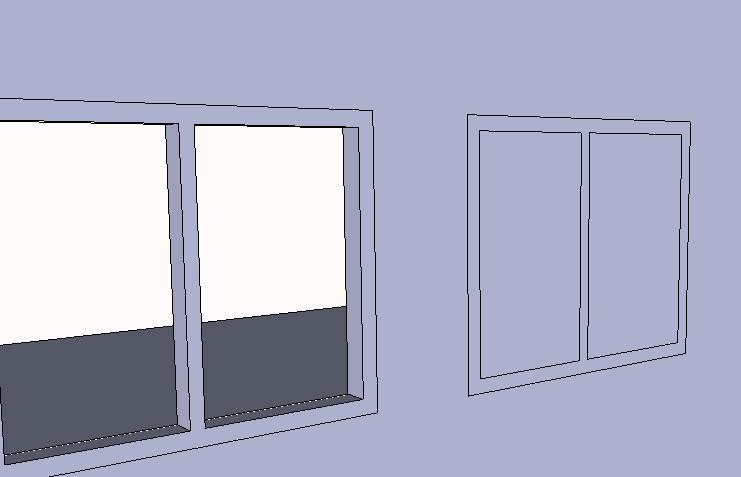
                    TEST.JPG


                    test2.JPG

                    1 Reply Last reply
                    Reply Quote 0
                    • GaieusG
                      Gaieus
                      last edited by

                      It sems that your component is not set to cut an opening automatically. Could you share it?

                      (Also, all faces are reversed which may add to the issue but more about it later maybe)

                      Gai...

                      1 Reply Last reply
                      Reply Quote 0
                      • C
                        cmartin
                        last edited by

                        @gaieus said:

                        It sems that your component is not set to cut an opening automatically. Could you share it?

                        (Also, all faces are reversed which may add to the issue but more about it later maybe)

                        I attached the sketchup model. You can find the window component listed as "window 1".

                        Thank you


                        test.skp

                        1 Reply Last reply
                        Reply Quote 0
                        • TIGT
                          TIG Moderator
                          last edited by

                          When you made the component you didn't set it to glue/cut or have the right axes [a cutting component's z/blue axis is perpendicular to the face it will cut... etc]
                          When you make a component make sure all of these get set...
                          Here is how to fix this existing component that is wrong...Wrong SettingsRight Settings [for a 'Wall']Right-click > Change Axes > Correct axes for a gluing/cutting component
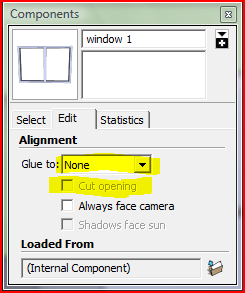
                          PS: Please make objects so the front face is 'out' - everything in your SKP seems to be made inside-out 😒

                          TIG

                          1 Reply Last reply
                          Reply Quote 0
                          • C
                            cmartin
                            last edited by

                            @tig said:

                            When you made the component you didn't set it to glue/cut or have the right axes [a cutting component's z/blue axis is perpendicular to the face it will cut... etc]
                            When you make a component make sure all of these get set...
                            Here is how to fix this existing component that is wrong...[attachment=2:35kkqb20]<!-- ia2 -->Capture.PNG<!-- ia2 -->[/attachment:35kkqb20][attachment=1:35kkqb20]<!-- ia1 -->Capture1.PNG<!-- ia1 -->[/attachment:35kkqb20][attachment=0:35kkqb20]<!-- ia0 -->Capture2.PNG<!-- ia0 -->[/attachment:35kkqb20]
                            PS: Please make objects so the front face is 'out' - everything in your SKP seems to be made inside-out 😒

                            thank you very much!

                            as far as everything being inside out, I start out by drawing a large rectangle (that is sort of like my piece of land I build my house on). And then start the house on top of that rectangle. Perhaps that is causing everything to be inside out?

                            1 Reply Last reply
                            Reply Quote 0
                            • Dave RD
                              Dave R
                              last edited by

                              @cmartin said:

                              thank you very much!

                              as far as everything being inside out, I start out by drawing a large rectangle (that is sort of like my piece of land I build my house on). And then start the house on top of that rectangle. Perhaps that is causing everything to be inside out?

                              It would be the cause of the inside out faces. If you orbit to look at your model from underneath, you probably have no bottom to the walls. If you really must have that face to draw on, draw the rectangle, reverse its face so it has the correct face up and make it a component or group. Then draw your floor plan on top of that and pull the walls up. They'll be right way out. Of course as far as just drawing goes, there's really no need to start on the rectangle either.

                              Etaoin Shrdlu

                              %

                              (THERE'S NO PLACE LIKE)

                              G28 X0.0 Y0.0 Z0.0

                              M30

                              %

                              1 Reply Last reply
                              Reply Quote 0
                              • GaieusG
                                Gaieus
                                last edited by

                                Or at least group your "land" first. But true that there's no real need for that. You can add some landscape at the end, too.

                                Gai...

                                1 Reply Last reply
                                Reply Quote 0
                                • C
                                  cmartin
                                  last edited by

                                  @dave r said:

                                  If you orbit to look at your model from underneath, you probably have no bottom to the walls.

                                  That is correct. there are no bottom to the walls.

                                  @unknownuser said:

                                  It would be the cause of the inside out faces. If you really must have that face to draw on, draw the rectangle, reverse its face so it has the correct face up and make it a component or group. Then draw your floor plan on top of that and pull the walls up. They'll be right way out. Of course as far as just drawing goes, there's really no need to start on the rectangle either.

                                  Thank you for the advice. I guess I will try really hard to start the house without the large rectangle to build it on.

                                  Quick question, when I made the new component and tried to put it into the wall, it goes sideways instead of vertical. I set it to vertical when i made it. in the air it is vertical but when I try to bring it down to the wall it turns sideways.

                                  1 Reply Last reply
                                  Reply Quote 0
                                  • TIGT
                                    TIG Moderator
                                    last edited by

                                    Either make the 'window' flat on the ground OR make it on a 'wall'.
                                    When you make the selected geometry into a component read the dialog and choose to make it glued/cutting as desired...


                                    TIG

                                    1 Reply Last reply
                                    Reply Quote 0

                                    Hello! It looks like you're interested in this conversation, but you don't have an account yet.

                                    Getting fed up of having to scroll through the same posts each visit? When you register for an account, you'll always come back to exactly where you were before, and choose to be notified of new replies (either via email, or push notification). You'll also be able to save bookmarks and upvote posts to show your appreciation to other community members.

                                    With your input, this post could be even better 💗

                                    Register Login
                                    • 1 / 1
                                    • First post
                                      Last post
                                    Buy SketchPlus
                                    Buy SUbD
                                    Buy WrapR
                                    Buy eBook
                                    Buy Modelur
                                    Buy Vertex Tools
                                    Buy SketchCuisine
                                    Buy FormFonts

                                    Advertisement