sketchucation logo sketchucation
    • Login
    Oops, your profile's looking a bit empty! To help us tailor your experience, please fill in key details like your SketchUp version, skill level, operating system, and more. Update and save your info on your profile page today!
    ⚠️ Important | Libfredo 15.6b introduces important bugfixes for Fredo's Extensions Update

    Problems doing a curve

    Scheduled Pinned Locked Moved Newbie Forum
    sketchup
    26 Posts 5 Posters 2.1k Views 5 Watching
    Loading More Posts
    • Oldest to Newest
    • Newest to Oldest
    • Most Votes
    Reply
    • Reply as topic
    Log in to reply
    This topic has been deleted. Only users with topic management privileges can see it.
    • GaieusG Offline
      Gaieus
      last edited by

      The whole thing is just 30 mm thick. Should the max top thickness be 520 mm?

      Gai...

      1 Reply Last reply Reply Quote 0
      • TIGT Offline
        TIG Moderator
        last edited by

        I quickly made this from the one face.
        Switched of Hidden Geometry.
        Removed the 'holes-surfaces'.
        Selected all Surface/Edges
        Use EEbyVector to extrude it backwards by ~50mm.
        The 'sides' are made, but the 'back' is missing at this point.
        Copied [Move+Ctrl] the front Surface and placed it on the back.
        Selected that Surface and Reversed it so all faces are then 'out'.
        Selected all and Smoothed...Capture.PNG

        TIG

        1 Reply Last reply Reply Quote 0
        • G Offline
          Gumleguf
          last edited by

          Gaieus > Not sure I understand?

          Bottom width is 420mm, top width is 520mm. Space between the two (depth) is 50mm.

          1 Reply Last reply Reply Quote 0
          • G Offline
            Gumleguf
            last edited by

            TIG > That's 99% procent done. Sweet! I'll try to follow your instructions, and see how far I get.

            You guys rock!

            1 Reply Last reply Reply Quote 0
            • G Offline
              Gumleguf
              last edited by

              Tig > Tried following your instructions and ended up with this. It looks correct except that when I use EEbyVector to extrude it backwards by 50mm my model gets "sliced up". I finished and also pasted the back to it and reversed it, but when smoothing the model the "slices" remains:

              gbl324234.JPG

              JamoR909_clone_6_EEbyVector_1.skp

              1 Reply Last reply Reply Quote 0
              • GaieusG Offline
                Gaieus
                last edited by

                Ah, OK, I thought you meant the thickness of that plate...

                Gai...

                1 Reply Last reply Reply Quote 0
                • TIGT Offline
                  TIG Moderator
                  last edited by

                  @gumleguf said:

                  Tig > Tried following your instructions and ended up with this. It looks correct except that when I use EEbyVector to extrude it backwards by 50mm my model gets "sliced up". I finished and also pasted the back to it and reversed it, but when smoothing the model the "slices" remains:
                  [attachment=1:1bxp6nwa]<!-- ia1 -->gbl324234.JPG<!-- ia1 -->[/attachment:1bxp6nwa]
                  [attachment=0:1bxp6nwa]<!-- ia0 -->JamoR909_clone_6_EEbyVector_1.skp<!-- ia0 -->[/attachment:1bxp6nwa]

                  NOT quite the expected result... but not irredeemable...
                  Select a face with the correct orientation and right-click 'Orient' to get them all facing the same way... then select all and Smooth till it looks like you want...

                  TIG

                  1 Reply Last reply Reply Quote 0
                  • G Offline
                    Gumleguf
                    last edited by

                    TIG > Am I not following your instructions?

                    I tried selecting a face, right-clicked and selected "Orient Faces", but it seems to me that it only made some other faces reverse?
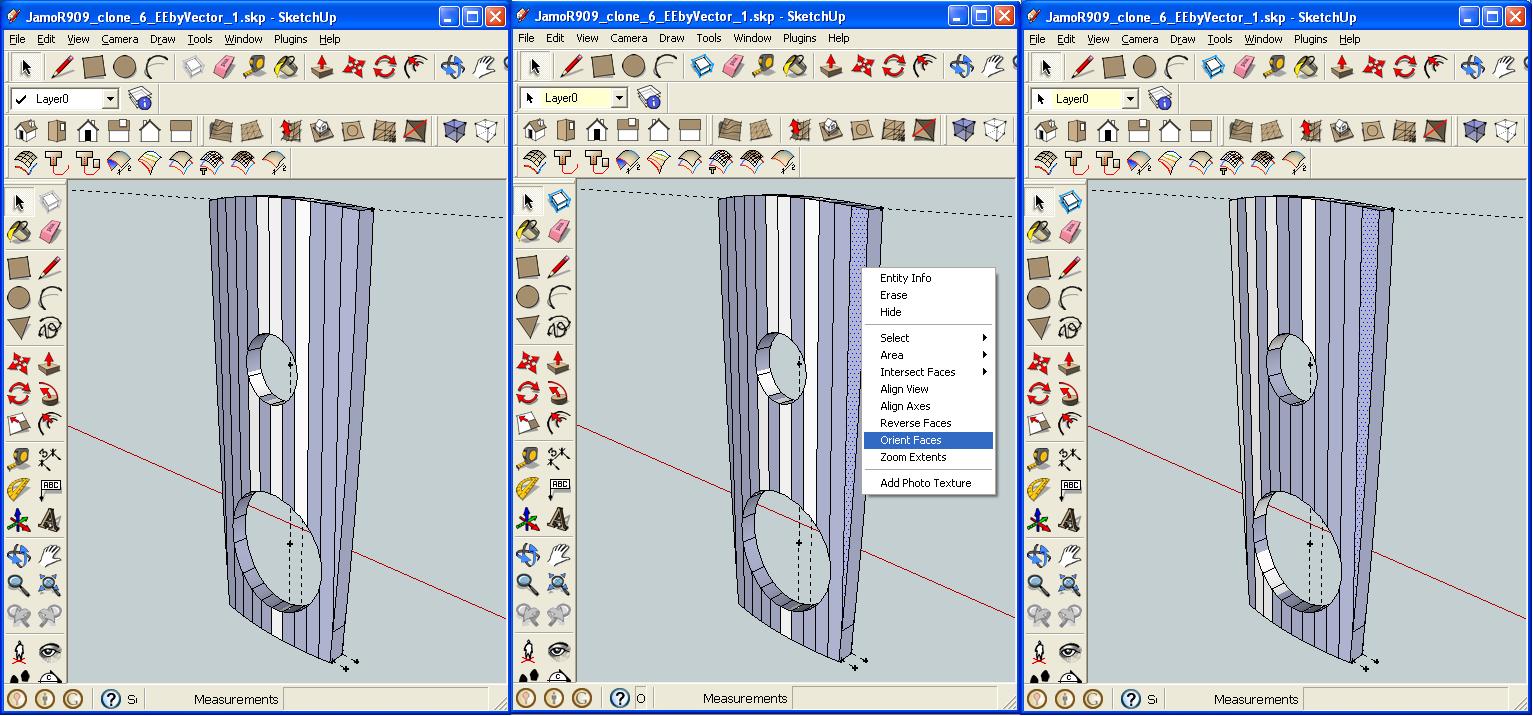
                    gbl7657475467.JPG

                    1 Reply Last reply Reply Quote 0
                    • TIGT Offline
                      TIG Moderator
                      last edited by

                      I think I have it!
                      You are making internal faces so can never successfully get orient faces to work as there are always some wrong!
                      I think this is because you are extruding ALL Edges as you have View > Hidden Geometry ON and are working on the Smoothed ones as well.
                      Switch View > Hidden Geometry OFF, then Select the Surface and its Edges [then Shift+Ctrl to deselect the Surface]...
                      EEbyVector on the Edges back 50mm.
                      At that point you shouls have all of the 'sides' made without a 'back'.
                      Copy the front as the back as explained before and reverse it...
                      πŸ€“

                      TIG

                      1 Reply Last reply Reply Quote 0
                      • G Offline
                        Gumleguf
                        last edited by

                        I think you're right.

                        Does this look correct (I think it does, but what do I know... πŸ˜‰ )?

                        JamoR909_clone_6_EEbyVector_3.skp

                        1 Reply Last reply Reply Quote 0
                        • TIGT Offline
                          TIG Moderator
                          last edited by

                          Good!

                          Now all you need to do is select the front Surface, right-click and Orient - all faces will be correct.
                          To 'smooth' the edges you don't want around the top edge, Select all [treble-click surface] and right-click Smooth...

                          Done πŸ˜„

                          TIG

                          1 Reply Last reply Reply Quote 0
                          • G Offline
                            Gumleguf
                            last edited by

                            This is too cool.

                            Thanks all. You are the best.

                            1 Reply Last reply Reply Quote 0
                            • 1
                            • 2
                            • 2 / 2
                            • First post
                              Last post
                            Buy SketchPlus
                            Buy SUbD
                            Buy WrapR
                            Buy eBook
                            Buy Modelur
                            Buy Vertex Tools
                            Buy SketchCuisine
                            Buy FormFonts

                            Advertisement