sketchucation logo sketchucation
    • Login
    Oops, your profile's looking a bit empty! To help us tailor your experience, please fill in key details like your SketchUp version, skill level, operating system, and more. Update and save your info on your profile page today!
    Mac User? | Join the Rayscaper Beta for Mac Learn More

    Texture blurry on export to jpg only

    Scheduled Pinned Locked Moved SketchUp Discussions
    sketchup
    12 Posts 6 Posters 2.7k Views 6 Watching
    Loading More Posts
    • Oldest to Newest
    • Newest to Oldest
    • Most Votes
    Reply
    • Reply as topic
    Log in to reply
    This topic has been deleted. Only users with topic management privileges can see it.
    • halroachH
      halroach
      last edited by halroach

      Hi,

      When I export a jpg of a model some textures come out really blurry, whereas others come out just fine.
      If I do a simple print-screen the texture is crisp - during export it blurs up.
      I have textures set to maximum in preferences, and the problematic texture is 2048x1316.

      Any ideas what is causing this and how I can get the same results in export as I see in the model?
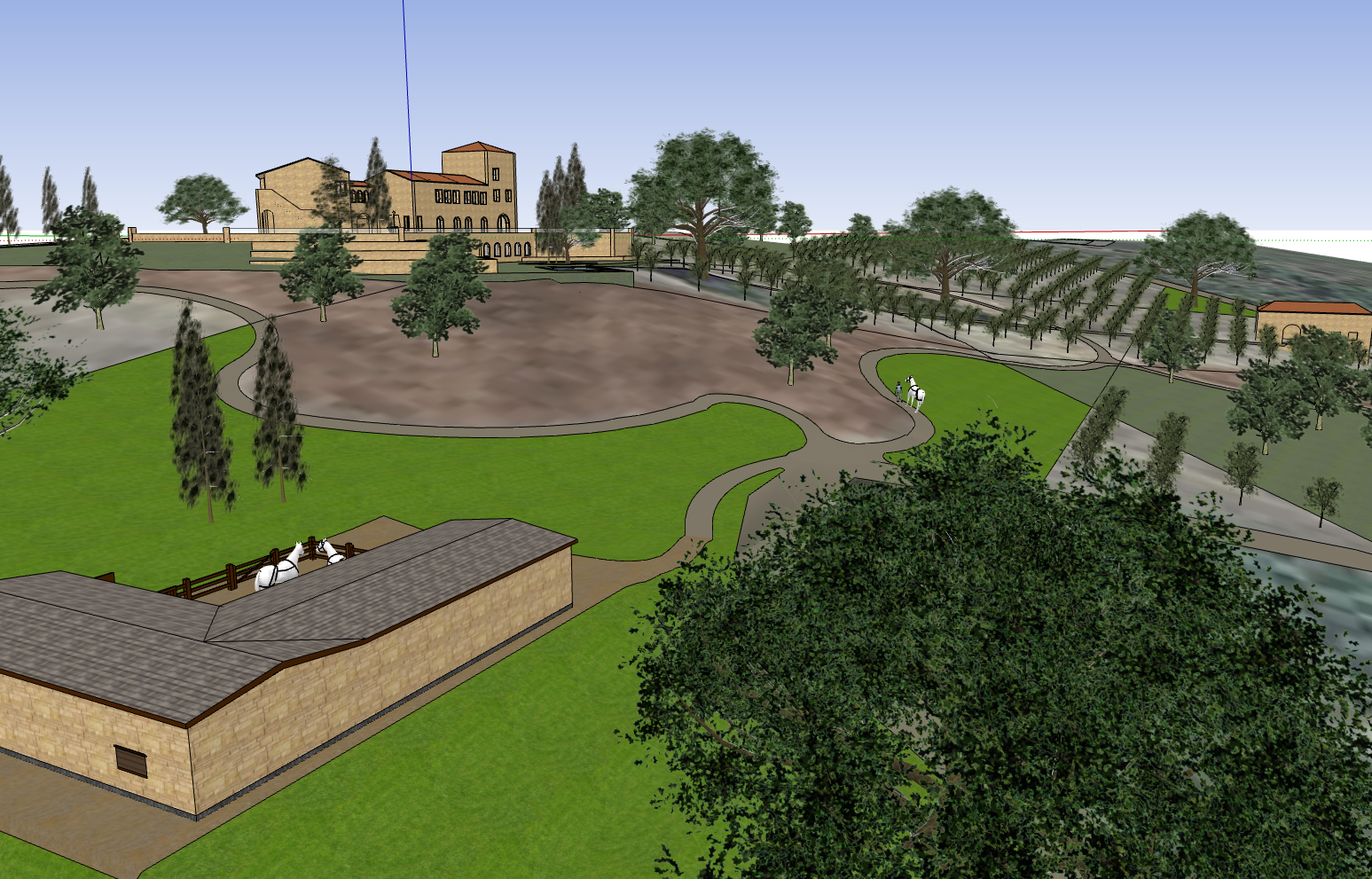
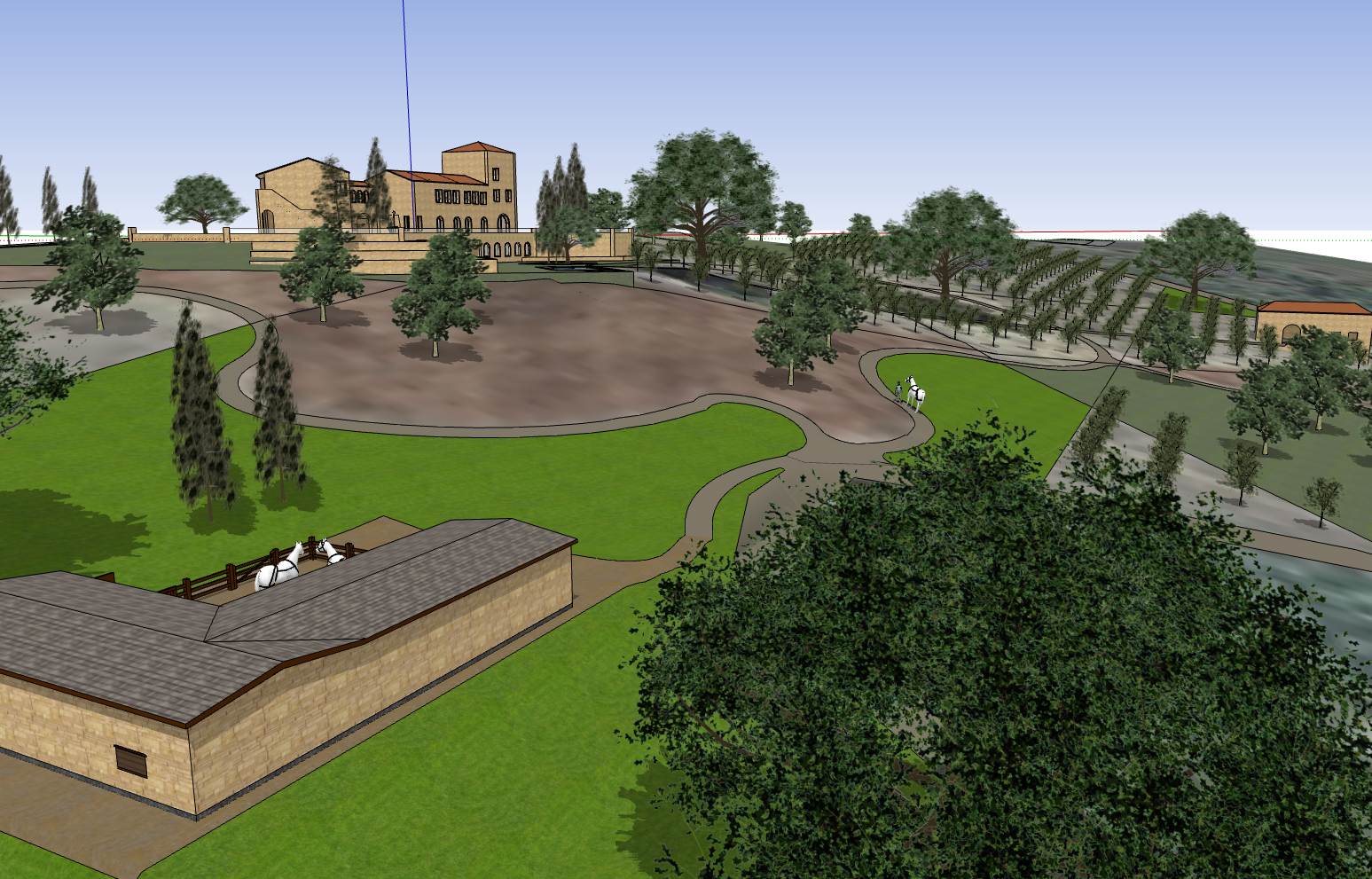
      from printscreen -crisp ground
      from printscreen - with shadows, still crisper than from export
      from export -blurry ground

      FlexTools - Super Quick Windows, Doors, Slats...

      1 Reply Last reply
      Reply Quote 0
      • Dave RD
        Dave R
        last edited by

        At what size are you exporting the image?

        Etaoin Shrdlu

        %

        (THERE'S NO PLACE LIKE)

        G28 X0.0 Y0.0 Z0.0

        M30

        %

        1 Reply Last reply
        Reply Quote 0
        • J
          jhauswirth
          last edited by

          Try png.

          1 Reply Last reply
          Reply Quote 0
          • halroachH
            halroach
            last edited by

            @dave r said:

            At what size are you exporting the image?

            this specific image I exported at 1547x991 to be the same like the printscreen, but this happens at high res too.

            FlexTools - Super Quick Windows, Doors, Slats...

            1 Reply Last reply
            Reply Quote 0
            • B
              bron
              last edited by

              Try "use maximum texture size" in window > preferences > OpenGL.

              Maybe it helps.

              The Story of Projectatinator and His Architectural Diploma
              http://diplofolio.posterous.com

              1 Reply Last reply
              Reply Quote 0
              • halroachH
                halroach
                last edited by

                @bron said:

                Try "use maximum texture size" in window > preferences > OpenGL.

                Maybe it helps.

                I have it in maximum texture size...
                I'll try png... don't think it will make a difference though.

                FlexTools - Super Quick Windows, Doors, Slats...

                1 Reply Last reply
                Reply Quote 0
                • icedkaszI
                  icedkasz
                  last edited by

                  @unknownuser said:

                  @bron said:

                  Try "use maximum texture size" in window > preferences > OpenGL.

                  Maybe it helps.

                  I have it in maximum texture size...
                  I'll try png... don't think it will make a difference though.

                  JPGs are made for compression, making things easier to stick on your floppy disk or send over your 56k modem (I'm assuming you're using neither). JPGs are an old format. PNGs avoid the compression, creating a higher quality picture. I use them for all my client files.

                  1 Reply Last reply
                  Reply Quote 0
                  • halroachH
                    halroach
                    last edited by

                    @unknownuser said:

                    JPGs are made for compression, making things easier to stick on your floppy disk or send over your 56k modem (I'm assuming you're using neither). JPGs are an old format. PNGs avoid the compression, creating a higher quality picture. I use them for all my client files.

                    What you're seeing as blurry is not a jpg compression artifact - that looks completely different. If anything, if it were the jpg compression, it would look more similar to the picture from the printscreen - but the printscreen is actually a 1 to 1 to what what I am seeing "live" on my screen. the blur is something else...

                    I believe the blur has something to do with how sketchup is interpreting that specific image because of it's relative size to the surface it's on.

                    FlexTools - Super Quick Windows, Doors, Slats...

                    1 Reply Last reply
                    Reply Quote 0
                    • icedkaszI
                      icedkasz
                      last edited by

                      Upon a second look, that is indeed pretty weird.
                      What file format is the texture for the grey grass? Maybe switching THAT to another format will work?
                      I'm just shooting in the dark, though

                      1 Reply Last reply
                      Reply Quote 0
                      • N
                        numerobis
                        last edited by

                        I'm experiencing the same now... is there any solution for this problem?!?
                        The screenshot looks good, but exported textures are completely blurred.

                        SketchUp Pro 8.0.15158, Win 7

                        1 Reply Last reply
                        Reply Quote 0
                        • halroachH
                          halroach
                          last edited by

                          Hi,

                          I don't quite remember if I solved it at the time, though there are a few things you can do:
                          1. play around with your OpenGL settings (under 'window''preferences'\openGL tab\ - note that if your hardware acceleration was off, turn it on, and only after a restart of sketchup will you see some more options under the 'capabilities' section - play around.

                          2. Make sure your texture isn't bigger than 4096 x 4096
                          see the following post on Sketchupdate blog:
                          http://sketchupdate.blogspot.co.il/2012/02/solution-for-low-resolution.html

                          3. If you need the extra resolution you can split your large texture into smaller parts (smaller than 4096x4096) in an image editing software and rearrange the parts back into sketchup.

                          4. Updating your graphics drivers might help.

                          5. Maybe it's been solved in sketchup 2013-2014? I didn't bother installing those cause they've introduced more problems than benefits.

                          There is a similar (unsolved) thread:
                          http://sketchucation.com/forums/viewtopic.php?f=15%26amp;t=24518

                          Hope it's of any help 😉

                          FlexTools - Super Quick Windows, Doors, Slats...

                          1 Reply Last reply
                          Reply Quote 0
                          • N
                            numerobis
                            last edited by

                            thanks for your suggestions. I lowered all texture resolutions to 4000x4000 (there was only one bigger than 2500) but this doesn't make a difference.


                            1 Reply Last reply
                            Reply Quote 0

                            Hello! It looks like you're interested in this conversation, but you don't have an account yet.

                            Getting fed up of having to scroll through the same posts each visit? When you register for an account, you'll always come back to exactly where you were before, and choose to be notified of new replies (either via email, or push notification). You'll also be able to save bookmarks and upvote posts to show your appreciation to other community members.

                            With your input, this post could be even better 💗

                            Register Login
                            • 1 / 1
                            • First post
                              Last post
                            Buy SketchPlus
                            Buy SUbD
                            Buy WrapR
                            Buy eBook
                            Buy Modelur
                            Buy Vertex Tools
                            Buy SketchCuisine
                            Buy FormFonts

                            Advertisement