How can I make a twisted window?
-
Hi guys! What
s up? Im new at the sketchup and at my work i need to make a twisted window, Does someone know how i can draw this? Or maybe Does it have a plugin that facilitates the modeling?I uploaded a photo to explain my problem

-
Hi Marco and welcome to SCF!
The file itself would be better. I cannot really see what's going on in that far end of the image...

-
option 1
build the window square... and true... then use Fredo's scaling tools to twist it.option 2
use curviloft to build one window and copy along the path. -
Kris, he says he is completely new to SU. We cannot bombard him with complex plugins on the first day - and also he should first learn how to do it with native tools!

-
ahh sorry... native tools... mmm that will be hard.
-
Hi Marco,
For presentation purposes attached file may explain how to do this with native SU.
To narrow down inaccuracy to ~0mm you may need to repeat the few steps on top geometry before smoothing edges.
Toggle 'Hidden Geometry' on/off in last scene to see which smooth edges I mean.So in short: make correct top selection > rotare and scale (rotate and scale) > final correcton at pole > smooth.
-
@krisidious said:
ahh sorry... native tools... mmm that will be hard.
No prob, Kris (and he was not asking for native tools only) it's just the learning curve, you know.

Wodan; I really wonder how you could get any relevant info from that skewed image!
-
You can do it several other ways too
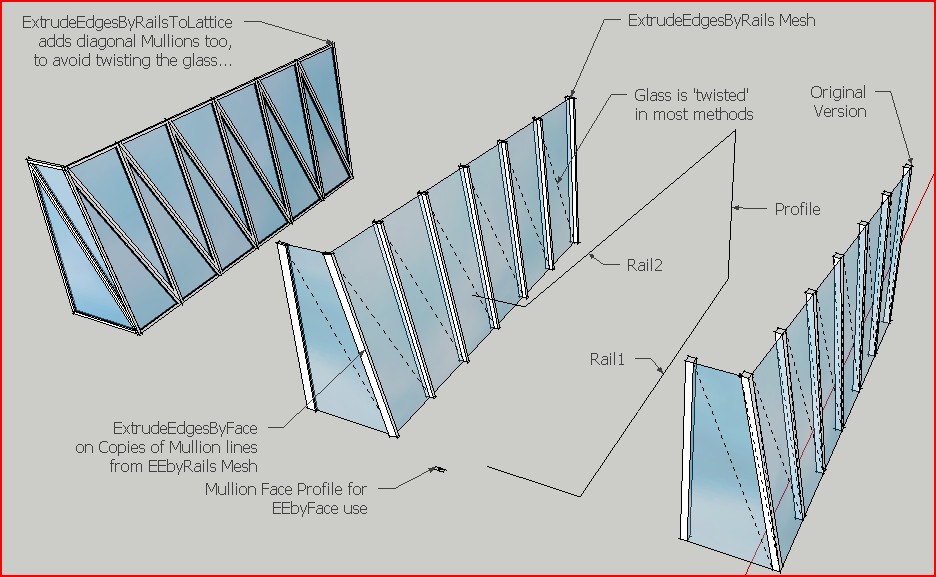
-
first of all, i want to thank u guys^^
So, maybe i'm not so new in the sketchup...
Oh sorry i'm without the file, in monday i post here again. But let me make a question, how can i decrease the file size, cause it has 20mb =[
Thxx for the replies!!
-
Here is the file
I reduced the size file =], i don`t know why but reduced a lot
So thks!!
Maybe i will need a lot of help in this model, and hopefuly i found this forum.
-
Hey guys
I don`t know how but i could reduce the file size. =], Maybe is because the components definitions someone know how to explain how i can reduce the number of components definitions
and this is the file:
-
Thank u so much for the possibilites, i`m gonna try now
-
Yeah, it
s ok now, thank u guys! I used the Frodo Scale something like that, and it was ok. Thk u TIG, cause i saw ur explanation about the Edge Extrude and ive done the domeI need to reduce the size of my file, i could reduce the file attached but i don
t know what ive done. XDThe original file have 17mb, i will try to fix it
This forum is really nice, i`m so glad i found it
Hugs!!




Hello! It looks like you're interested in this conversation, but you don't have an account yet.
Getting fed up of having to scroll through the same posts each visit? When you register for an account, you'll always come back to exactly where you were before, and choose to be notified of new replies (either via email, or push notification). You'll also be able to save bookmarks and upvote posts to show your appreciation to other community members.
With your input, this post could be even better 💗
Register Login


Advertisement