sketchucation logo sketchucation
    • Login
    Oops, your profile's looking a bit empty! To help us tailor your experience, please fill in key details like your SketchUp version, skill level, operating system, and more. Update and save your info on your profile page today!
    ⚠️ Important | Libfredo 15.6b introduces important bugfixes for Fredo's Extensions Update

    [HELP] which is the best follow-me tool?

    Scheduled Pinned Locked Moved Plugins
    15 Posts 8 Posters 1.4k Views 8 Watching
    Loading More Posts
    • Oldest to Newest
    • Newest to Oldest
    • Most Votes
    Reply
    • Reply as topic
    Log in to reply
    This topic has been deleted. Only users with topic management privileges can see it.
    • TIGT Offline
      TIG Moderator
      last edited by

      And some of the Extrusion Tools = e.g. Extrude Face by Rails
      AND of course "FollowMe and Keep" too............

      TIG

      1 Reply Last reply Reply Quote 0
      • olisheaO Offline
        olishea
        last edited by

        OK, thanks for the response! 😍

        Follow me and keep seems to be working well for my needs, although it can be inconsistent.

        I forgot about curviloft.....this produced most consistent results.....although you need to manually finish up the connection (I forgot to mention my path is in a continuous loop)

        The videos for "2 faces + path" don't work anymore....its not consistent though, unexpected results.

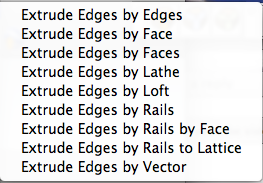
        TIG: You say "extrude face by rails" but I can not see this in the tool set. here is a screengrab of my extrude tools:

        sorry if I'm being stupid. your extrude tools are sweet btw, I'm just still getting my head round using them. Will make my university work so much easier! My favourite is extrude edges by rails....also extrude edges by vector....very clever (the amount of times I've wanted to push/pull a line!!!!). tell me though, why aren't these plugins for sale?? worth buying.....

        Picture 17.png

        oli

        1 Reply Last reply Reply Quote 0
        • pilouP Offline
          pilou
          last edited by

          @unknownuser said:

          (I forgot to mention my path is in a continuous loop)

          Some examples of what profil you want propagate on what path?

          Frenchy Pilou
          Is beautiful that please without concept!
          My Little site :)

          1 Reply Last reply Reply Quote 0
          • EdsonE Offline
            Edson
            last edited by

            do not forget 1001bit tools. in it you will find a tool that works fine every time: extrude along sloping curved path. this most useful set of tools has free and pro versions.

            edson mahfuz, architect| porto alegre β€’ brasil
            http://www.mahfuz.arq.br

            1 Reply Last reply Reply Quote 0
            • N Offline
              notareal
              last edited by

              @unknownuser said:

              2 faces + path by Kirill2008

              Wonder what happened to Kirill2008? Tutorial videos where taken down...

              Welcome to try [Thea Render](http://www.thearender.com/), Thea support | [kerkythea.net](http://www.kerkythea.net/) -team member

              1 Reply Last reply Reply Quote 0
              • GaieusG Offline
                Gaieus
                last edited by

                @notareal said:

                Wonder what happened to Kirill2008?

                Yes, me too. Hope he's well!

                Gai...

                1 Reply Last reply Reply Quote 0
                • TIGT Offline
                  TIG Moderator
                  last edited by

                  I meant try these...

                  Extrude Edges by Face [multiple FollowMe]
                  Extrude Edges by Faces [melds two faces along rails like FollowMe with 'morphing']
                  Extrude Edges by Rails by Face [multiple "Extrude Edges by Face" over a 'mesh' surface]

                  each of which does some 'FollowMe-like' stuff............

                  I think I am getting forgetful...

                  I think I am getting forgetful... πŸ˜‰

                  TIG

                  1 Reply Last reply Reply Quote 0
                  • utilerU Offline
                    utiler
                    last edited by

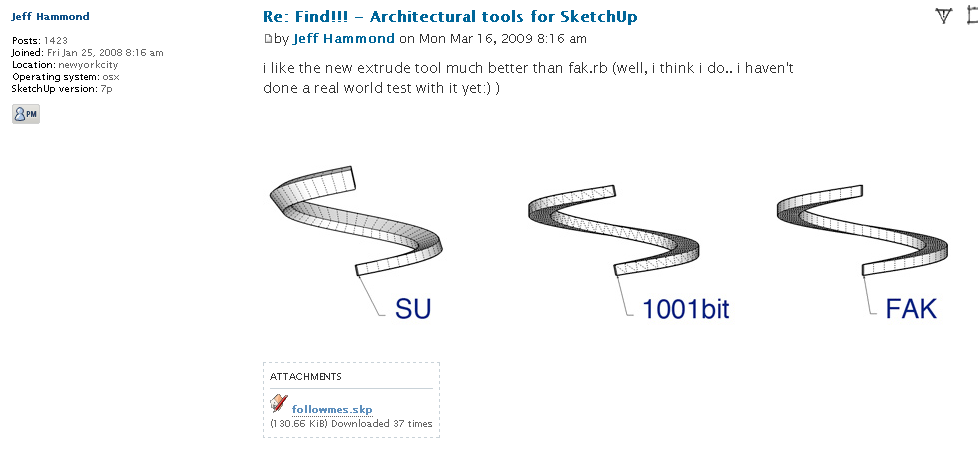
                    This was a good visual example of the different outcomes, olishea.


                    FollowMes.png


                    followmes.skp

                    Just Curious...

                    1 Reply Last reply Reply Quote 0
                    • olisheaO Offline
                      olishea
                      last edited by

                      thanks guys lots of great ways of doing this. TIG i think its just the names of your plugins that confuse me! not saying you should change them or anythin. i think you need a youtube series all to yourself!!

                      cheers for all the help, great forum work guys!! πŸ‘ πŸ‘ πŸ‘

                      oli

                      1 Reply Last reply Reply Quote 0
                      • TIGT Offline
                        TIG Moderator
                        last edited by

                        Know what you mean πŸ˜’
                        They confuse me too - and I made them πŸ˜•
                        The Extrusion Tools just grew like Topsy and 'EEbyXXX' originally seemed a 'sensible' naming convention until it gets too complicated...


                        TIG

                        1 Reply Last reply Reply Quote 0
                        • 1 / 1
                        • First post
                          Last post
                        Buy SketchPlus
                        Buy SUbD
                        Buy WrapR
                        Buy eBook
                        Buy Modelur
                        Buy Vertex Tools
                        Buy SketchCuisine
                        Buy FormFonts

                        Advertisement