sketchucation logo sketchucation
    • Login
    Oops, your profile's looking a bit empty! To help us tailor your experience, please fill in key details like your SketchUp version, skill level, operating system, and more. Update and save your info on your profile page today!
    ⚠️ Important | Libfredo 15.6b introduces important bugfixes for Fredo's Extensions Update

    ANY IDEA of can i create this?

    Scheduled Pinned Locked Moved Newbie Forum
    sketchup
    15 Posts 8 Posters 1.4k Views 8 Watching
    Loading More Posts
    • Oldest to Newest
    • Newest to Oldest
    • Most Votes
    Reply
    • Reply as topic
    Log in to reply
    This topic has been deleted. Only users with topic management privileges can see it.
    • massimoM Offline
      massimo Moderator
      last edited by

      Yes you can use this plugin: + canc πŸ˜‰

      1 Reply Last reply Reply Quote 0
      • TIGT Offline
        TIG Moderator
        last edited by

        If you select [click-on] just face[s] and press the delete key the face[s] will erase leaving any edges behind.
        There are several tools - e.g. thomthom's "selection-toys" to manipulate selections, so if you have selected all of the faces AND edges at the 'holes' level by using a fence [after PuhPulling] you will want to remove the edges from the selection... then the holes' faces remain selected - press delete and they are gone... πŸ€“

        TIG

        1 Reply Last reply Reply Quote 0
        • massimoM Offline
          massimo Moderator
          last edited by

          ...or if you have many holes you could try this. πŸ˜„

          1 Reply Last reply Reply Quote 0
          • TIGT Offline
            TIG Moderator
            last edited by

            @massimo said:

            ...or if you have many holes you could try this. πŸ˜„

            Good tip - I had forgotten about that one - you'd use it before doing the PushPulling........

            TIG

            1 Reply Last reply Reply Quote 0
            • Jean LemireJ Offline
              Jean Lemire
              last edited by

              Hi folks.

              To erase may holes quickly try this:

              1 - Select all.

              2 - Press and hold the SHIFT key to Add/Subtract from the selection.

              3 - While stil pressing the SHIFT key, double click anywhere on the area between the holes. This will deselect it as well as all the perimeters of the holes and the perimeter of the rectangular area that you want keep.

              4 - Delete the selection. Only the inside face of all the holes will be deleted.

              Just ideas.

              Jean (Johnny) Lemire from Repentigny, Quebec, Canada.

              1 Reply Last reply Reply Quote 0
              • GaieusG Offline
                Gaieus
                last edited by

                @jean lemire said:

                Hi folks.

                To erase may holes quickly try this:

                1 - Select all.

                2 - Press and hold the SHIFT key to Add/Subtract from the selection.

                3 - While stil pressing the SHIFT key, double click anywhere on the area between the holes. This will deselect it as well as all the perimeters of the holes and the perimeter of the rectangular area that you want keep.

                4 - Delete the selection. Only the inside face of all the holes will be deleted.

                Just ideas.

                πŸ‘

                Gai...

                1 Reply Last reply Reply Quote 0
                • pilouP Offline
                  pilou
                  last edited by

                  Classic πŸ˜‰

                  Frenchy Pilou
                  Is beautiful that please without concept!
                  My Little site :)

                  1 Reply Last reply Reply Quote 0
                  • bazB Offline
                    baz
                    last edited by

                    @jean lemire said:

                    Hi folks.

                    To erase may holes quickly try this:

                    1 - Select all.

                    2 - Press and hold the SHIFT key to Add/Subtract from the selection.

                    3 - While stil pressing the SHIFT key, double click anywhere on the area between the holes. This will deselect it as well as all the perimeters of the holes and the perimeter of the rectangular area that you want keep.

                    4 - Delete the selection. Only the inside face of all the holes will be deleted.

                    Just ideas.

                    Thanks Jean, I was just about to search for the plugin which does this, you've reminded me again that plugins dont really do anything which is not doable anyway in native su.
                    baz
                    here is that plugin:
                    http://forums.sketchucation.com/viewtopic.php?p=243598#p243598

                    1 Reply Last reply Reply Quote 0
                    • TIGT Offline
                      TIG Moderator
                      last edited by

                      Excellent tip Jean - sometimes you think a plugin is needed when it's as quick to do it manually... β˜€

                      TIG

                      1 Reply Last reply Reply Quote 0
                      • pilouP Offline
                        pilou
                        last edited by

                        @unknownuser said:

                        to do it manually

                        yes...but it's finally the prog who works πŸ˜‰

                        Frenchy Pilou
                        Is beautiful that please without concept!
                        My Little site :)

                        1 Reply Last reply Reply Quote 0
                        • bazB Offline
                          baz
                          last edited by

                          not to take anything away from the fab ruby gurus who have given us so much more in su.
                          i think it would be well to remind the newbies that as pilou said, its the 'program' which does the work.
                          rb's certainly help the workflow, but you still have to know what you want to achieve.
                          remember 'garbage in, garbage out'?

                          some of the setups that i see on utube defy belief, every plugin ever invented in the toolbar, leaving a business card to design on.

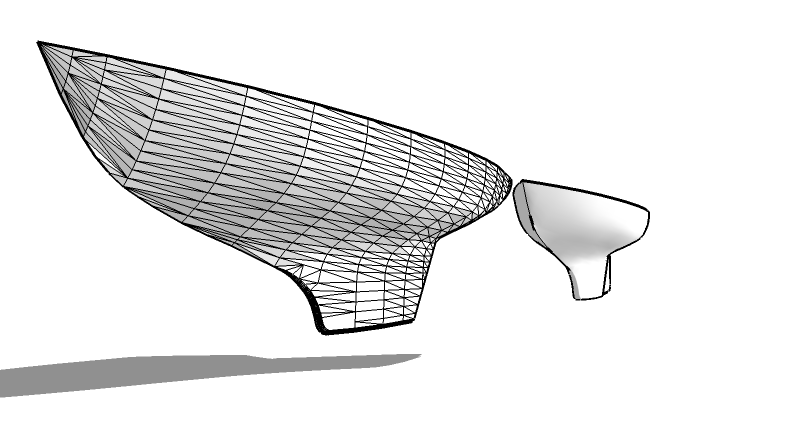
                          there was a fella here a while ago, 'gully' that helped me with a boat hull. he stitched it for me from the stations or 'splines'. twas beyond me, but thru his generosity, i began to understand how the program works.

                          this arvo i was having a play with the 'loft by spline' beta by fredo, and it works perfectly for me, some others, alas, were having trouble.
                          I think it works for me perhaps because i have some small understanding of how it works.

                          i have always admired the boulder teams' philosophy... start simple, keep it simple, eg:you have to 'find' the sandbox.

                          in some ways, i think it would be better if access to plugins was restricted to pros.
                          on the other hand, give em enough rope etc πŸ˜„

                          bazgully's hull


                          gullyhull.skp

                          1 Reply Last reply Reply Quote 0
                          • pyrolunaP Offline
                            pyroluna
                            last edited by

                            ...or you could just texture the face with a semi-transparent png...

                            1 Reply Last reply Reply Quote 0
                            • 1 / 1
                            • First post
                              Last post
                            Buy SketchPlus
                            Buy SUbD
                            Buy WrapR
                            Buy eBook
                            Buy Modelur
                            Buy Vertex Tools
                            Buy SketchCuisine
                            Buy FormFonts

                            Advertisement