Give thickness
-
Hi all, im a newbie here but I have been working with SU for a couple of years now and still love it!

I have a modeling query that im hoping someone can help me with - I have a rectangular box with rounded edges that i need to give a thickness to (see links here:
I'm guessing the answer is a script or plug-in or some sort? please advise as i'm out of ideas on this one!
Many thanks in advance

-
Fredo's
JointPushPullwill probably do what you want... http://forums.sketchucation.com/viewtopic.php?p=42783#p42783
Be sure to get all of the files you need installed into the right folders - read the instructions carefully... There are many useful tips in that thread too...
-
Thanks for the quick response TIG!

Looks a little complicated so i will try it out this evening when i have more time...
-
It's really easy - just make sure you have it set to keep the original faces... the 'inset' is less than the radii... and finally orient the faces...
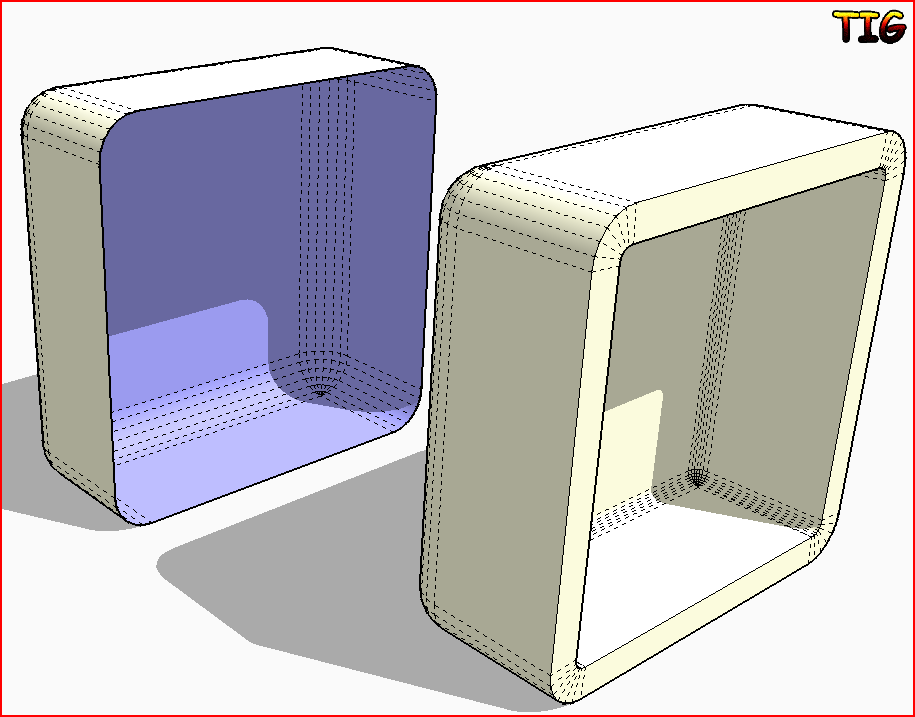
-
Ok thanks - for some reason i am not able to view the .png you have attached, i get this meassage:
You do not have the required permissions to view the files attached to this post.maybe its because im a new member still - also i have to keep logging in every time i click on something which is very annoying!

-
You will get full privileges shortly - the 'trial period' is to deter spammers who might only login once or twice and can therefore be trapped before going public...
I'll PM you the image also... -
Wait a inute, guys, "newly registered members" should be able to access attachments! What's up in the Plugins forum then???
-
Worked fine in the end thankyou - i am using the 'Normal PP' for now as the others give me weird results. It mentions 'documentation' in that thread although i can t find it - any ideas? i could do with some kind of written guide as i dont feel im using the plugin properly...
Also i have the idea that my drawing has become 'heavy' since creating all these new faces on one small model - is there a way to check the face count of a model/component so i can compare before and after for example?
Thanks again for all your help so far
Chris
-
Did you get the latest version
JointPushPull - 25 Aug 09.zip?
That has a 'tutorial' PDF file in its subfolder...
Tutorial Joint Push Pull - English - v1.1 - 20 Feb 08.pdf -
I have the latest version thanks and after reading the documentation everything made a lot more sense - although i am still unable to tell what change i have made to the size of the component itself - i'm afraid of generating heavy models as i need to make quick changes to the model in front of the client and i cant afford a sluggish model during navigation...
-
@masheen said:
I have the latest version thanks and after reading the documentation everything made a lot more sense - although i am still unable to tell what change i have made to the size of the component itself - i'm afraid of generating heavy models as i need to make quick changes to the model in front of the client and i cant afford a sluggish model during navigation...
masheen
Read this it may help http://sites.google.com/site/sketchupsage/faster




Hello! It looks like you're interested in this conversation, but you don't have an account yet.
Getting fed up of having to scroll through the same posts each visit? When you register for an account, you'll always come back to exactly where you were before, and choose to be notified of new replies (either via email, or push notification). You'll also be able to save bookmarks and upvote posts to show your appreciation to other community members.
With your input, this post could be even better 💗
Register Login


Advertisement