sketchucation logo sketchucation
    • Anmelden
    Oops, your profile's looking a bit empty! To help us tailor your experience, please fill in key details like your SketchUp version, skill level, operating system, and more. Update and save your info on your profile page today!
    ⚠️ Important | Libfredo 15.6b introduces important bugfixes for Fredo's Extensions Update

    [Plugin] Blend ver 1.12.

    Geplant Angeheftet Gesperrt Verschoben Plugins
    80 Beiträge 35 Kommentatoren 65.1k Aufrufe 35 Watching
    Lade mehr Beiträge
    • Älteste zuerst
    • Neuste zuerst
    • Meiste Stimmen
    Antworten
    • In einem neuen Thema antworten
    Anmelden zum Antworten
    Dieses Thema wurde gelöscht. Nur Nutzer mit entsprechenden Rechten können es sehen.
    • GaieusG Offline
      Gaieus
      zuletzt editiert von

      Come on, Kirill, this is too much for me today. 😮 😲 😕 😒

      Gai...

      1 Antwort Letzte Antwort Antworten Zitieren 0
      • EarthMoverE Offline
        EarthMover
        zuletzt editiert von

        Mr Krillshot....fantastic work and dedication to continually improving your script. Can't wait to see v. 1.8! Thanks so much!

        3D Artist at Clearstory 3D Imaging
        Guide Tool at Winning With Sketchup
        Content Creator at Skapeup

        1 Antwort Letzte Antwort Antworten Zitieren 0
        • kenK Offline
          ken
          zuletzt editiert von

          Mr Krillshot

          Great pluging, however, I am having trouble duplicating all the video you are showing. Would it be possible to also attach the Sketchup file so I can try out the same file as you are using. This way I would know if the problems I am having are with my computer or the plugin.

          Again thanks for the pluging

          Ken

          Fight like your the third monkey on Noah's Ark gangway.

          1 Antwort Letzte Antwort Antworten Zitieren 0
          • utilerU Offline
            utiler
            zuletzt editiert von

            This is nuts; really. I can't beleive how fast you are developing this plugin, Mr Kirill!!!

            Just Curious...

            1 Antwort Letzte Antwort Antworten Zitieren 0
            • K Offline
              kirill2008
              zuletzt editiert von

              @unknownuser said:

              Would it be possible to also attach the Sketchup file so I can try out the same file as you are using.

              interactive tests file
              File with the model, that appears in the demo video of ver. 1.8.
              Unfortunately interactivity enabled only in run-time (untill skp file is not closed) and I don't know yet how to save interaction data to skp file (maybe it's not possible at all). So if you want to play with initial faces, then it is necessary to make new blended object.

              Ver. 1.8. does not support interaction with curves yet, because it is difficult to get the curve object from the Sketchup.active_model... The point is that active_model contains no curves (curve is just a 'conceptual entity' "all circles, arcs, and arbitrary curves are really just edges that are bound together in sequence"). So it's necessary to perform some tricky things to obtain the certain curve, that you need.
              Edges also behave strange: moving of the edge or moving of the edge vertex does not envoke onChangeEntity event handler 😕. Only if you change some properties of the edge (for example layer or smoothness), then modify event rises and onChangeEntity envokes.

              [flash=425,344:2o85cxyz]http://www.youtube.com/v/ZgOUZR3Z2xE&hl=ru&fs=1" type="application/x-shockwave-flash" allowscriptaccess="always" allowfullscreen="true" width="425" height="344"[/flash:2o85cxyz]

              So ver. 1.8. supports interaction only between 2 faces and face+construction point. I'm not sure if I can solve myself edge and curve problems.

              1 Antwort Letzte Antwort Antworten Zitieren 0
              • MALAISEM Offline
                MALAISE
                zuletzt editiert von

                It's amazing the way you progress. I hardly have time to test the current version, and you're already publishing the next version....... 😄

                Thanks a lot for sharing.

                MALAISE 👍 👍

                La Connaissance n'a de valeur que partagée

                1 Antwort Letzte Antwort Antworten Zitieren 0
                • P Offline
                  PRSS
                  zuletzt editiert von

                  Fantastic, I say !!!

                  With best regards
                  PRSS

                  1 Antwort Letzte Antwort Antworten Zitieren 0
                  • T Offline
                    tomot
                    zuletzt editiert von

                    @kirill2008 said:

                    @utiler said:

                    Have you thought about adding a path function to this script?

                    Yes, I think about it almost every day (and some times night 😄 too). I want to add a path processing very much,

                    Yes I have been there too 😄 sometimes I have even dreamed of the answer, but forgot to write it down just before I woke up. Then later I would get a deja vú moment where the solution I eventually arrived at was the same as what I had dreamed of.

                    I like the path idea.

                    [my plugins](http://thingsvirtual.blogspot.ca/)
                    tomot

                    1 Antwort Letzte Antwort Antworten Zitieren 0
                    • utilerU Offline
                      utiler
                      zuletzt editiert von

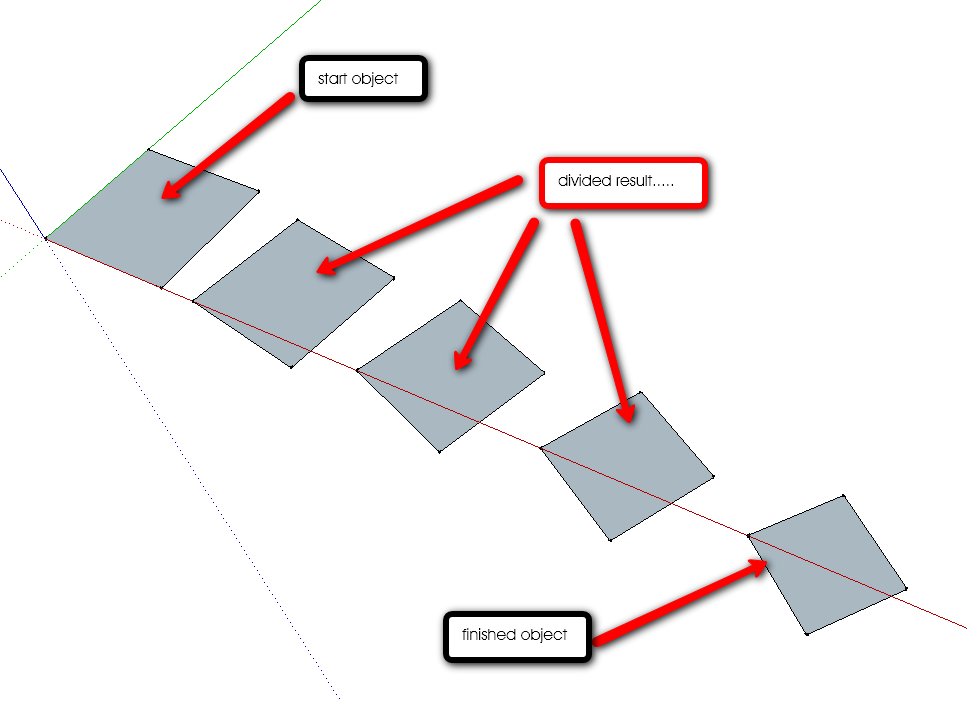
                      Here's the idea.....

                      See the attached video example and finished result.
                      Copy an object a given distance, scale it by 0.6 and rotate it 40 degrees AND DIVIDE BY 4.

                      Can't be too hard couldn't it?


                      Blend_Idea.swf


                      blend_idea.png

                      Just Curious...

                      1 Antwort Letzte Antwort Antworten Zitieren 0
                      • K Offline
                        kirill2008
                        zuletzt editiert von

                        @utiler said:

                        See the attached video example and finished result.
                        Copy an object a given distance, scale it by 0.6 and rotate it 40 degrees AND DIVIDE BY 4.

                        Can't be too hard couldn't it?

                        That's cool 👍 It is a step to complex path+profile modeling tool, I guess. Looks like, the final destination is to set some 'key' positions along the path and apply some transformations (move, rotate, scale) to the profile at each 'key' position. Intermediate steps transformations (between key positions) will be interpolated between 'key' transformations.
                        Some 3d modelling programms have already implemented similar tools. It would be great to implement such tool for Sketchup too. Don't know how much time it may take.

                        1 Antwort Letzte Antwort Antworten Zitieren 0
                        • I Offline
                          iamarchitecture
                          zuletzt editiert von

                          Fantastic Plugin, Thanks.

                          1 Antwort Letzte Antwort Antworten Zitieren 0
                          • MALAISEM Offline
                            MALAISE
                            zuletzt editiert von

                            Now, let's draw icebergs...or coloured curtains easily....
                            Colors effects are awsome
                            Thanks Kirill 👍 👍

                            La Connaissance n'a de valeur que partagée

                            1 Antwort Letzte Antwort Antworten Zitieren 0
                            • B Offline
                              Ben Ritter
                              zuletzt editiert von

                              Thanks again.

                              1 Antwort Letzte Antwort Antworten Zitieren 0
                              • K Offline
                                kirill2008
                                zuletzt editiert von

                                Now the work on path processing feature is in progress. For now it works stable only when the path curve is at XY plane. So I'm going to publish new plugin 'pathface.rb', when it will be possible to follow the path curve regardless of it's orientation (it will take about several days, I think).
                                [flash=425,344:1244ddom]http://www.youtube.com/v/z-IO3YLPTeY&hl=ru&fs=1" type="application/x-shockwave-flash" allowscriptaccess="always" allowfullscreen="true" width="425" height="344"[/flash:1244ddom]

                                1 Antwort Letzte Antwort Antworten Zitieren 0
                                • S Offline
                                  sepo
                                  zuletzt editiert von

                                  Fantastic.. 👍 👍

                                  1 Antwort Letzte Antwort Antworten Zitieren 0
                                  • D Offline
                                    DIEGO-RODRIGUEZ
                                    zuletzt editiert von

                                    incredible plugins, thank you very much

                                    1 Antwort Letzte Antwort Antworten Zitieren 0
                                    • C Offline
                                      cokea
                                      zuletzt editiert von

                                      even v1.7 and the lower works well, 1.8, 1.9 gives a notice like this "Error Loading File sublend.rb
                                      undefined superclass `EntityObserver'" HELP

                                      1 Antwort Letzte Antwort Antworten Zitieren 0
                                      • utilerU Offline
                                        utiler
                                        zuletzt editiert von

                                        @kirill2008 said:

                                        @utiler said:

                                        See the attached video example and finished result.
                                        Copy an object a given distance, scale it by 0.6 and rotate it 40 degrees AND DIVIDE BY 4.

                                        Can't be too hard couldn't it?

                                        That's cool 👍 It is a step to complex path+profile modeling tool, I guess. Looks like, the final destination is to set some 'key' positions along the path and apply some transformations (move, rotate, scale) to the profile at each 'key' position. Intermediate steps transformations (between key positions) will be interpolated between 'key' transformations.
                                        Some 3d modelling programms have already implemented similar tools. It would be great to implement such tool for Sketchup too. Don't know how much time it may take.

                                        That's great you like it Kirill, Hope you can find the time to bring it to fruition..... your work here and generosity is appreciated by all!! 🎉 🎉 🎉

                                        Just Curious...

                                        1 Antwort Letzte Antwort Antworten Zitieren 0
                                        • mitcorbM Offline
                                          mitcorb
                                          zuletzt editiert von

                                          Hi, Kirill:
                                          Just want to report this observation:
                                          I did a simple blend procedure where I made a rounded corner rectangle on xy plane, copied and raised it up in the z direction, and scaled it then shifted it in the y direction. The blend completed. But when I selected the top plane and attempted to scale it, the intermediate blended geometry disappeared from the file. I did not check the console to see if any error comments came up, as I do not customarily keep the console open.
                                          Any ideas on this?

                                          I take the slow, deliberate approach in my aimless wandering.

                                          1 Antwort Letzte Antwort Antworten Zitieren 0
                                          • H Offline
                                            Haru
                                            zuletzt editiert von

                                            “Blend” is awesome plug-in.
                                            Nevertheless, somewhat, it doesn’t work right way in connecting two different faces and it occurs twisted face unrelated to design-purpose.
                                            It can be fixed with the vector that gives the drawing order, but sometimes, it is difficult to reform the design.
                                            Therefore, as I thought, it can be possible to make it right with adding another vector to this plug-in.
                                            As following down-below example of case 1 and case 2, it shows two different cases made by different start points.
                                            In order to make the blended face right to designer’s intention, each start-point of two figures(①,③) shall be set-up as well as the direction of drawing, that is clockwise(②,④) or counterclockwise.(②,④-a)
                                            For all, it’s just an idea; unfortunately, I’m not good enough to make the plug-in.
                                            I anticipate that someone has intention to make this vector and post it on the blog in near soon.
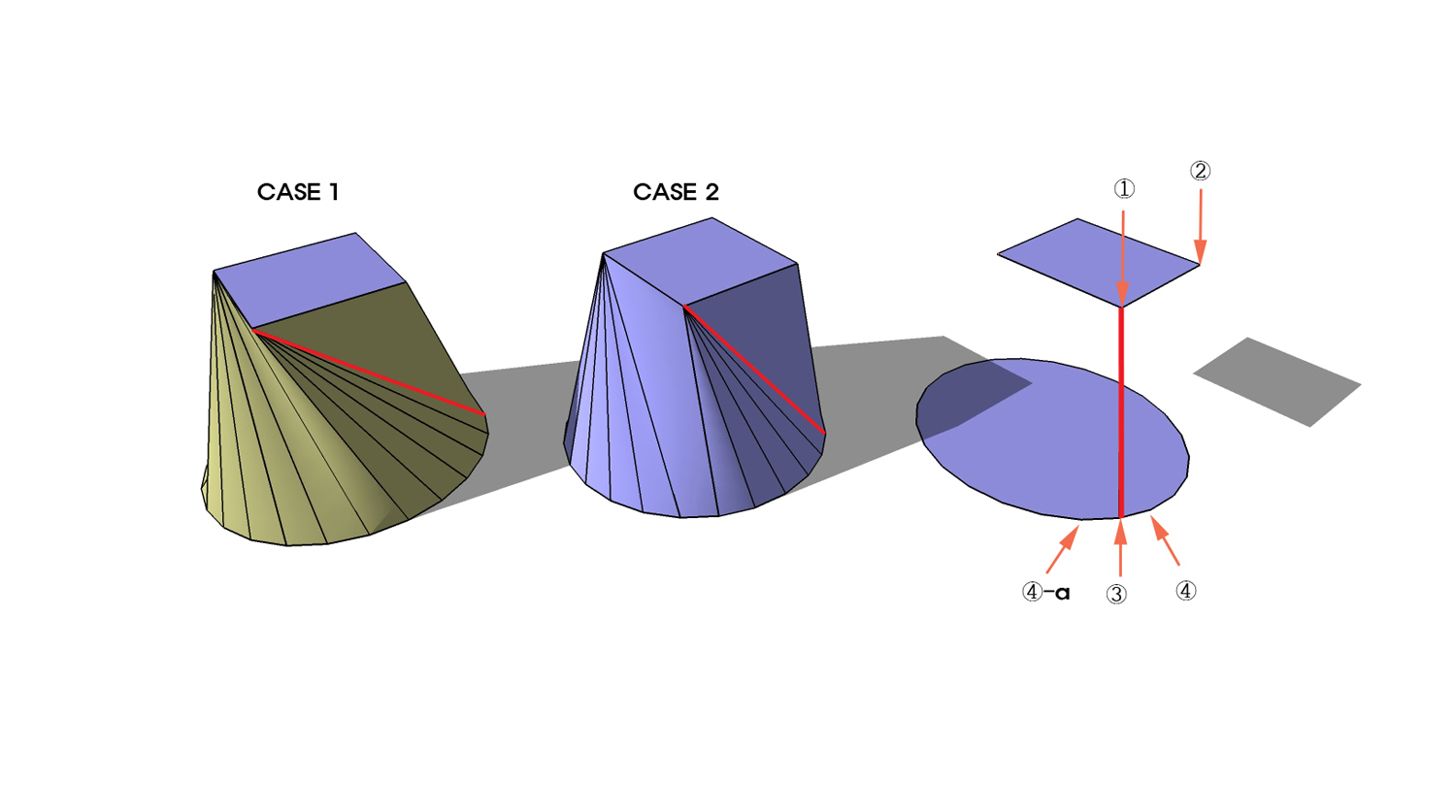


                                            blend-vector-2.jpg

                                            1 Antwort Letzte Antwort Antworten Zitieren 0
                                            • 1
                                            • 2
                                            • 3
                                            • 4
                                            • 3 / 4
                                            • Erster Beitrag
                                              Letzter Beitrag
                                            Buy SketchPlus
                                            Buy SUbD
                                            Buy WrapR
                                            Buy eBook
                                            Buy Modelur
                                            Buy Vertex Tools
                                            Buy SketchCuisine
                                            Buy FormFonts

                                            Advertisement