sketchucation logo sketchucation
    • Login
    Oops, your profile's looking a bit empty! To help us tailor your experience, please fill in key details like your SketchUp version, skill level, operating system, and more. Update and save your info on your profile page today!
    Mac User? | Join the Rayscaper Beta for Mac Learn More

    How do I do this "cut" function

    Scheduled Pinned Locked Moved LayOut Discussions
    layout
    10 Posts 6 Posters 1.9k Views 6 Watching
    Loading More Posts
    • Oldest to Newest
    • Newest to Oldest
    • Most Votes
    Reply
    • Reply as topic
    Log in to reply
    This topic has been deleted. Only users with topic management privileges can see it.
    • R
      redinhawaii
      last edited by Gábor

      Picture 99.png
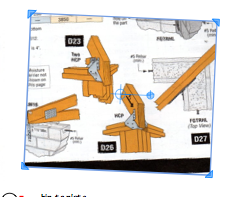
      I have this image, that was imported. I cannot seem to clip or cut this image. I want to cut the bottom black off yet keep the scale of the rest of the image. When I try to rescale the image / or clip the image the whole image is affected.
      Do I need to do a "clipping path" type process. Is there a command that I am missing in order to grab one side only and cut off the black at the bottom.
      The cut tool does not work on this either.
      One thing, is I could "fill" or cover the parts I do not want, but it seems I am just missing a command for the best use of the tool.
      If I wanted to put arrows and circles to more clearly illustrate the situation for communication here, is there an obvious way that I am missing too?
      Sorry to sound so beginner at this.
      thanks
      aloha
      red

      1 Reply Last reply
      Reply Quote 0
      • numbthumbN
        numbthumb
        last edited by

        I guess I´d just use the line tool to trace over the edges and erase the part I don´t need.

        Comfortably numb...

        1 Reply Last reply
        Reply Quote 0
        • ely862meE
          ely862me
          last edited by

          Have u exploded the image?

          Elisei (sketchupper)


          Before no life was done on Earth it was THE LIFE ITSELF...GOD
          Come and See EliseiDesign

          1 Reply Last reply
          Reply Quote 0
          • TIGT
            TIG Moderator
            last edited by

            Wouldn't you be better off using something like GraphicConverter/Gimp [Mac/PC] to edit the image before importing it ?
            You could then 'square-up' the image and trim off any unwanted parts - you could even split the image into separate 'details' ?

            TIG

            1 Reply Last reply
            Reply Quote 0
            • R
              redinhawaii
              last edited by

              Graphic converter did work, but I did not find how to rotate the tool? is that possible, or just clip it and rotate in LayOut, duh...
              thanks
              aloha
              red

              1 Reply Last reply
              Reply Quote 0
              • TIGT
                TIG Moderator
                last edited by

                I'm sure thee is an image rotate/skew tool in GC AND Gimp ?

                TIG

                1 Reply Last reply
                Reply Quote 0
                • pilouP
                  pilou
                  last edited by

                  use SumoPaint 😉
                  More easy and "on line" 😉

                  Frenchy Pilou
                  Is beautiful that please without concept!
                  My Little site :)

                  1 Reply Last reply
                  Reply Quote 0
                  • GaieusG
                    Gaieus
                    last edited by

                    Hi guys,

                    I don't know if anyone realised that this is a LayOut question, not SU!
                    😉

                    Red, here is how you can create a clipping mask in LayOut. You could easily draw a shape over that image and exclude that bottom part of it.

                    Gai...

                    1 Reply Last reply
                    Reply Quote 0
                    • TIGT
                      TIG Moderator
                      last edited by

                      I knew it was LO - I thought he was trying to adjust an image in LO, but that it probably needed rotating and cropping before importation - hammer and screwdriver metaphor ?...

                      TIG

                      1 Reply Last reply
                      Reply Quote 0
                      • R
                        redinhawaii
                        last edited by

                        Yes, it was a LayOut issue / question, hence within the LayOut discussions.
                        And thanks, yes, clipping mask is the way to go, I knew of that but thought it would be more work, ultimately not.
                        Thanks again for all the insightful support.
                        aloha
                        red

                        1 Reply Last reply
                        Reply Quote 0

                        Hello! It looks like you're interested in this conversation, but you don't have an account yet.

                        Getting fed up of having to scroll through the same posts each visit? When you register for an account, you'll always come back to exactly where you were before, and choose to be notified of new replies (either via email, or push notification). You'll also be able to save bookmarks and upvote posts to show your appreciation to other community members.

                        With your input, this post could be even better 💗

                        Register Login
                        • 1 / 1
                        • First post
                          Last post
                        Buy SketchPlus
                        Buy SUbD
                        Buy WrapR
                        Buy eBook
                        Buy Modelur
                        Buy Vertex Tools
                        Buy SketchCuisine
                        Buy FormFonts

                        Advertisement