Color to Image texture?
-
I don't suppose there exists a plugin to take an in-model (solid) color material, make an external image file of the same color, then use that image and replace the in-model color with the texture material?
-
you can right click a colored (painted) face and select make unique texture, it will ask what size image you want ie. 1024x768. i'm not sure where SU saves the corresponding image file though. anyone know?
-
ah, here we go right click on it here, then save where ever you want. of course you have to right click the face and select make unique texture first.
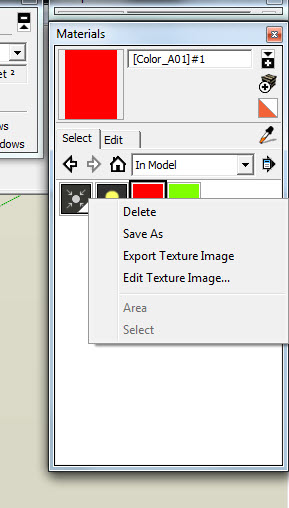
-
You can easily get the material's color's RGB.
You then need to write a png file with those values.
Import it in as a texture for that material...
There are image writing modules for Ruby with stuff like GD2 ?

-
It is available as built in tool of SketchUp. But it is not expoed in the API. So I don't think a plugin exists. But you can do it natively. Just right click on a single face with a color material applied to it. And choose "Make Unique Texture". That turns it into an image material. Then you can open it in photoshop.
Chris
-
 sorry if this was a coding question.
 -
@tig said:
You can easily get the material's color's RGB.
You then need to write a png file with those values.
Import it in as a texture for that material...
There are image writing modules for Ruby with stuff like GD2 ?
PNG files are not trivial to deal with. If anyone are knows of a lightweight lib to use with SU Ruby then I'd be very interested.
I just wrote my own BMP reader for a plugin I'm working on. A BMP writer would be easy - but the downside is the filesize...



Hello! It looks like you're interested in this conversation, but you don't have an account yet.
Getting fed up of having to scroll through the same posts each visit? When you register for an account, you'll always come back to exactly where you were before, and choose to be notified of new replies (either via email, or push notification). You'll also be able to save bookmarks and upvote posts to show your appreciation to other community members.
With your input, this post could be even better 💗
Register Login


Advertisement