Differents views in sketchup
-
hi
is it possible to get differents views in sketchup 6 o 7 (free version)
like side/top/face ... viewthanks and good day
-
Hi Amigoface,
Have a look at these links:
http://sketchup.google.com/support/bin/answer.py?hl=en&answer=94936
Best are with parallel projection:
http://sketchup.google.com/support/bin/answer.py?hl=en&answer=115433
then create scenes so that you can easily change the views:
http://sketchup.google.com/support/bin/answer.py?hl=en&answer=39656
http://sketchup.google.com/support/bin/answer.py?hl=en&answer=114928
etc... etc... -
thanks guys
-
@amigoface said:
hi
is it possible to get differents views in sketchup 6 o 7 (free version)
like side/top/face ... viewthanks and good day
Use Scene Tabs - Menu > Windows > Scene Manger
Set the view in each as needed, right-click and update to save - use different Settings and styles in Scenes as needed too... -
I sometimes suspect SketchUp's default Toolbar set-up is less than optimal.
Please don't be offended by this most basic of questions - is the Views toolbar enabled?
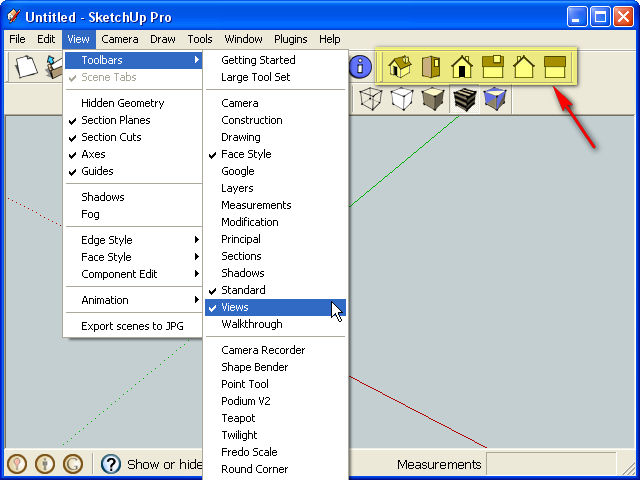
-
@Jim : you know what ... i did'nt see it

but hey .. we are in the noobs forum here !
-
SketchUp is deceptively simple. Google promotes SketchUps ease of use, but in reality it has a huge number of settings spread over many menus and windows, and it's easy to overlook them.
-
thanks



Hello! It looks like you're interested in this conversation, but you don't have an account yet.
Getting fed up of having to scroll through the same posts each visit? When you register for an account, you'll always come back to exactly where you were before, and choose to be notified of new replies (either via email, or push notification). You'll also be able to save bookmarks and upvote posts to show your appreciation to other community members.
With your input, this post could be even better 💗
Register Login


Advertisement