The duh thread for forum how to's
-
I realized yesterday that I have no idea how to show a link to a previous thread / topic on this forum.
 I'm probably the only link challenged individual in the entire forum and would appreciate knowing how. And while I'm embarrassing myself, I don't know how to directly embed something like a YouTube video either.
But on the bright side, I love to learn. I'd appreciate the help. -
If it's any consolation . . .you're not alone.
-
Hi guys,
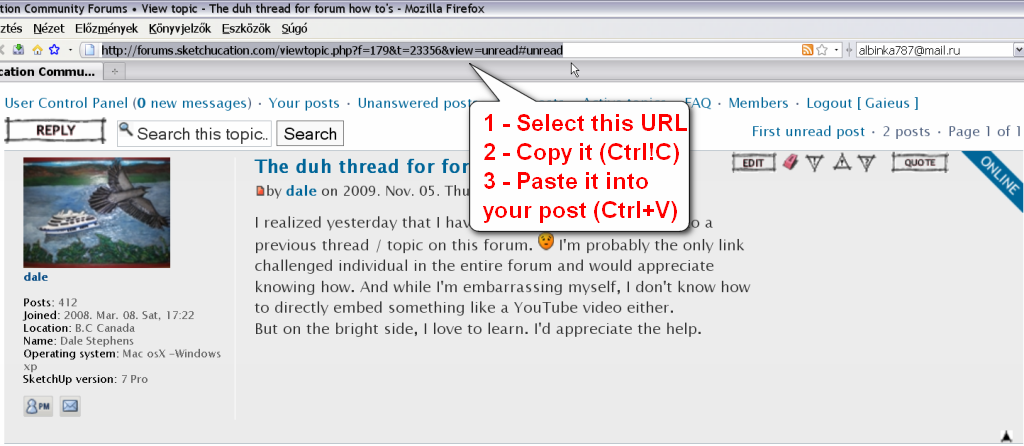
Pasting the url (link) to another post simply goes like you copy and paste any other links in your posts (see attached).As for embedding videos, Simon played around with a whole lot of possibilities in this topic:
http://forums.sketchucation.com/viewtopic.php?f=79&t=10103
-
@dale said:
I realized yesterday that I have no idea how to show a link to a previous thread / topic on this forum.
I'm probably the only link challenged individual in the entire forum and would appreciate knowing how. And while I'm embarrassing myself, I don't know how to directly embed something like a YouTube video either.
But on the bright side, I love to learn. I'd appreciate the help.There's a small rectangle to the left of the posters name in the post, right click over that and pick 'copy link location' [or similar depending on browser] then just paste that into your own post to link to that very page in that thread... To link to a thread just copy/paste the URL as already explained...
There's another thread on how to embed stuff like video... http://forums.sketchucation.com/viewtopic.php?p=144086#p144086 -
Thank you, Thank you, Thank you.
-
for the forum link, just copy the address from the page you'd like to link to and paste it into your new message like this:
http://forums.sketchucation.com/viewtopic.php?f=179&t=23356or you can get fancy and do something like:
[url=http://forums.sketchucation.com/viewtopic.php?f=179&t=23356]here's a link to this thread[/url]which results in:
here's a link to this threadfor youtube, copy all the stuff in the embed option.. it will look like this:
<object width="640" height="505"><param name="movie" value="http://www.youtube.com/v/IXOrj7QAc8M&hl=en&fs=1&"></param><param name="allowFullScreen" value="true"></param><param name="allowscriptaccess" value="always"></param><embed src="http://www.youtube.com/v/IXOrj7QAc8M&hl=en&fs=1&" type="application/x-shockwave-flash" allowscriptaccess="always" allowfullscreen="true" width="640" height="505"></embed></object>take the part in quotes after 'scr=' which in this case is
http://www.youtube.com/v/IXOrj7QAc8M&hl=en&fs=1&add the flash tags to it like this:
[flash=]http://www.youtube.com/v/IXOrj7QAc8M&hl=en&fs=1&[/flash]now place the size you'd like it to display at on the forum.. i'll use the same size which is in the original youtube embed option of 640x505..
[flash=640,505]http://www.youtube.com/v/IXOrj7QAc8M&hl=en&fs=1&[/flash]which will embed like this:
[flash=640,505:226i12ee]http://www.youtube.com/v/IXOrj7QAc8M&hl=en&fs=1&[/flash:226i12ee]also, you don't have to manually type in the tags.. just highlight the text you'd like to add tags to and click the appropriate button at the top of the reply/new message window.. ie- if i want to make this bold, i just highlight 'this' then click the B up there..
[edit] oh, i think miguel's method that TIG linked to is a lot simpler than this method.. might have to switch up my technique from now on

-
Testing 1-2
[flash=1280,745:2uilc1xk]http://www.youtube.com/v/bdJ1Hj9pQ78&NR=1&hd=1&fs=1[/flash:2uilc1xk]You guys are in trouble now.
-
haha
congrats -
I'll work on the size part. Thanks again.
-
@unknownuser said:
haha
congratsI think your YouTube may have more class. I forgot how good Wes Montgomery is.
-
Teat #2
http://forums.sketchucation.com/viewtopic.php?p=198005#p198005
Is it legal to link the post your in
Thanks again.
-
legal? probably
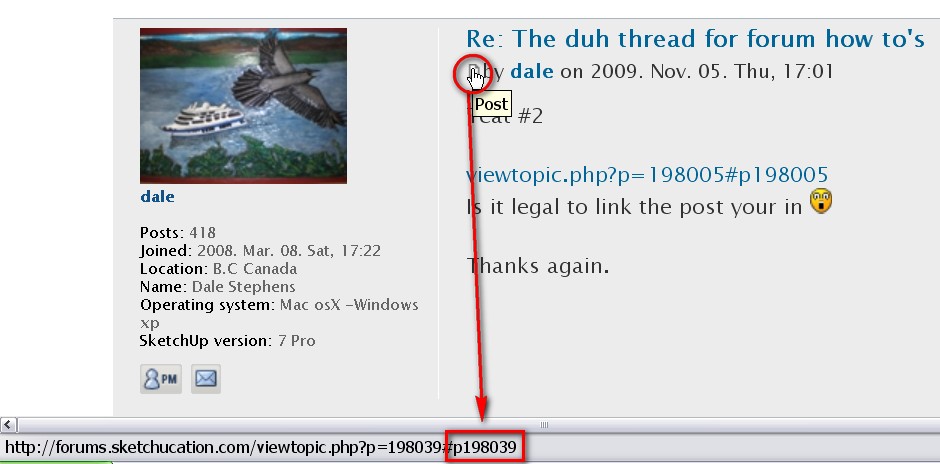
definitely ok if the thread has a bunch of pages and you want to link to an exact post in it.. that's what TIG was talking about with the little box/letter looking thing next to the poster's name..
http://forums.sketchucation.com/viewtopic.php?p=198025#p198025 -
And you can also link to individual posts, not just whole topics - the pxxxx shows the post number as it is stored in the database.
-
Starting to sink in. Now I have bookmarks to the pages that have code for the links which link posts of the past.... The hipbone's connected to thigh bone the thighbones connected to the...
Thanks Gai, I have always wondered where that number was after seeing it posted with the "viewtopic" and could never seem to find it. I always thought that it held the key. Never thought of just asking. I am a little thick.
-
Another forum "Duh!" for me is realizing there are a bunch of useful buttons way beyond the Google adsense blocks in the lowest part of the screen.





Hello! It looks like you're interested in this conversation, but you don't have an account yet.
Getting fed up of having to scroll through the same posts each visit? When you register for an account, you'll always come back to exactly where you were before, and choose to be notified of new replies (either via email, or push notification). You'll also be able to save bookmarks and upvote posts to show your appreciation to other community members.
With your input, this post could be even better 💗
Register Login


Advertisement