[SQ] Move an object into a Group ?
-
[SQ] for "Simple Question" (rather than the "Silly Question" I have in mind
 )
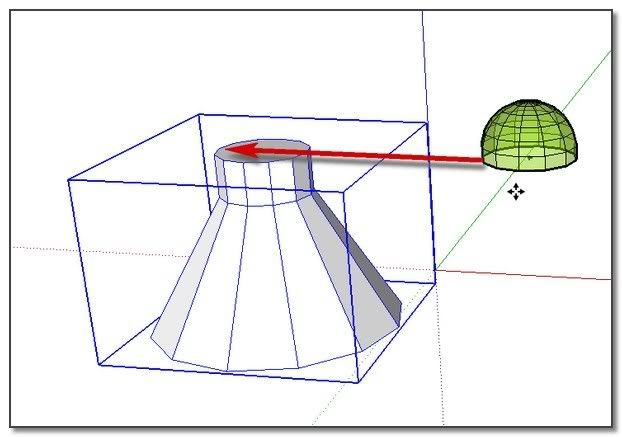
)Some people advocate working primarily with groups and components. One thing until now had prevented me to do this way. This is that I hadn't actually found how to simply move an object into a group, or from a group into another one!
For me, the only solution is to Edit/Copy this object, then open the group and Edit/Past it, and only after that Move it in place.
You will agree with me that this process is laborious !
!
So. Does Anybody Knows a solution??
simon
-
Hi Simon,
Instead of Paste and start moving about, just "paste in place". This item is in the Edit menu but you can assign a shortcut key (I use Shift+Ctrl+V for instance).
-
Hi Simon,
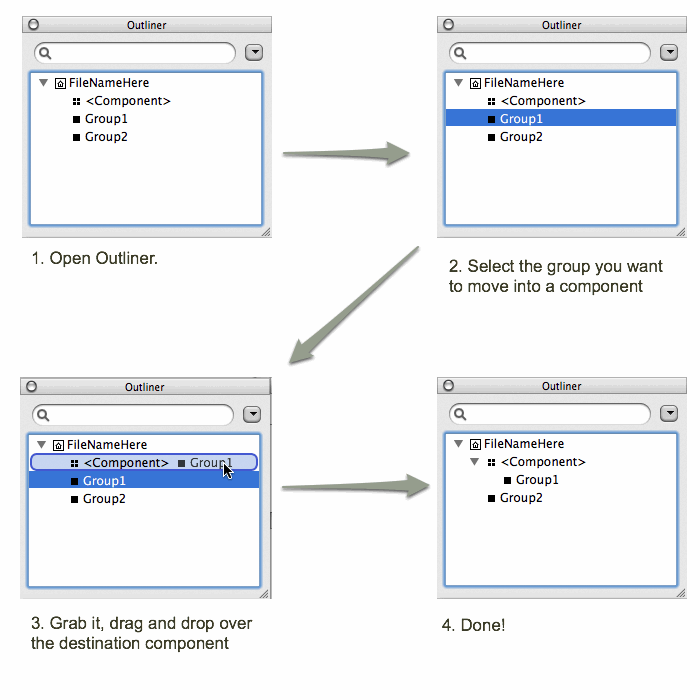
I cannot stress the usefulness of Outliner enough.
-
thank you sirs,
Two good tips indeed.
The Gaieus one suggests to first move/copy the object (here the translucid dome) on to its place on the grouped shape, and then: Cut it - Open the group - and PasteInPlace... >>handy this way

The takesh h one using the Outliner is evidently very helpfull to work between several groups and components. I had never try to grab one in another
(I just regret it seems not possible to grab just a copy (CTRL) of the group or component. )
) simon
simon -
you can use copy and paste functions after selecting through the outliner as well. ctrl drag.
-
Hi xrok1,
thank you for having completed@unknownuser said:
you can use copy and paste functions after selecting through the outliner as well. ctrl drag.
Yes: CtrlC/CtrlV is working with a group/component selected through the Outliner.
Also I have found that a doubleClic on a group through the Outliner open it.But,Ctrl drag is not working for me!?? Is it really for you?
simon
-
@unknownuser said:
But,Ctrl drag is not working for me!?? Is it really for you?
i thought it was but when i tried it again it wasn't. my mistake




Hello! It looks like you're interested in this conversation, but you don't have an account yet.
Getting fed up of having to scroll through the same posts each visit? When you register for an account, you'll always come back to exactly where you were before, and choose to be notified of new replies (either via email, or push notification). You'll also be able to save bookmarks and upvote posts to show your appreciation to other community members.
With your input, this post could be even better 💗
Register Login


Advertisement