sketchucation logo sketchucation
    • Login
    Oops, your profile's looking a bit empty! To help us tailor your experience, please fill in key details like your SketchUp version, skill level, operating system, and more. Update and save your info on your profile page today!
    πŸ”Œ Smart Spline | Fluid way to handle splines for furniture design and complex structures. Download

    [Plugin] [CityGen] - Street Generator [WIP] (0.5.2a)

    Scheduled Pinned Locked Moved City Generator
    124 Posts 37 Posters 118.9k Views 37 Watching
    Loading More Posts
    • Oldest to Newest
    • Newest to Oldest
    • Most Votes
    Reply
    • Reply as topic
    Log in to reply
    This topic has been deleted. Only users with topic management privileges can see it.
    • R Offline
      remus
      last edited by

      @thomthom said:

      Man, after watching that Google Wave Demo I keep thinking how nice it'd be if that service existed now...

      I kind of wish i hadnt seen it now, then i wouldnt keep thinking how good it would be πŸ˜›

      http://remusrendering.wordpress.com/

      1 Reply Last reply Reply Quote 0
      • Chris FullmerC Offline
        Chris Fullmer
        last edited by

        @unknownuser said:

        Don't think we agreed. I just threw the question out there.
        I think I favour that the module that takes the block and splits it into building footprints does that. Maybe, what the street generator can do is instead of making just the block face, also define the sidewalk face.

        I think I'm tending to want a separate sidewalk module. It would accept a single face as input and then inset all edges to create the sidewalk. This way it would be easy to make different sidewalk generator modules. So a simple prototype that does an offset can be made quickly, and then others that add scorelines, materials, streetposts, random components, etc, could be added later.

        Chris

        Lately you've been tan, suspicious for the winter.
        All my Plugins I've written

        1 Reply Last reply Reply Quote 0
        • thomthomT Offline
          thomthom
          last edited by

          The street module would have to deal with the rounded street corners. If it's doing a blind offset you'll end up with some strangle lines at the corners. I'd think that the offsets would most likely end up having sharp corners. (which I think is better for the parcel generator?)

          Thomas Thomassen β€” SketchUp Monkey & Coding addict
          List of my plugins and link to the CookieWare fund

          1 Reply Last reply Reply Quote 0
          • Chris FullmerC Offline
            Chris Fullmer
            last edited by

            Hmm, that might require some modeling for me to think through. I am thinking that it should be the sidewalk generators that decides what type of inside corners to make for itself. Perhaps it could be given a face and also the centerlines, or the offset street edges(pre curving) so it could use those if needed to calculate its inside edges.

            Again, maybe I need to model it so I can think it through.

            Chris

            Lately you've been tan, suspicious for the winter.
            All my Plugins I've written

            1 Reply Last reply Reply Quote 0
            • M Offline
              mattg
              last edited by

              Seriously, how have Google managed to swindle us all so we they sit on their arses doing nothing while all you guys work so hard at developing their product for free! Its absolutely insane!

              Anyway all I'll say is thanks so much for all your hard work - been said before - but everyone appreciates it!

              This thing looks so freakin awesome!

              1 Reply Last reply Reply Quote 0
              • Chris FullmerC Offline
                Chris Fullmer
                last edited by

                Some of think of it more like "Google made a platform that has 1 million differet users a week using it, and maybe there is a way we can somehow make money off them eventually". So far all my scripts are free, and this is will be opensource, but eventually I'll get good enought to write something and sell it. eventually.

                And seriously, doesn't this project look awesome! I'm very excited about it. Thanks for the comments πŸ˜„

                Chris

                Lately you've been tan, suspicious for the winter.
                All my Plugins I've written

                1 Reply Last reply Reply Quote 0
                • thomthomT Offline
                  thomthom
                  last edited by

                  @chris fullmer said:

                  Some of think of it more like "Google made a platform that has 1 million differet users a week using it, and maybe there is a way we can somehow make money off them eventually". So far all my scripts are free, and this is will be opensource, but eventually I'll get good enought to write something and sell it. eventually.

                  Most of favourite applications are applications that allows users to develop plugins and extend it as they see fit. Firefox for instance... πŸ˜‰

                  Thomas Thomassen β€” SketchUp Monkey & Coding addict
                  List of my plugins and link to the CookieWare fund

                  1 Reply Last reply Reply Quote 0
                  • S Offline
                    spider74
                    last edited by

                    interesting,i haven't downloaded it yet but from the pics it looks good.It would suit me for my push/pull cities.Also
                    i will recommend it on the skyscraperpage forum-google sketchup section as a lot of people there do cities.Usually
                    they do street plans to show the layout etc.

                    push/pull city 1-sampadoria

                    http://img11.imageshack.us/img11/3277/bigcitya.jpg

                    in the above pics there are no road plans,if i had the plugin and put the roads in a different colour
                    it would have been way cooler.Iwill try street gen and plus make a new push/pull city ...it all so may
                    be great for faces of skyscrapers....

                    co.clare ireland

                    1 Reply Last reply Reply Quote 0
                    • halroachH Offline
                      halroach
                      last edited by

                      Very nice stuff you guys have going on here!
                      Just a short question:
                      How did you color the lines in the posted model? Coloring lines is a very useful tool in itself!
                      Is it something specific to the model? cause I wasn't able to copy and paste the colored lines into another model.

                      Thank You!

                      FlexTools - Super Quick Windows, Doors, Slats...

                      1 Reply Last reply Reply Quote 0
                      • J Offline
                        Jim
                        last edited by

                        Hi Halroach (Hal?)

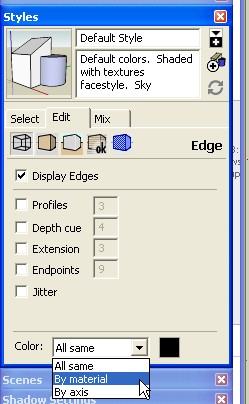
                        You need to set the Color By Material option for the Sytles. Then you can paint them using the tool.

                        But I think you make a good point - it isn't particularly easy (for me, anyway) to paint lines. It is sort of hit-and-miss.

                        154.jpg

                        Hi

                        1 Reply Last reply Reply Quote 0
                        • thomthomT Offline
                          thomthom
                          last edited by

                          @jim said:

                          But I think you make a good point - it isn't particularly easy (for me, anyway) to paint lines. It is sort of hit-and-miss.

                          Yea, I was thinking of maybe adding a brush painting tool. Where you can sweep. Or maybe have a large hit-radius.

                          Thomas Thomassen β€” SketchUp Monkey & Coding addict
                          List of my plugins and link to the CookieWare fund

                          1 Reply Last reply Reply Quote 0
                          • Chris FullmerC Offline
                            Chris Fullmer
                            last edited by

                            @thomthom said:

                            Yea, I was thinking of maybe adding a brush painting tool. Where you can sweep. Or maybe have a large hit-radius.

                            I think that would be a welcome addition to the plugin. I was having frustration issues when I tried to paint lines earlier for my demo too.... They are tricky little things to pin down with the bulky paintbucket.

                            Chris

                            Lately you've been tan, suspicious for the winter.
                            All my Plugins I've written

                            1 Reply Last reply Reply Quote 0
                            • thomthomT Offline
                              thomthom
                              last edited by

                              Yea, I often find that it's easer to select the lines I want to colour and use the Entity info to apply materials. Lines just have too small hit-area.
                              But I don't see any better way to pre-visualize the road construction. Or any other means of defining road width without it quickly becoming too complicated and bulky.

                              Thomas Thomassen β€” SketchUp Monkey & Coding addict
                              List of my plugins and link to the CookieWare fund

                              1 Reply Last reply Reply Quote 0
                              • Chris FullmerC Offline
                                Chris Fullmer
                                last edited by

                                We could also offer a way for users to select all boulevards and then pop up a dialog for "assign road widths" and then the plugin does the coloring for the user also.

                                Chris

                                Lately you've been tan, suspicious for the winter.
                                All my Plugins I've written

                                1 Reply Last reply Reply Quote 0
                                • thomthomT Offline
                                  thomthom
                                  last edited by

                                  @chris fullmer said:

                                  We could also offer a way for users to select all boulevards and then pop up a dialog for "assign road widths" and then the plugin does the coloring for the user also.

                                  But how do you define a road as boulevards?
                                  Applying materials to the lines was what I meant to be the method of defining what the road was. The Material name contained the road type name and width, and the colour was the means of providing visual feedback to the user.

                                  Thomas Thomassen β€” SketchUp Monkey & Coding addict
                                  List of my plugins and link to the CookieWare fund

                                  1 Reply Last reply Reply Quote 0
                                  • Chris FullmerC Offline
                                    Chris Fullmer
                                    last edited by

                                    Right, I just meant that they could have all their default black road cenerlines set up. Then they selec the ones they want to be a certain type - lets say they choose all the ones they want to 40m wide. Then they have the option of painting them, or they can pop up a road width assigning window that allows them to enter the width and the color, and the plugin does the width association and the coloring for them.

                                    Its just another method of associating the color and the width to the centerlines. Its not necessary, but I think some might like it?

                                    Chris

                                    Lately you've been tan, suspicious for the winter.
                                    All my Plugins I've written

                                    1 Reply Last reply Reply Quote 0
                                    • thomthomT Offline
                                      thomthom
                                      last edited by

                                      I'm working on some webdialogs to provide a UI for the read widths.

                                      There would be one that would list the road widths and their associated colour. The default setting would be at the top. You could then select the items on the list to make changes to them. Or create new definition. So when you generate the streets you won't be promted every time. It just uses what you've set up. And if nothing is set up, it uses the defaults. (Defaults would be a setting that's stored between sessions.)

                                      Thomas Thomassen β€” SketchUp Monkey & Coding addict
                                      List of my plugins and link to the CookieWare fund

                                      1 Reply Last reply Reply Quote 0
                                      • J Offline
                                        Jim
                                        last edited by

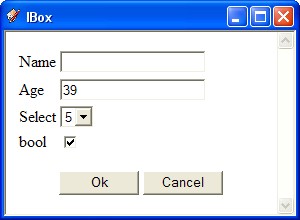
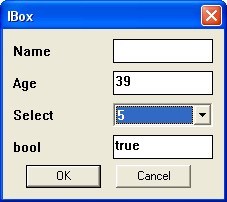
                                        I have been adding webdialog support to my inputbox class. Same dialog using UI or WebDialog, persistent storage, array and hash-like access to the values.

                                        I could add it to the repository, if you like it. The plugin page is here.

                                        157.jpg


                                        158.jpg

                                        Hi

                                        1 Reply Last reply Reply Quote 0
                                        • thomthomT Offline
                                          thomthom
                                          last edited by

                                          Thanks Jim, but I'm making some illustrations and extra description to go along with the UI elements. So I need to do this by hand. And the Road Type list will require some special UI elements.

                                          But good to know that that plugin class exists. I hadn't noticed it before.

                                          Thomas Thomassen β€” SketchUp Monkey & Coding addict
                                          List of my plugins and link to the CookieWare fund

                                          1 Reply Last reply Reply Quote 0
                                          • EdsonE Offline
                                            Edson
                                            last edited by

                                            thomas,

                                            what if a boulevard had its lanes divided by median strips? how would SG deal with it? and how would one have to introduce the lines before running SG?


                                            edson mahfuz, architect| porto alegre β€’ brasil
                                            http://www.mahfuz.arq.br

                                            1 Reply Last reply Reply Quote 0
                                            • 1
                                            • 2
                                            • 3
                                            • 4
                                            • 5
                                            • 6
                                            • 7
                                            • 3 / 7
                                            • First post
                                              Last post
                                            Buy SketchPlus
                                            Buy SUbD
                                            Buy WrapR
                                            Buy eBook
                                            Buy Modelur
                                            Buy Vertex Tools
                                            Buy SketchCuisine
                                            Buy FormFonts

                                            Advertisement