[Plugin] [CityGen] - Street Generator [WIP] (0.5.2a)
-
I agree, simple radius is great.
And I forgot, did we decide that the street generator should create the sidewalks, or is that going to bein the block module? Or de we plan on their being a sidewalk module?
Chris
-
Maybe It wouldn't be bad if Street Generator would automatically assign different corner radius based on width of the roads connecting? Something like (in pseudocode):
if both_roads == 6m
   radius = 4m
elsif road1 == 6m && road2 == 12m
   radius = 5m
else #both roads == 12m
   radius = 6m
end
just an idea..
-
Thats a good idea! I think it could give some really interesting results
Chris
PS - After about 48 hours of straight pain, I think I finally got tortoise to work on Vista 64 bit with Google code - woohoo!!!!!! So we'll look into goole code and compare it with the others. I wouldn't mind one that had a better forum built in and maybe even an IRC channel. But perhaps I'm dreaming? Thanks for the help so far!
-
Thomthom and Chris:
The way you guys are throwing ideas back and forth-- are we witnessing the first global collaboration on Sketchup plugins or have I missed a bunch of stuff? I say more power to you, and the more collaborators the better for the community. You guys are awesome.
mitcorb -
@unknownuser said:
Maybe It wouldn't be bad if Street Generator would automatically assign different corner radius based on width of the roads connecting? Something like (in pseudocode):
I guess then we'd need some input to approximately it'd be calculated.
Not even sure if the radius depends on the road width? (I'm not trying to make this completely accurate to reality, but a simplified approximation.)@chris fullmer said:
And I forgot, did we decide that the street generator should create the sidewalks, or is that going to bein the block module? Or de we plan on their being a sidewalk module?
Don't think we agreed. I just threw the question out there.
I think I favour that the module that takes the block and splits it into building footprints does that. Maybe, what the street generator can do is instead of making just the block face, also define the sidewalk face.@chris fullmer said:
PS - After about 48 hours of straight pain, I think I finally got tortoise to work on Vista 64 bit with Google code - woohoo!!!!!! So we'll look into goole code and compare it with the others. I wouldn't mind one that had a better forum built in and maybe even an IRC channel. But perhaps I'm dreaming? Thanks for the help so far!
Good work Chris.
I still haven't had time to look into the various solutions. (Ben struggling with my website that suddenly went offline. apparently lots of stuff has expired without any prior notification... grumble )@mitcorb said:
I say more power to you, and the more collaborators the better for the community.
Yes. More collaborators please!

Man, after watching that Google Wave Demo I keep thinking how nice it'd be if that service existed now... -
@thomthom said:
Man, after watching that Google Wave Demo I keep thinking how nice it'd be if that service existed now...
I kind of wish i hadnt seen it now, then i wouldnt keep thinking how good it would be

-
@unknownuser said:
Don't think we agreed. I just threw the question out there.
I think I favour that the module that takes the block and splits it into building footprints does that. Maybe, what the street generator can do is instead of making just the block face, also define the sidewalk face.I think I'm tending to want a separate sidewalk module. It would accept a single face as input and then inset all edges to create the sidewalk. This way it would be easy to make different sidewalk generator modules. So a simple prototype that does an offset can be made quickly, and then others that add scorelines, materials, streetposts, random components, etc, could be added later.
Chris
-
The street module would have to deal with the rounded street corners. If it's doing a blind offset you'll end up with some strangle lines at the corners. I'd think that the offsets would most likely end up having sharp corners. (which I think is better for the parcel generator?)
-
Hmm, that might require some modeling for me to think through. I am thinking that it should be the sidewalk generators that decides what type of inside corners to make for itself. Perhaps it could be given a face and also the centerlines, or the offset street edges(pre curving) so it could use those if needed to calculate its inside edges.
Again, maybe I need to model it so I can think it through.
Chris
-
Seriously, how have Google managed to swindle us all so we they sit on their arses doing nothing while all you guys work so hard at developing their product for free! Its absolutely insane!
Anyway all I'll say is thanks so much for all your hard work - been said before - but everyone appreciates it!
This thing looks so freakin awesome!
-
Some of think of it more like "Google made a platform that has 1 million differet users a week using it, and maybe there is a way we can somehow make money off them eventually". So far all my scripts are free, and this is will be opensource, but eventually I'll get good enought to write something and sell it. eventually.
And seriously, doesn't this project look awesome! I'm very excited about it. Thanks for the comments
Chris
-
@chris fullmer said:
Some of think of it more like "Google made a platform that has 1 million differet users a week using it, and maybe there is a way we can somehow make money off them eventually". So far all my scripts are free, and this is will be opensource, but eventually I'll get good enought to write something and sell it. eventually.
Most of favourite applications are applications that allows users to develop plugins and extend it as they see fit. Firefox for instance...

-
interesting,i haven't downloaded it yet but from the pics it looks good.It would suit me for my push/pull cities.Also
i will recommend it on the skyscraperpage forum-google sketchup section as a lot of people there do cities.Usually
they do street plans to show the layout etc.push/pull city 1-sampadoria

in the above pics there are no road plans,if i had the plugin and put the roads in a different colour
it would have been way cooler.Iwill try street gen and plus make a new push/pull city ...it all so may
be great for faces of skyscrapers.... -
Very nice stuff you guys have going on here!
Just a short question:
How did you color the lines in the posted model? Coloring lines is a very useful tool in itself!
Is it something specific to the model? cause I wasn't able to copy and paste the colored lines into another model.Thank You!
-
Hi Halroach (Hal?)
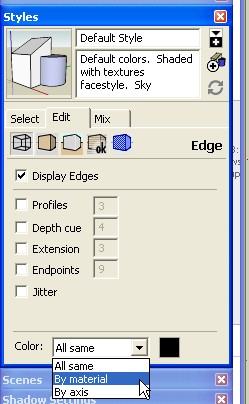
You need to set the Color By Material option for the Sytles. Then you can paint them using the tool.
But I think you make a good point - it isn't particularly easy (for me, anyway) to paint lines. It is sort of hit-and-miss.
-
@jim said:
But I think you make a good point - it isn't particularly easy (for me, anyway) to paint lines. It is sort of hit-and-miss.
Yea, I was thinking of maybe adding a brush painting tool. Where you can sweep. Or maybe have a large hit-radius.
-
@thomthom said:
Yea, I was thinking of maybe adding a brush painting tool. Where you can sweep. Or maybe have a large hit-radius.
I think that would be a welcome addition to the plugin. I was having frustration issues when I tried to paint lines earlier for my demo too.... They are tricky little things to pin down with the bulky paintbucket.
Chris
-
Yea, I often find that it's easer to select the lines I want to colour and use the Entity info to apply materials. Lines just have too small hit-area.
But I don't see any better way to pre-visualize the road construction. Or any other means of defining road width without it quickly becoming too complicated and bulky. -
We could also offer a way for users to select all boulevards and then pop up a dialog for "assign road widths" and then the plugin does the coloring for the user also.
Chris
-
@chris fullmer said:
We could also offer a way for users to select all boulevards and then pop up a dialog for "assign road widths" and then the plugin does the coloring for the user also.
But how do you define a road as boulevards?
Applying materials to the lines was what I meant to be the method of defining what the road was. The Material name contained the road type name and width, and the colour was the means of providing visual feedback to the user.




Hello! It looks like you're interested in this conversation, but you don't have an account yet.
Getting fed up of having to scroll through the same posts each visit? When you register for an account, you'll always come back to exactly where you were before, and choose to be notified of new replies (either via email, or push notification). You'll also be able to save bookmarks and upvote posts to show your appreciation to other community members.
With your input, this post could be even better 💗
Register Login


Advertisement