sketchucation logo sketchucation
    • Login
    Oops, your profile's looking a bit empty! To help us tailor your experience, please fill in key details like your SketchUp version, skill level, operating system, and more. Update and save your info on your profile page today!
    ⚠️ Important | Libfredo 15.6a introduces important bugfixes for Fredo's Extensions Update

    Problem with components in section cuts

    Scheduled Pinned Locked Moved SketchUp Discussions
    sketchup
    15 Posts 4 Posters 827 Views 4 Watching
    Loading More Posts
    • Oldest to Newest
    • Newest to Oldest
    • Most Votes
    Reply
    • Reply as topic
    Log in to reply
    This topic has been deleted. Only users with topic management privileges can see it.
    • GaieusG Offline
      Gaieus
      last edited by

      Edson, the skippy would definitely be of great help. First of all, identifying whether it's just you (your machine) or the file itself.

      Gai...

      1 Reply Last reply Reply Quote 0
      • thomthomT Offline
        thomthom
        last edited by

        Just had a brainwave. At least for screenshot #2. Is your sectioncut located inside a group or component?

        In the attached image I reproduced similar scenario. The walls are in a group and the window frame is components. The section cut is located inside the wall group. If I move the section cut to the top level (outside any groups or component it cuts through all the model.)
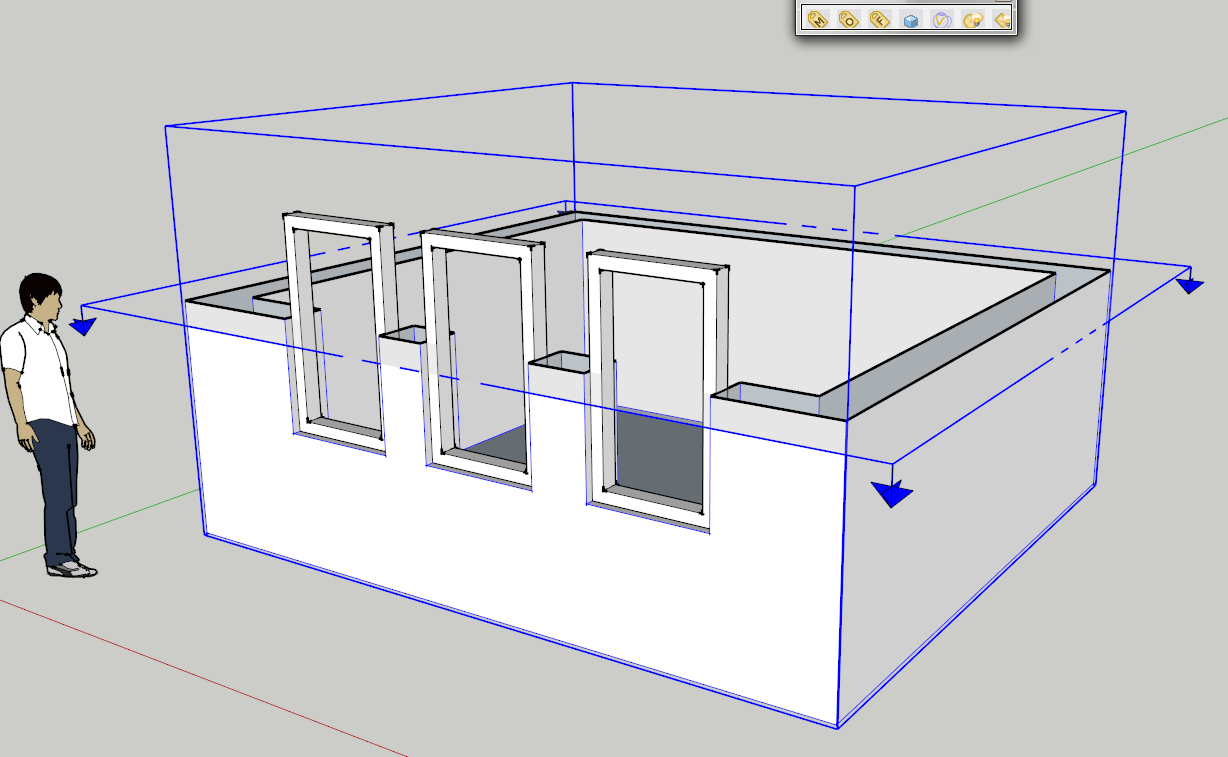

        Section cuts.png

        Thomas Thomassen β€” SketchUp Monkey & Coding addict
        List of my plugins and link to the CookieWare fund

        1 Reply Last reply Reply Quote 0
        • GaieusG Offline
          Gaieus
          last edited by

          That was my first guess, too, but then those wireframe things got me thinking. That could be hardly reproducible (although you never know...) πŸ˜‰

          Gai...

          1 Reply Last reply Reply Quote 0
          • EdsonE Offline
            Edson
            last edited by

            i am running the latest SU7 Pro build (7.0.10248) on an iMac 2.16 ghz, core 2 duo, 3gb ram, OS X 10.4.11.

            thomas, you may have a point about the card hypothesis. running the same file on my macbook pro (SUp latest build, mac OS X 10.5.6) did not have the same result. none of what i described above happened. but then why is this happening only on some sections and not on others?

            any way, you can download the file from
            http://www.4shared.com/file/89568818/146d7824/Cortes_2em1_2502.html

            thanks.

            edson mahfuz, architect| porto alegre β€’ brasil
            http://www.mahfuz.arq.br

            1 Reply Last reply Reply Quote 0
            • EdsonE Offline
              Edson
              last edited by

              @thomthom said:

              Just had a brainwave. At least for screenshot #2. Is your sectioncut located inside a group or component?

              no, the section is not located inside any group or component.

              edson mahfuz, architect| porto alegre β€’ brasil
              http://www.mahfuz.arq.br

              1 Reply Last reply Reply Quote 0
              • GaieusG Offline
                Gaieus
                last edited by

                I had a look Edson and nothing abnormal or unusual. It must be your machine I believe. Could you temporarily turn off hardware acceleration (Sketchup . Preferences . OpenGL)?

                Gai...

                1 Reply Last reply Reply Quote 0
                • EdsonE Offline
                  Edson
                  last edited by

                  nothing changed with hardware acceleration off. thanks.

                  edson mahfuz, architect| porto alegre β€’ brasil
                  http://www.mahfuz.arq.br

                  1 Reply Last reply Reply Quote 0
                  • thomthomT Offline
                    thomthom
                    last edited by

                    On my primary system Q9450 2.66GHz, nVidia Geforce 8800GT, Windows 7 Beta 64bit: everything normal
                    On my secondary computer, P4 HT, 2.8GHz, ATI Radeon 9800, Windows Vista 32bit: everything normal.
                    On my olg G4 Mac Mini (second generation) 1.25GHz, some ATI graphic card I think: I see the exact same bugs. Even the wireframe thing.

                    So it looks like it's a Mac issue. Not sure how to update graphic card driver on Mac, so I was unable to try that.

                    Also don't know why it happens with some cuts and some not. I suppose there's some trigger combination that has to match.

                    Thomas Thomassen β€” SketchUp Monkey & Coding addict
                    List of my plugins and link to the CookieWare fund

                    1 Reply Last reply Reply Quote 0
                    • EdsonE Offline
                      Edson
                      last edited by

                      as far as i know, there is no way to update a graphic card on mac.

                      it must be an ATI Radeon card-related problem as i have no problems on my macbook pro with GEForce 8600.

                      edson mahfuz, architect| porto alegre β€’ brasil
                      http://www.mahfuz.arq.br

                      1 Reply Last reply Reply Quote 0
                      • soloS Offline
                        solo
                        last edited by

                        Never seen this either, must be a video card issue.

                        There is no way to upgrade you GPU on a Mac? I cannot confirm this as I always assumed Mac's updates included current firmware and drivers.

                        http://www.solos-art.com

                        If you see a toilet in your dreams do not use it.

                        1 Reply Last reply Reply Quote 0
                        • thomthomT Offline
                          thomthom
                          last edited by

                          @edson said:

                          as far as i know, there is no way to update a graphic card on mac.

                          it must be an ATI Radeon card-related problem as i have no problems on my macbook pro with GEForce 8600.

                          On Mac only , since my Windows ATI Radeon worked fine.
                          Has Apple dropped support for these cards? No way to obtain drivers from ATI?

                          Thomas Thomassen β€” SketchUp Monkey & Coding addict
                          List of my plugins and link to the CookieWare fund

                          1 Reply Last reply Reply Quote 0
                          • EdsonE Offline
                            Edson
                            last edited by

                            @solo said:

                            Never seen this either, must be a video card issue.

                            There is no way to upgrade you GPU on a Mac? I cannot confirm this as I always assumed Mac's updates included current firmware and drivers.

                            what i meant is that the user cannot download a driver and update his card. the updates are probably included on each system upgrade.


                            edson mahfuz, architect| porto alegre β€’ brasil
                            http://www.mahfuz.arq.br

                            1 Reply Last reply Reply Quote 0
                            • 1 / 1
                            • First post
                              Last post
                            Buy SketchPlus
                            Buy SUbD
                            Buy WrapR
                            Buy eBook
                            Buy Modelur
                            Buy Vertex Tools
                            Buy SketchCuisine
                            Buy FormFonts

                            Advertisement
