Splitting down the middle and re-gluing
-
I have been attempting to make several symmetrical objects. I have done work and then tried to establish a gluing plane by intersecting the work with a large rectangular block... and cutting away everything I don't need.
I use the move key to make a second copy and the scale tool set to minus 1 to reverse the object. I then slide everything back together and make it a group as best I can. Should not things that are put right next to each other lock onto their counterpart? Can I work on the boundary between the two "components" or "groups" without having to "explode?"
It seems like things get out of line hours later when I discover there are two lines in some places.
Thanks for any suggestions.
John D.
-
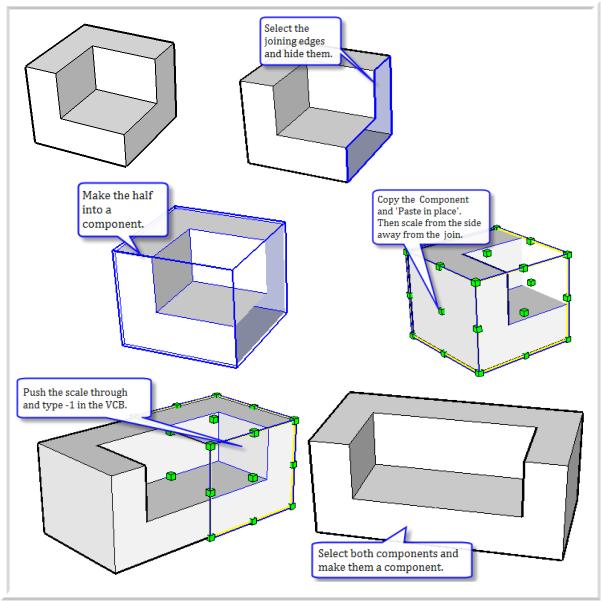
To make a symmetrical shape, create half of it. Hide the edges that meet. Make it a component, copy and 'paste in place', then scale the copy by -1. To finish make the two components into a new component.
Bob
-
Bob, that's a beautifully presented explanation.
How did you produce that page? -
Yeah, that is very cool, compact, and probably pretty quick. I noticed Jean-Paul using a similar method. Screen exports maybe.
-
Thanks. Screen grabs and callouts with SnagIt; you have to use screen grabs or if you want to show any of the SU controls. Edited the final image in Xara because it make sit easy to re-size and shuffle on the page.
Bob
Hello! It looks like you're interested in this conversation, but you don't have an account yet.
Getting fed up of having to scroll through the same posts each visit? When you register for an account, you'll always come back to exactly where you were before, and choose to be notified of new replies (either via email, or push notification). You'll also be able to save bookmarks and upvote posts to show your appreciation to other community members.
With your input, this post could be even better 💗
Register Login


Advertisement