Also make sure that if your glass has thickness, that the glass material is applied to both front and back faces.
Oops, your profile's looking a bit empty! To help us tailor your experience, please fill in key details like your SketchUp version, skill level, operating system, and more. Update and save your info on your profile page today!
Urasik Extensions | Lots of new extensions to check out Learn More
V
Offline
Posts
-
RE: Switching the daylight on
-
RE: Displacement problem
Theres a lot of good info on displacement here http://sketchucation.com/forums/viewtopic.php?f=322%26amp;t=28593
I simply thing that displacement is not the right way to render this type of material. I have had minimal success with displacement in general. You have to subdivide the hell out of the faces you are applying the material to and I think for maps like this that are so linear, displacement renders very unclean. It's great for stonework and organic maps. Maybe I'm wrong. I would love to see your results.
-
RE: White screen on the Vray rendering
In my humble opinion, noone should be using anything but V-Ray for SketchUp 2.0 inside SketchUp 2015 64 bit.
This is really your absolution best option. You are making your life impossible with anything else!
-
RE: Proxy doesn't show on render
If you dont have a centralized location for your vrmesh files and move folders around then vray might not be able to find the mesh file. Best practice is to have all meshes live in a proxies library on your local or network drive. if you need to remap the location of a mesh, just right click and your should be a menu item to relocated proxy file.
When you start a render and the log pops up it will show you all maps and proxies that are loaded, if it cant find a file, it will say so.
-
RE: Displacement problem
It could also just be the resolution of the displacement map. I see its only 520x520
-
RE: Displacement problem
Ive always had better luck modeling these in 3D than using displacement. It will render a lot faster too. 1001 bit pro models these things like a champ.
-
RE: Installing V-Ray Materials
Install the Express Tools from your VRay license reseller. It will install all the materials from the Chaos site on your machine and create a folder in your SketchUp materials with all the materials already setup. I think its like a 7-800MB download.
-
RE: How to render a model in face style X-Ray?
Not sure what you are looking for, but there was an xray style material on the Chaos site under Vismat / Misc.
VRay doesn't recognize the styles in SketchUp. You would have to make custom vray materials with transparency for this kind of effect.
-
RE: V-ray Render Problem
Which version of 2? Earlier versions had this bug. Make sure you have the latest update.
Also, I HIGHLY recommend all V-Ray users to upgrade to 2015. The 64 bit version resolves a lot of memory crash issues we were having in the confines of 32 bit SketchUp.
-
RE: How to lighten ambient occlusion layer?
The issue here is that you are trying to make an AO pass the same way they do in Max. The huge difference is the Max workflow uses VRayLight Tex as the base image and we don't have that in VR for SU.
2 Solutions.
1- Just use the AO tick box in your GI settings and it will add the AO automatically (less flexible than having a separate pass.)
2- Remove your ceiling/roof and use pure white in your GI to flood the space with light. You'll have to test this one out.
I have asked the Chaos guys to give us the VRayLightTex and the XtraTex pass in order to do AO the Max way, but for now this is what we have.
-
RE: V-ray Render Problem
Reinstall Windows???
No, make sure you have the latest VR4SU update. What version are you using? This looks like an old bug.
-
RE: Vray Proxy Channels
I see what you are saying now. Yeah, I think you need to manually put each material on the same ID color. Also try to render out ObjectID - this might give you a channel of that proxy.
-
RE: Vray Proxy Channels
Not sure of what you mean in your question.
1- How are you making the vrmesh file?
2- Aren't you getting a Multi ID material that's applied to the mesh when you import it? -
RE: Vray 2.0 can't render more than 1200x800
How much memory installed on your machine. 64 bit is only as good as the amount of RAM you have. I have machines with 12 and 32GB and have never had an issue.
Check your dynamic memory limit and set to 0.
-
RE: VRAY won't show and render
1- Version of SketchUp?
2- Version of V-Ray?
3- Have you tried to install all Windows Updates and reboot. Sounds crazy but I do get this issue sometimes and this resolves it, especially when my machine has been on for days or weeks. -
RE: Getting giod perspective
1 - Try adjusting your field of view setting for your SU camera
2- Most arch renders use 2pt perspective try turning this on (only works with latest VR)
3- Look at photography and study how they make good perspectives. Its all about composition. Google "Rule of Thirds" for starters.
Good source of images both real and rendered to see how perspective views are composed.
-
RE: Animation and camera control (SU15 Vray 2)
Smustard has some. They are old plugins, but I think they still work.
-
RE: HDRI Light splotches problem
@majid said:
If you are using HDR images, make a small blurred copy and also increase the HS subdivide to let me say 50 or more
This is a good trick if you are not using 2.0. But I would say, moving forward with VR2, all HDRIs should be used with a dome light. You will not need the extra subdivs on your IR map. If you have a lot of noise in the image, increase the subdivs of the dome light.
-
RE: Matching output between Vray and Sketchup
Even using ThomThoms Vray Toys, as long as you are clicking Get Aspect before rendering. It will match SU exactly. If you are not in the latest 2.0, than turn off 2 point. I use a SU export every time I render and I have never had a problem matching the views.
-
RE: Matching output between Vray and Sketchup
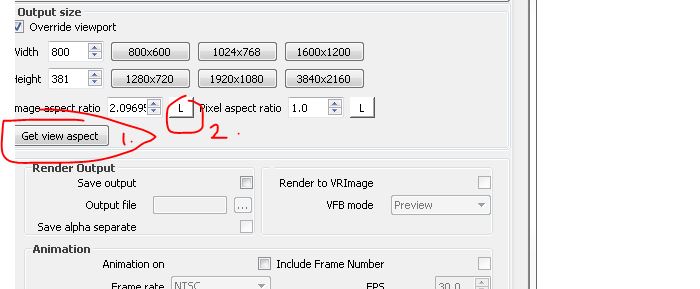
Your issue is your image aspect. Its set to 1.333 (the default) You need to first click L to unlockl the ration, then click The Get Aspect button to match SketchUp's viewport. This is different on mostly every computer because of screen size, toolbars, etc. Then click L again to lock it.
It also looks like you are using a 2pt perspective. This only works in the latest version of V-Ray. Otherwise you need to turn 2pt off and adjust that in Photoshop.