Do you want a particular size and/or shape for the lattice? Are hidden lines to be considered? Do you want the faces in one group and the lattice in another or all in one? Do you want a material applied to the lattice? Perhaps you could post a model containing a sample of the mesh.
Oops, your profile's looking a bit empty! To help us tailor your experience, please fill in key details like your SketchUp version, skill level, operating system, and more. Update and save your info on your profile page today!
⚠️ Important | Libfredo 15.8b introduces important bugfixes for Fredo's Extensions Update
 Offline
Posts
-
RE: How to create a multistep plugin...
-
RE: [Plugin] Stair Maker
Stair Maker keeps the default values in a text file with the name of Stair Maker.txt. Some times this file can become corrupted. Find this file, it should be in the plugins folder, and delete it. Stair Maker will recreate it the next time you execute the plugin.
-
RE: Idea for plug
You are welcome to try my Select By Material plugin on my blog. It works just like you described. You Make current the material of interest then the plugin gives you the option of Select If or Hide If Not.
-
RE: [REQ] Edge 2 Groove
I'm not surprised that the plugin fails and/or splats on these examples. It is going to be very tough if not impossible to come up with a general solution.
-
RE: Help with plugin
@sergio morera said:
Hi Sdmitch
Thank you very much for your prompt reply. I loaded the script in my sketchup plugin folder and it shows fine when I load sketchup but nothing happens when I import the file. Any clues?
CheersThe components are created then the initial instance is deleted. If you go to Window>Components and click on the the "little house" to show components in the model, I think you will see them there. If not post the data file you are working with so I can check it out.
-
RE: Help with plugin
Sergio,
Attached plugin should do what you want. Assumes one cigar box comma seperated data per line,ie Name,Height,Width,Depth.
-
RE: [REQ] Edge 2 Groove
mit, That is a certainly a possibility and using followme instead of pushpull. The problem will always be sorting out which edges should be followed unless the paths are selected one at a time.
-
RE: [REQ] Edge 2 Groove
@earthmover said:
single face grooves, grooves to define cabinet drawers, grooves for concrete building facades.
Please provide an example of each.
-
RE: [REQ] Edge 2 Groove
Yes I'm sure much more can be done but, as I stated in the post, the plugin attached was developed and tested on that one example alone.
I just looked at it as a sidewalk, with at flat top and curved sides. I examined each edge to see if it was between coplanar faces, normals parallel, to indicate it was on top and calculated the boundary points of the three faces that I could pushpull to create the top and side grooves. In addition to the normals parallel, I need to require the the normal.z is pointing up or down. This will allow sides to be straight as well.
Adding grooves to a four sided column poses the additional problem of trying to determine "which" way is up".
-
RE: [REQ] Edge 2 Groove
Charly, Please see my last post. I knew it was a mistake to post the alpha version because people always think that, no matter what bazaar situation they can create, the plugin should be able to handle it.
-
RE: [REQ] Edge 2 Groove
Using the Edge 2 Groove model supplied, I have been able to create a plugin for this unique situation.
[flash=800,600:14uqb6r8]http://www.youtube.com/v/JvROg-dN2YA[/flash:14uqb6r8]
-
RE: [REQ] Edge 2 Groove
In my plugin, the top groove is not a problem. But the side grooves either cross or diverge when pushpulled due to the faces not being coplanar.
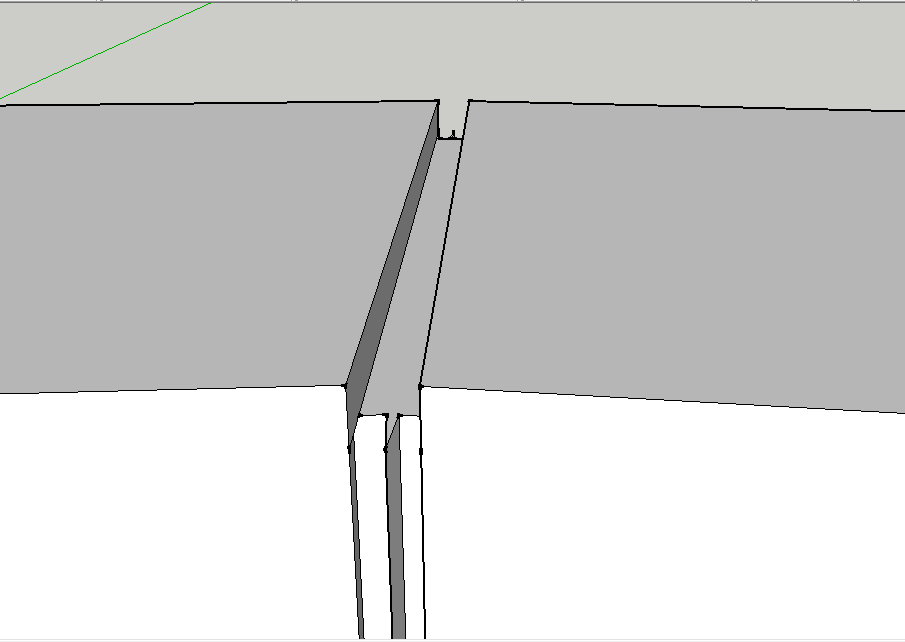
as the image shows.
-
RE: [REQ] Click Copy Rotation-Released
Not sure why but I don't have that problem.
-
RE: [REQ] Click Copy Rotation-Released
@unknownuser said:
Works like a charm!

Just 2 little things
Ctl + Z exit and dont erase the last drawn object << Esc key
The helper text appears before the Snap point << ??? You want to pick the Component/Group first then get the "Rotate by:" prompt?Very cool for make random tilling controled!

-
RE: [REQ] Click Copy Rotation-Released
Do you want the copy to be inserted at and rotated around the picked point?
-
RE: 'Dynamic' array
by simply adding the line above the areas[group.name] += faces[0].area line like this
groups.each{|group| faces=group.entities.to_a.find_all{|e|e.class==Sketchup;;Face} areas[group.name]=0 if !areas[group.name] areas[group.name]+=faces[0].area }### assuming only one face in group -
RE: 3d points of coplanar polygons - SketchUp Ruby API
vhiguita, Are you still working on this problem or do you have a solution? I was interested in your problem and thought I would give it a try. Using the data from you post, I created a "html" file and created a plugin to read it and place the data. My html file contains the faces, lines and points but the lines and points are really the only data you need. I assummed the units were feet. It would help if I had an actual file to work with so post one if possible.
-
RE: 'Dynamic' array
If you look back at my previous post, the second code snippit has the answer to your problem.
-
RE: 'Dynamic' array
Not to step on TIG's toes but to find the groups
groups=Sketchup.active_model.active_entities.find_all{|e| e.class==Sketchup;;Group}and to total area of multiple faces
 areas[group.name]=0 if !areas[group.name]
 areas[group.name] += faces[0].area