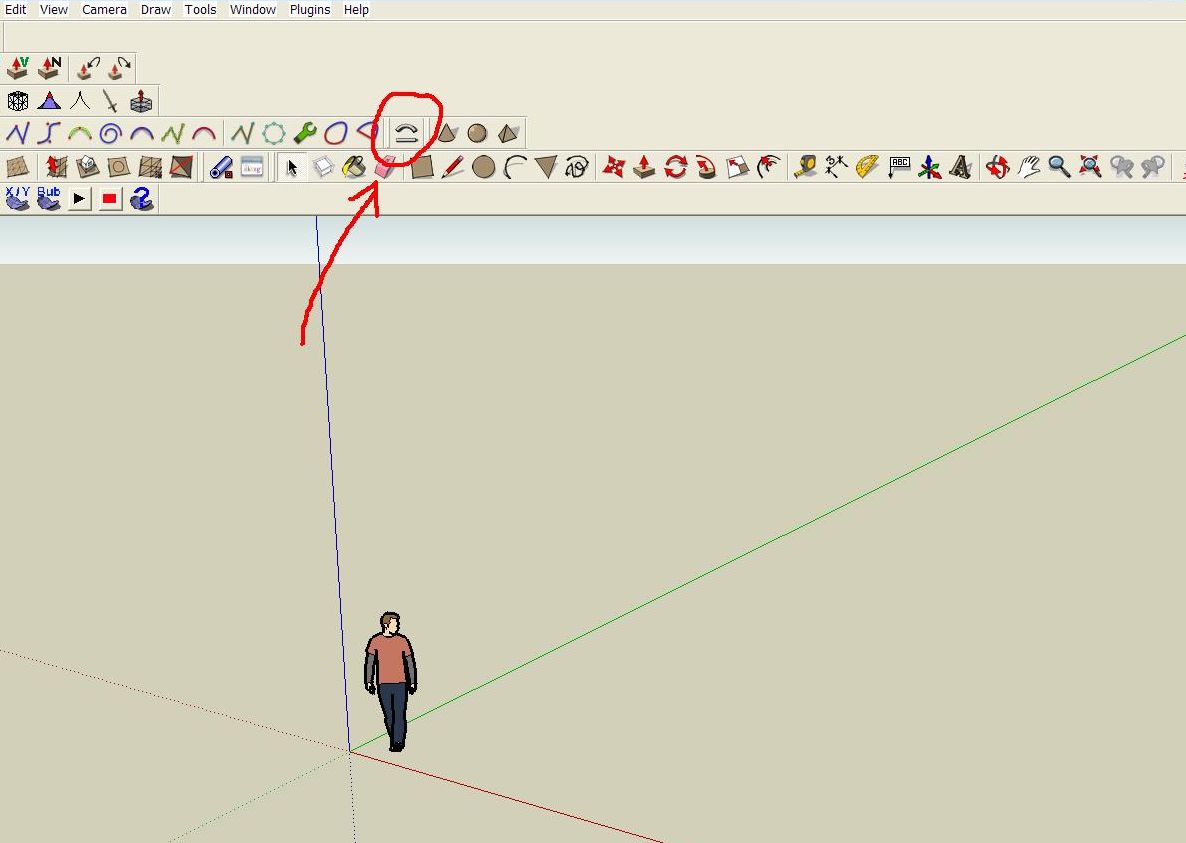
Hm, you should have "Chris Fullmer Tools - Shape Bender " uder plugins menu.
There should also be the icon in the toolbar ( see the image).
 N
Offline
N
Offline
Hm, you should have "Chris Fullmer Tools - Shape Bender " uder plugins menu.
There should also be the icon in the toolbar ( see the image).
Doh! again. Slight memory disturbances in the aged, I guess...
Thanks for the explanation. Another question if you guys don´t mind. What do I have to do if I want to edit a texture applied on a surface? ( i.e. not on a single face?)
He, he. I´ve been there, man.
"Last time I was sober, man I felt bad
Worst hangover that I ever had
It took six hamburgers and scotch all night
Nicotine for breakfast just to put me right"
Bottoms up!
I like it already.
I am very fond of WWI era airplanes, and I used to spend a lot of my free time in aircraft scale modeling - all that has survived is 1/72 Sopwith camel, SE 5A and some German fighters. Now I am trying to "resurrect" them in 3D.
I would really like to see your model, once it is finished ( I guess it is going to be a very detailed one ).
I have stumbled upon these photos http://www.ivyandmartin.demon.co.uk/martinphotos/pup_n6181.htm
Hope they may come in handy.
Cheers!
Pilou was kind enough to answer my newbie question about propeller blades http://forums.sketchucation.com/viewtopic.php?f=79&t=21757. If you come up with a different solution, I would really like to know about it.
Keep up the good work!
Darn it, I would really like to see some kind of 3D mesh painting tool inside SketchUp...
OK, thanks for the explanation.
OK Gaieus, I am obviously DUMBthumb, but could you please tell me the difference between what you´ve been so patiently doing here and this http://www.youtube.com/watch?v=HHsRRLCAOm8 ?
It´s not that I am pretending to be smart, I just don´t fully understand this.
Hi David!
Would it be a problem to tell me which particular type of WWI biplane are you modeling?
I agree with Ecuadorian, 3 view drawings are definitely not enough.
As for Ruby tools and plugins - I found Simple Loft quite useful for aircraft modeling, but see for yourself if it suits your needs.
Also there are many videos on YouTube, like http://www.youtube.com/watch?v=1FJi1nmVGKg - not really a SketchUp thing, but it may help.
This is about modeling airplanes using SketchUp - http://www.rcgroups.com/forums/showthread.php?t=920416
Also check this site for some more 3 view drawings - http://richard.ferriere.free.fr/3vues/3vues.html
Hope this helps!
To the best of my knowledge, PS CS4 Extended allows import and export of OBJ, U3D, KMZ, Collada and 3DS models import.
It is possible to edit textures on 3D model in PS CS3, I think. Not sure if you could do anything with Photoshop Elements 7, at least in 3D.
Seriously, if I had noticed that this was answered already, I wouldn´t risk playing a wise guy here.
I don˙t really understand what you mean. How about uploading a picture or a model so we both can learn something?
Hello and welcome!
I think there are many similar threads on the forums and many more competent people to clarify this, but check http://www.youtube.com/watch?v=HHsRRLCAOm8 for some explanation regarding applying textures on curved surfaces (if that is the problem )
Or you can download 3DShapesTool.zip from Ruby Library depot for easy creation of various 3D shapes - this doesn´t mean that you should neglect the possibilities of Follow Me tool, of course.
Have fun!
Now that´s some serious twisting. Thanks, Pilou!
Could someone please explain to me how to add a "twist" to the aircraft propeller blade ( because there is not a constant pitch throughout their entire lenght, right?)
Don´t know if this could be of any help to you, but check it out - http://www21.brinkster.com/jrcsurvey/tutorials/alana/Index.html.
I have found it some time ago when I was playing with Wings3D, but maybe it could be useful for SU users also.