@Didier-Bur Well, obviously the Roundcorner was the first one I tried – and failed exacly like the other popular bevel plugins.
As long the bevel plugins can't do the simple and trivial trick to strictly preserve vertexes (even if they would fall back to 0-length edges) and keep the matches between the appropriate vetexes from the original and the beveled contour, it will surely fail on slightly more complex shapes as the concave one in my example.
In these circumstances I'll be tempted to develop a workable extension for myself…
Oops, your profile's looking a bit empty! To help us tailor your experience, please fill in key details like your SketchUp version, skill level, operating system, and more. Update and save your info on your profile page today!
Check out Febhouse | New extensions for Shadow Analysis in SketchUp Download
K
Offline
Posts
-
RE: [Plugin] Emboss
-
RE: [Plugin] Emboss
Hi Didier,
First of all, thank you for the Emboss plugin — it is one of the very few SketchUp tools that preserves vertex topology perfectly.
I’m using it for precision modeling, and the way it keeps the original curve structure intact is extremely valuable.I’ve found one issue that only appears with concave shapes.
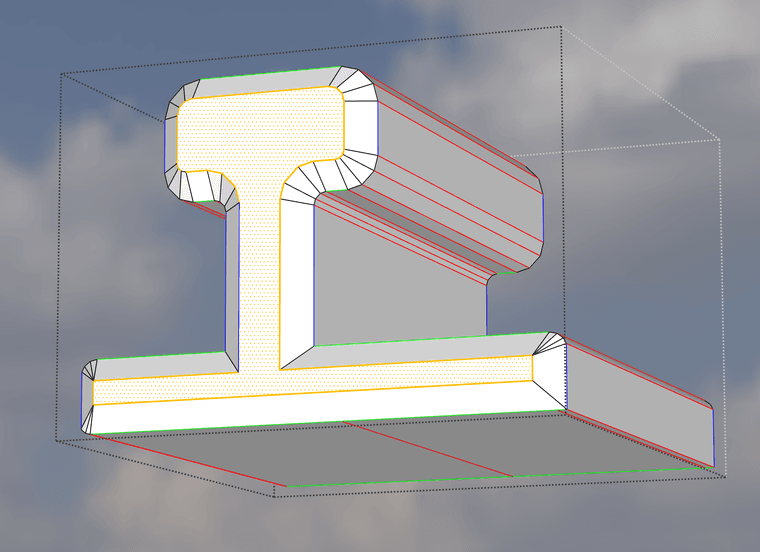
On convex curves the embossing works flawlessly, but on concave sections the displacement direction becomes inverted or distorted.Below are two screenshots:
This is how the emboss should look (approximately, made by hand):
This is what Emboss actually generates on the same concave shape:
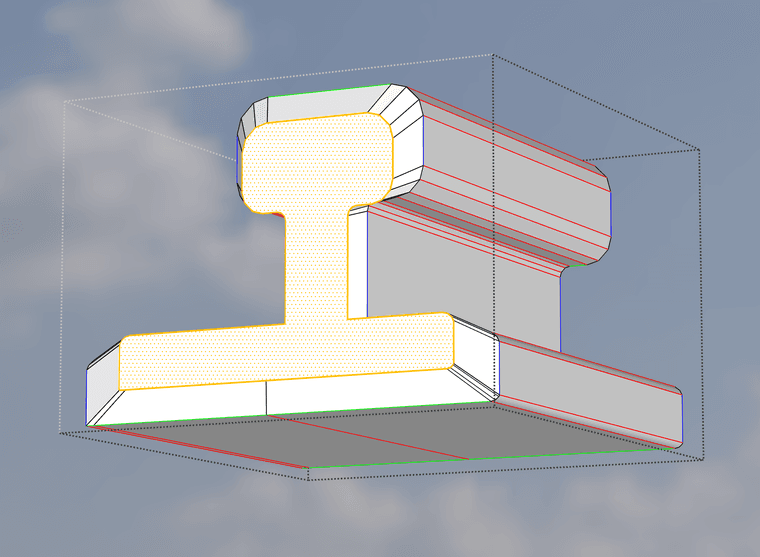
The difference is only in the normal direction handling at concave vertices.
If the algorithm could detect concave angles and flip the displacement direction accordingly, the result would be perfect.Would it be possible to adjust the normal calculation so concave vertices receive a correct inward/outward direction as well?
If you need test models or more examples, I’m happy to provide them.
Thank you again for your work — this plugin is already incredibly useful.
Best regards,
Zoltán