
sketchucation logo sketchucation
    • Login
    1. Home
    2. Juantxo
    3. Posts
    Oops, your profile's looking a bit empty! To help us tailor your experience, please fill in key details like your SketchUp version, skill level, operating system, and more. Update and save your info on your profile page today!
    ⚠️ Important | Libfredo 15.8b introduces important bugfixes for Fredo's Extensions Update
    Offline
    • Profile
    • Following 0
    • Followers 0
    • Topics 10
    • Posts 83
    • Groups 1

    Posts

    Recent Best Controversial
    • Window.open webdialog on MAC close parent

      Hi,
      I'm trying to make a plugin MAC compatible, and I can't open a child window of a webdialog.
      window.open does not have same behaviour on MAC and it open a child window in parent window closing parent I think.
      Someone knows why donesn't work on MAC.

      
      dialog = UI;;WebDialog.new("PVGYS", true, "sk_pvgys", 930,  830, 500, 0, true)
      dialog.set_url('http://re.jrc.ec.europa.eu/pvgis/apps3/pvest.php')	
      dialog.show(){
      dialog.execute_script("myWindow=window.open('','output','left=0 width=550,height=800,scrollbars=1,resizable=1');") 
       }
      
      
      posted in Developers' Forum
      JuantxoJ
      Juantxo
    • RE: [Plugin] Skelion (solar, shadows)

      Thanks for your post. Some people have problems understanding how to insert panels. So I think it's necessary make a video to teach how to insert solar panels, co-planar or with some tilt, over the roof.
      With the plugin you can insert panels like you want, but it's necessary understand the concept of azimuth and tilt relative. This concept it's a bit dark...
      Selecting an edge and a face, and using the rights azimuth and tilt relative you can insert the panels in many ways.
      We'll try to make a video...

      posted in Plugins
      JuantxoJ
      Juantxo
    • RE: [Plugin] Skelion (solar, shadows)

      Please, send the model or an image please.
      Plugin insert panels in rows, from down to the top, and centering panels of each row from borders.
      Actually not maximize space in vertical. User must sometimes modify rows. May be in a future it will be improved.

      posted in Plugins
      JuantxoJ
      Juantxo
    • RE: [Plugin] Skelion (solar, shadows)

      Sorry jwood2012, you need to clear the cache of your browser to download current version.
      The problem is you downloaded an older version.

      posted in Plugins
      JuantxoJ
      Juantxo
    • RE: [Plugin] ShadowProjector

      If someone is interested there is a similar shadow projector in skelion plugin.
      You can project shadows at specific time, but over a range of time too, that's the main difference of the plugin.
      I tried with the magnifier.skp test and it works.(Time calculation about a minut)

      posted in Plugins
      JuantxoJ
      Juantxo
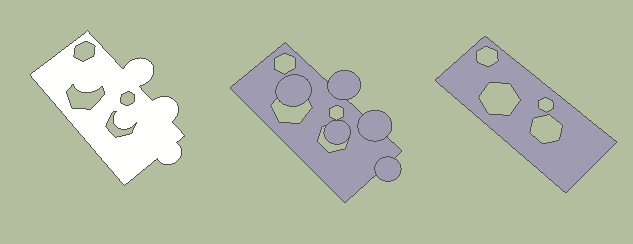
    • [Plugin] 2d all bool faces operations

      This plugin is valid to intersect, trim, subtract, union, split faces.

      You need to select two groups with a general planar polygon.
      General planar polygon = A single polygon or a polygon consisting of a set of non-intersecting single polygons.

      DOWNLOAD 2d_simplex_bool at SektchUP extension warehouse

      http://skelion.com/images/forum/2dbool.jpg

      Thanks to Joel G for the toolbar icon.

      Best regards

      posted in Plugins
      JuantxoJ
      Juantxo
    • RE: [Plugin] 2dBoolean ver1.3.1 beta UPDATE 20 dec 2013

      Actually I'm working in 2D boolean of polygons in Sketchup because I need for other stuff. I did this plugin using simplicians theory.
      May be could be usefull for someone.

      You need to select two groups with a general planar polygon.
      General planar polygon = A single polygon or a polygon consisting of a set of non-intersecting single polygons.

      DOWNLOAD 2d_simplex_bool.rbz

      http://skelion.net/bool/2dbool.jpg

      posted in Plugins
      JuantxoJ
      Juantxo
    • RE: [Plugin] 2dBoolean ver1.3.1 beta UPDATE 20 dec 2013

      Sorry, but actually I prefer the code scrambled. The code is not very optimized because I did it to translate to C after.
      I don't use any line of your code. I used a simplicans planar theory. (I taked your one icon, feel free of use my icons)

      Best regards

      posted in Plugins
      JuantxoJ
      Juantxo
    • RE: Question about order in selection

      Solid tools has its own tool, but also, you can use selection tool, pick two entities and substract them. And order its detected.
      So, order of selection tool is detected by "solid tools".

      posted in Developers' Forum
      JuantxoJ
      Juantxo
    • RE: Question about order in selection

      Yes, it's a good way, but I'm looking something to know the order of selection tool, not the order of my own tool.
      Like in "Solid tools" toolbar.
      In "Solid tools" you can use the selection tool and substract two entities, second entity will be substracted from first entity selected. Solid tools knwos the order you pick the entities with selection tool.

      posted in Developers' Forum
      JuantxoJ
      Juantxo
    • RE: Question about order in selection

      I've had the same problem,
      I need to be sure what is the first or the second selected entity with the mouse (the two have the same class).
      I've used SelectionObserver (onSelectionBulkChange, onSelectionCleared) storing selection entities in two variables,
      one with first click and the other with next click. So, comparing variables I can find out what is first entity and second.
      I'm not very sure if it is the right form...but works.

      posted in Developers' Forum
      JuantxoJ
      Juantxo
    • RE: Question about order in selection

      That is the code I use, but I don't like too much use observers.
      If someone knows better solution...

      
      require 'sketchup'
      
      class MySelectionObserver < Sketchup;;SelectionObserver
      	@@sel2_ord=[]
      	
      	def initialize()
      		@s1=[]
      		@s2=[]
      	end
      				
      	def onSelectionBulkChange(selection)
      		@@sel2_ord=[]
      		if selection.length==1 then  @s1=selection.collect{|el| el}; @s2=[] end
      		if selection.length==2 then  
      		@s2=selection.collect{|el| el}
      				if @s2.include?(@s1[0]) then
      				@s2.delete(@s1[0])
      				@@sel2_ord=[@s1[0],@s2[0]];
      				@s1=[];@s2=[]
      			end	
      		end
      	end
      
      	def onSelectionCleared(selection)
      	@s1=[]
      	@s2=[]
      	@@sel2_ord=[]
      	end
      	
      	def self.sel2_ord()
      		return @@sel2_ord
      	end
      	
      end
        
      	 
      if( not file_loaded?(__FILE__) )
          bool_2d_obs = MySelectionObserver.new()
      	Sketchup.active_model.selection.add_observer(bool_2d_obs )
      	file_loaded(__FILE__)	 
      end	 
      
      #To find out the two objects selected in order,  write in ruby command window 
      #p(MySelectionObserver.sel2_ord)
      
      posted in Developers' Forum
      JuantxoJ
      Juantxo
    • RE: Help with shadow_info and SunRise

      I thought I was doing something wrong.
      Then, I don't worry about this discrepancy.

      Thanks Tig

      posted in Developers' Forum
      JuantxoJ
      Juantxo
    • Help with shadow_info and SunRise

      Hello,

      I'm trying to debug this method but I could not find out why the same day has some seconds of difference in Sunrise.
      May be it's not the right form to find out the Sunrise for a given time?
      (I'm using Sketchup 8.04811)

      Please help!

      
      def fsun(year1,month1,day1,hours1, minuts1)
      	model=Sketchup.active_model
      	info=model.shadow_info
      	
      new_time=Time.local(year1, month1, day1, hours1, minuts1)
      info["ShadowTime"]=new_time
      
      	p(info["SunRise"])	
      end
      
      
      fsun(2011, 12, 21, 11, 59)
      fsun(2011,  6, 21,  9, 59)
      fsun(2011, 12, 21,  9, 59)
      fsun(2011,  6, 21,  9, 59)
      fsun(2011, 12, 21, 11, 59)
      
      
      #RESULT;
      # Wed Dec 21 08;24;22 +0100 2011 #SunRise should be equal?
      # Tue Jun 21 06;37;23 +0200 2011
      # Wed Dec 21 08;24;31 +0100 2011 #SunRise should be equal?
      # Tue Jun 21 06;37;23 +0200 2011
      # Wed Dec 21 08;24;22 +0100 2011
      # true
      
      posted in Developers' Forum
      JuantxoJ
      Juantxo
    • RE: [Plugin] Skelion (solar, shadows)

      http://skelion.netne.net/ is a free hosting. May be it is the reason.
      In the future I'll change the hosting if I'll see interest in the plugin, but not now.

      posted in Plugins
      JuantxoJ
      Juantxo
    • RE: [Plugin] Skelion (solar, shadows)

      A new version has been released with some bugs fixed and a commercial version with more features.

      posted in Plugins
      JuantxoJ
      Juantxo
    • RE: Counting Components

      I understand. You are the best

      Thanks very much!

      posted in SketchUp Discussions
      JuantxoJ
      Juantxo
    • RE: Counting Components

      In the video you can see 3 rectangles, but count_instaces only returns 1. If you click all the groups to edit them and then exit, count_instances returns the
      rigth number, 3 rectangles. I think count_instances method has a bug. ¿What do you think?

      posted in SketchUp Discussions
      JuantxoJ
      Juantxo
    • RE: Counting Components

      If you insert a group with an instance of a component inside, count_instaces method and ComponentDefinition.instances["instance"].length fails.

      http://www.youtube.com/watch?v=kLAAAK2_APc
      You need to enter inside the groups, then the number of instances is corrected.
      ¿Is there another way?

      posted in SketchUp Discussions
      JuantxoJ
      Juantxo
    • RE: Solar North and green axes Sketchu 8

      In this link I found people worried for the same.
      http://www.google.com/support/forum/p/sketchup/thread?tid=589b0d27a1c59111&hl=en
      I've attached a simple plugin to rotate to green +Y default and set solar north to 0. (I need it for my skelion plugin)
      After rotate the model, you can restore the model if you want export to Google Earth.
      The plugin only works in SU8


      Plugin

      posted in Newbie Forum
      JuantxoJ
      Juantxo
    • 1 / 1