sketchucation logo sketchucation
    • Login
    1. Home
    2. jolran
    3. Posts
    Oops, your profile's looking a bit empty! To help us tailor your experience, please fill in key details like your SketchUp version, skill level, operating system, and more. Update and save your info on your profile page today!
    ⚠️ Important | Libfredo 15.6b introduces important bugfixes for Fredo's Extensions Update
    Offline
    • Profile
    • Following 0
    • Followers 0
    • Topics 37
    • Posts 1,027
    • Groups 2

    Posts

    Recent Best Controversial
    • RE: [Plugin] Hatchfaces (v1.8 beta) UPDATED 15-Dec-2012

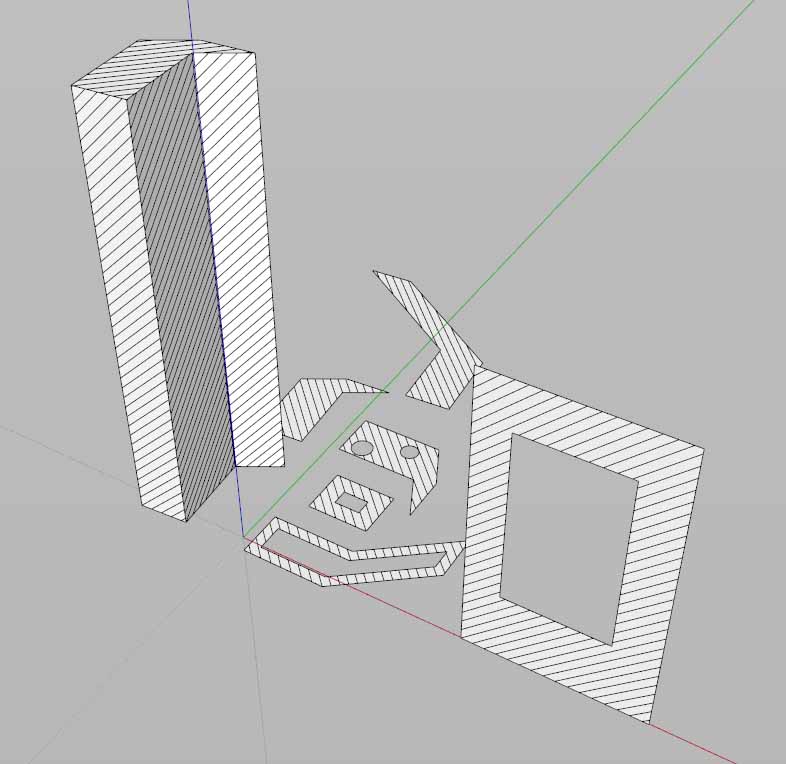
      Crap! It always hatches in the axis. Doesent matter if the cube is rotated or not.

      OK. for tomorrow then... sigh... I hope you will come to the rescue again πŸ˜„
      I'm guessing -transformation to axis something?

      I will never get to experiment with NEW features!!!

      It put the ver 1.4 update up anyway. Think it's better than it was before.
      posted in Plugins
      jolranJ
      jolran
    • RE: [Plugin] Hatchfaces (v1.8 beta) UPDATED 15-Dec-2012

      Thanks for all your help and advice TIG!

      I will follow them.

      @unknownuser said:

      is the angle always more logically oriented to an axis rather than an edge of the face ??

      Don't know πŸ˜„

      So I'll update the plugin then? All OK?
      Will work on the crosshatching later. I think it is a good idea to get this fix out, so people can use this plugin
      more properly.

      This coding-testing burns more calories than a 2hours jogging in the forest πŸ˜„

      posted in Plugins
      jolranJ
      jolran
    • RE: [Plugin] Hatchfaces (v1.8 beta) UPDATED 15-Dec-2012

      Works with holes..


      test forVer1.4.jpg

      posted in Plugins
      jolranJ
      jolran
    • RE: [Plugin] Hatchfaces (v1.8 beta) UPDATED 15-Dec-2012

      Think I got! @face=gents.add_face etc..in tha Face creating-part And use @ varibles in the code below seams to do the trick!
      It works on holes anyway. Don't know how kosher that is TIG? It would get into the linehatching method.

      posted in Plugins
      jolranJ
      jolran
    • RE: [Plugin] Hatchfaces (v1.8 beta) UPDATED 15-Dec-2012

      @unknownuser said:

      You get all of this from the original face NOT the temporary face!

      Yes, that part I understand(hopefully) what it was about to fix for problems.

      However when you said I can't get the plane or normal of an erased face, I thought
      order matters. I think my english is a bit bad, I don't understand everything right away. Apologize for that.

      Lets say I use ORIGINAL "face" for face plane, I still must pass "face" on in the argument-list if I am going to
      have following script setup, wich will be needed for crosshatching later on, no?

      Feels like I'm doing some fundamential misstake here.

      (edited)It should be "face" in the argument list. NOT faces.


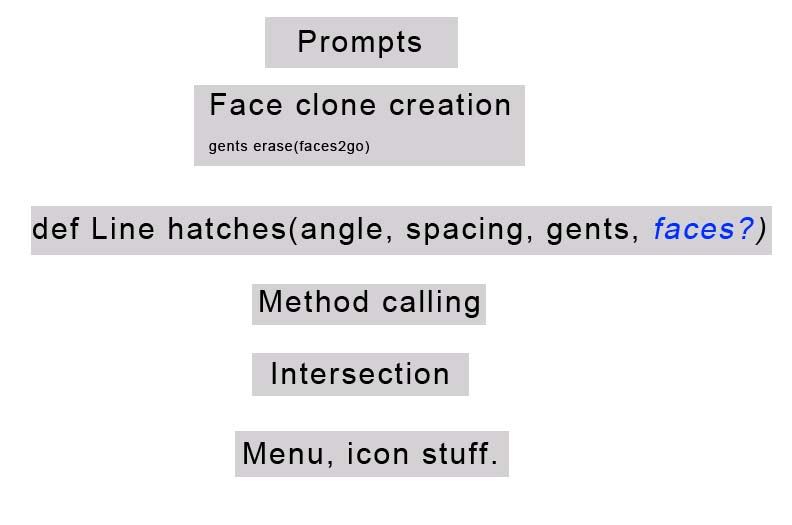
      code_structureidea1.jpg

      posted in Plugins
      jolranJ
      jolran
    • RE: [Plugin] Hatchfaces (v1.8 beta) UPDATED 15-Dec-2012

      @unknownuser said:

      You can set variables plane=face.plane and normal=face.normal and pt=face.outer_loop.vertices[0].position, then face.erase!

      Ok. You mean before faces2go << face? After erase.faces2goI was going to define the
      linehatching as a method for crosshatching, as we discussed earlier. They will have to be instance.variables then or do I pass all of them into the argument-list when calling the method?
      That's why I was wondering if one could use face from gents.entities, since gents will be passed into the args-list anyway.

      Or did you originaly mean I should put the whole operation into a method for crosshatching?

      I'm sorry if I sound confused. 😳 But I am.

      posted in Plugins
      jolranJ
      jolran
    • RE: [Plugin] Hatchfaces (v1.8 beta) UPDATED 15-Dec-2012

      The "earliest" place where I can insert gents.erase_entities(faces2go) without erasing the access to face.plane is:

      tr=Geom;;Transformation.rotation(pt,face.normal,@angle.degrees)
             vp=ve.transform(tr)
              vp.length=di*2
               vs=face.normal.cross(vp) #spacing vector perpendicular to hatch line
                gents.erase_entities(faces2go)


      The result is not correct. Missing edges and too short.

      Is face.plane or any command referring to "face" using the inner-hole faces, perhaps?
      Should one use gents.entities.face(or something to retrieve the face.entity in gents) instead of just face?

      posted in Plugins
      jolranJ
      jolran
    • RE: [Plugin] Hatchfaces (v1.8 beta) UPDATED 15-Dec-2012

      AHA!!

      So even if I am stupid enough to make that misstake, I noticed that in fact that was the error going on?

      I'm making progress!! πŸ˜„

      Thanks TIG. I will try to fix it.

      posted in Plugins
      jolranJ
      jolran
    • RE: [Plugin] Hatchfaces (v1.8 beta) UPDATED 15-Dec-2012

      It does not work 😞

      However i noticed that "face" entity gets erased after erase(facestogo) if it has holes in it. Not if it's a square for ex!

      I used puts face after loop face erasing..

      So do face.plane have something to refere to when there are holes? Or is the variabel set earlier?

      posted in Plugins
      jolranJ
      jolran
    • RE: [Plugin] Hatchfaces (v1.8 beta) UPDATED 15-Dec-2012

      May have found something? Commented out the last parts. Line hatching and intersection.
      The results of faces with holes is a group(clone) with reversed face? Faces without holes is created as expected.
      Since using face.normal that might (in my theory logic) pose some trouble?

      Updated Hmmm, no. Grr. Did not matter if faces was reversed or not. Problem remains..

      This code reverses the faces anyway.
      Could be useful later on, but it will reverse ALL faces, wich is not useful right now. Faces without holes do not need reversing.

      faces2=[]
            gents.each{|e|faces2 << e.reverse! if e.class==Sketchup;;Face
      
      posted in Plugins
      jolranJ
      jolran
    • RE: [Plugin] Hatchfaces (v1.8 beta) UPDATED 15-Dec-2012

      Anyway heres how I implemented your code, between ents erase(facestogo) and intersection. It does not work on faces with holes, as mentioned.
      Is there a clash with 2 pt.clones? Maybe I HAVE put your code in wrong places. I will continue..

      bb=face.bounds
            di=bb.diagonal
             pt=face.vertices[0].position
              p1=pt.clone
           if face.normal.x.abs>0.9999
            p1.y=p1.y+1
           else
            p1.x=p1.x+1
           end#if
            p1=p1.project_to_plane(face.plane)
             ve=pt.vector_to(p1)
              po=pt.clone
            tr=Geom;;Transformation.rotation(pt,face.normal,@angle.degrees)
             vp=ve.transform(tr)
              vp.length=di*2
               vs=face.normal.cross(vp) #spacing vector perpendicular to hatch line
               tot=0
            until tot>=di*2
              ps=pt.offset(vp)
               pe=pt.offset(vp.reverse)
                gents.add_line(ps,pe)
                 pt.offset!(vs,spacing)
                  ps=po.offset(vp)
                 pe=po.offset(vp.reverse)
                gents.add_line(ps,pe)
               po.offset!(vs.reverse,spacing)
              tot=
      
      posted in Plugins
      jolranJ
      jolran
    • RE: [Plugin] Hatchfaces (v1.8 beta) UPDATED 15-Dec-2012

      Wow, thanks! So if I understand it correctly one do only need to compare x to y to get the required results. Where if>0,9999 switches to other axis-comparison=under1? Clever.

      It works for faces without holes if I switch values p0 to pt, with your last posted code.
      Or do you mean p0 to be po, (typo)? Cause that is a whole different thing. That does not makes sence though, wonder why I think that...

      I will try that meanwhile..Se if holes get fixed.

      po=pt.clone:

      ps=pt.offset(vp)
              pe=pt.offset(vp.reverse)
              gents.add_line(ps,pe)
              pt.offset!(vs,spacing)
              ps=po.offset(vp)
      etc
      
      posted in Plugins
      jolranJ
      jolran
    • RE: [Plugin] Hatchfaces (v1.8 beta) UPDATED 15-Dec-2012

      @unknownuser said:

      You have to learn the ruby language itself

      Yeah, you are right. Working on that.

      Good news is the code seams to be working for sorting irregular faces and hatching.

      
            p1=pt.clone
            p1.x=p1.x+1 # X value = x axis needs to be replaced if using another axis
            
            p1=p1.project_to_plane(face.plane)
            ve=pt.vector_to(p1)
            bb=face.bounds
            di
      

      So something like this does not do the trick yet. Will work on it..

       p1.each {|e|e.z+1 if face.normal.z.abs==1
            e.x+1 if face.normal.x.abs==1
            e.y+1 if face.normal.y.abs==1}
      
      
      posted in Plugins
      jolranJ
      jolran
    • RE: [Plugin] Hatchfaces (v1.8 beta) UPDATED 15-Dec-2012

      @unknownuser said:

      vector can't have a zero length!

      That I can understand. Alright, I will have a go at it. I'm not sure a fully grasp this 😳
      This is more and more your plugin, it's starting to be too complicated for me. My level is more icons and stuff.
      Maybe one day I can contribute more.

      Thanks for your invaluable help TIG πŸ‘

      posted in Plugins
      jolranJ
      jolran
    • RE: [Plugin] Hatchfaces (v1.8 beta) UPDATED 15-Dec-2012

      Hmm I will try..

      Where do you learn all these commands?? πŸ˜„ It feels like I'm missing some information source(exept from this forum).

      BTW won't there be a conflict of axes if one for ex. have a face rotated 45 degrees?

      posted in Plugins
      jolranJ
      jolran
    • RE: [Plugin] Hatchfaces (v1.8 beta) UPDATED 15-Dec-2012

      Genious TIG!

      I think I got it right. It work for me in a few tests.

      Like this, no?

      pt=face.vertices[0].position
            p1=pt.clone
            p1.x=p1.x+1
            p1=p1.project_to_plane(face.plane)
            ve=pt.vector_to(p1)
            bb=face.bounds
            di=bb.diagonal
            po=pt.clone
      

      I mean is that correct for an update, cause this problem is(was) irritating.

      posted in Plugins
      jolranJ
      jolran
    • RE: [Plugin] Hatchfaces (v1.8 beta) UPDATED 15-Dec-2012

      Hmm, no? I must have gotten it wrong. Doesent work in Y,Z axis.

      posted in Plugins
      jolranJ
      jolran
    • RE: [Plugin] Hatchfaces (v1.8 beta) UPDATED 15-Dec-2012

      He he. This is bothering me badly. Most annoying.
      One of my first ideas when I thought about this plugin was to let the user select from a scroll list, Front, Right, Left Back view etc, and have determined pt from bounds according to selection. That of course is not a flexible and smart solution. But maybe viable? Will be troublesome for in between angles.. It's not a good solution...

      @unknownuser said:

      relative to the vector formed by the face's first edge

      Oh, yeah that's right 😳

      @unknownuser said:

      A consistent and simple way would be to make it relative the the X-axis that has been transformed to lie on the face.plane ???

      Do you mean create edge first on X and move to face.plane?

      Or maybe select a reference edge as Sergey idea?

      posted in Plugins
      jolranJ
      jolran
    • RE: [Plugin] Hatchfaces (v1.8 beta) UPDATED 15-Dec-2012

      Hmm interesting.. I get the same result. Very disturbing. This must be fixed I agree!

      I was thinking of modifying TIG's script later on so it will copy lines in 2 directions, from center-> out. Or at least be aligned from center. Maybe that will take care of things. Although I have the feeling it has something to do with how the diagonal is created and vector comparison. Eg that it has to do with vertices 0 and 1 (vectorcreation). Depending of how the boundingbox is created, those points will be on different positions.

      At the moment I'm trying to fix the crosshatching(having some difficulties), so I will look at this later.

      Thank you Sergey for experimenting and notifying this!

      posted in Plugins
      jolranJ
      jolran
    • RE: [Plugin] Simple Scale Tool Handles v1.2 7-25-2011

      Great tool Kyyu! Thanks.

      posted in Plugins
      jolranJ
      jolran
    • 1 / 1