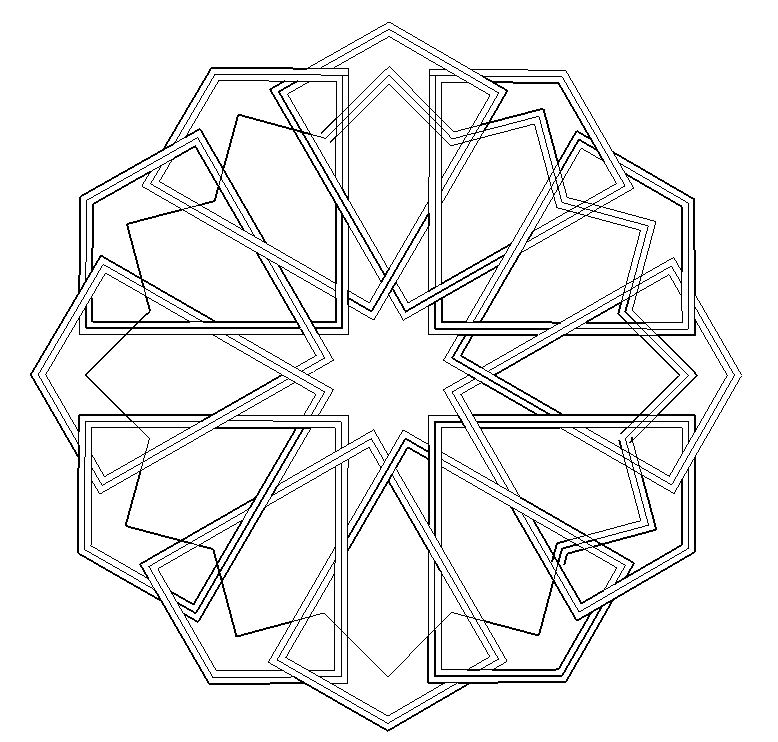
I think I still don't understand what makes a line thick or thin by default (I'm not employing any special settings). I get the basic principle that a line with a "loose" end will be thick, and will become thin - ie become a proper edge - when it is part of a completed polygon.
In the current case, I'm only doing a two-dimensional diagram, so viewpoint aspects of thick and thin shouldn't be relevant. I have a standard model called 2D canvas, which is just a white rectangle. I draw everything 2D on that surface, avoiding (I hope) any non-coplanar lines.
But lines still turn up thick when I think they should be thin and areas are not properly enclosed as faces, allowing colouring. Attempts to colour some of the apparently enclosed areas which have thick-line boundaries result in the colour leaking out over the whole canvas.
Assiduous erasing and redrawing of lines sometimes succeeds in making them thin when they were previously thick, but this doesn't always work.
What am I doing wrong or failing to understand and how do I ensure all lines are thin and all areas properly enclosed?
I append a screen-grab of the incomplete drawing. If my mistakes are not obvious from that, I will upload the model.
Thanks in advance.