I just ran into the same problem by myself.
Thanks for explanation.
Oops, your profile's looking a bit empty! To help us tailor your experience, please fill in key details like your SketchUp version, skill level, operating system, and more. Update and save your info on your profile page today!
Urasik Extensions | Lots of new extensions to check out Learn More
B
Offline
Posts
-
RE: Problem about ruby searching path in sketchup
-
RE: AVI format animation with PNG files
There is tiny open source project, that does exactly what you are looking for:
-
RE: Upgrading plugins to Ruby 2.0 for SketchUp 2014
@unknownuser said:
SketchUp is still 32bit.
What a pity, I thought this version is 64bit already
 .
.
There is still no possibility to load 64bit's dlls.@unknownuser said:
The error you are getting is from the Win32API module. Seems to not like it that you feed it integer. It's expecting strings. Maybe you'll get some hints if you dig into Win32API.rb at the line number that raised the error. This Win32API compatibility shim might not be 100% compatible with the old Ruby 1.8. I'm not sure how much it changed between Ruby 1.8 and Ruby 2.0.
Thank you, you put my thoughts into right direction.
changing
BRrender = Win32API.new(mydll,"RenderScene",["P","P","I","I","I"],"I")
into
BRrender = Win32API.new(mydll,"RenderScene",["I","P","I","I","I"],"I")solves the problem.
Looks like "P" is char* now, and "I" can be int or void*... -
RE: Upgrading plugins to Ruby 2.0 for SketchUp 2014
Win32API.so seems to no longer works on SU2014, instead we should use build in Win32API.rb.
When passing
Sketchup.active_model.skpdoc
pointer,
I've got error:Error: #<TypeError: no implicit conversion of Fixnum into String>
C:/Program Files (x86)/SketchUp/SketchUp 2014/Tools/RubyStdLib/Win32API.rb:23:inpack' C:/Program Files (x86)/SketchUp/SketchUp 2014/Tools/RubyStdLib/Win32API.rb:23:inblock in call'
C:/Program Files (x86)/SketchUp/SketchUp 2014/Tools/RubyStdLib/Win32API.rb:22:ineach' C:/Program Files (x86)/SketchUp/SketchUp 2014/Tools/RubyStdLib/Win32API.rb:22:ineach_with_index'
C:/Program Files (x86)/SketchUp/SketchUp 2014/Tools/RubyStdLib/Win32API.rb:22:incall' C:/Users/l/AppData/Roaming/SketchUp/SketchUp 2014/SketchUp/Plugins/BrighterSU/BrighterSU.rb:68:inmydll_render'
C:/Users/l/AppData/Roaming/SketchUp/SketchUp 2014/SketchUp/Plugins/BrighterSU/BrighterSU.rb:248:inblock in InitToolbar' -e:1:incall'funciton definition:
BRrender = Win32API.new(mydll,"RenderScene",["P","P","I","I","I"],"I")function call:
BRrender.call(Sketchup.active_model.skpdoc,Sketchup.active_model.path,width.to_i,height.to_i,nFromSett.to_i)Is it because of SU 64bit version?
Does anyone have similar problem or anyone succeed to pass
Sketchup.active_model.skpdoc pointer into c++ dll with SU2014? -
RE: Brighter3D Update 1.08
Not bad, but I would place this table in some environment...
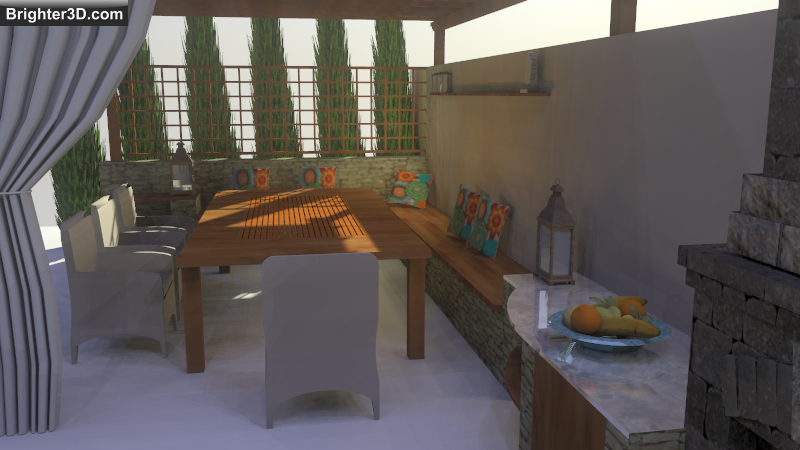
-
Cleanup on SketchUp close problem
Hi all,
I am calling function from ruby that creates modal fltk window from c++ plugin dll (which is not true modal in Sketchup),
and I am making SketchUp window its parent.
Window is shown as long as user close it by close/apply button (or esc key).When SketchUp closes, I would like to clearly close that window.
I added onQuit() function from Sketchup::AppObserver that calls code to close the window.
It works, but the problem is after close it returns value to the original ruby function call,
and it seems not longer exist at this moment.it locks on ntdll.dll!KiFastSystemCallRet()
And Sketchup does not close.Does any of you had similar problem?
Maybe it is possible to create true modal window with Sketchup as a parent window?If I use exit(0) at the end it closes, but it is not very clean solution...