sketchucation logo sketchucation
    • Login
    1. Home
    2. Anton_S
    3. Posts
    Oops, your profile's looking a bit empty! To help us tailor your experience, please fill in key details like your SketchUp version, skill level, operating system, and more. Update and save your info on your profile page today!
    ⚠️ Important | Libfredo 15.6b introduces important bugfixes for Fredo's Extensions Update
    A
    Offline
    • Profile
    • Following 0
    • Followers 7
    • Topics 52
    • Posts 1,261
    • Groups 2

    Posts

    Recent Best Controversial
    • RE: [Plugin] FullScreen v5.1.3 (25 April 2024)

      updated february 10th, 2012
      Now works on windows 7 too!!! Well, read the 1st post for an info. πŸ˜‰

      Thankyou, for your replies and comments!!! They really improved the plugin plus my English. πŸ˜„
      Somehow, therefore, I don't strugle at the english essays anymore... ❗ 😍

      posted in Plugins
      A
      Anton_S
    • RE: [Plugin] FullScreen v5.1.3 (25 April 2024)

      @unclex said:

      WellDone

      Win7X86Pro
      Su8.0.11Pro

      except Toolbar, all worked

      and i can not dare try the Menu Option, if i close it, how reopen it ??

      The toolbars option is to hide toolbars that are not embedded into SU controll bar, meaning the onece that have a border and caption. They should work.

      And yes, hide menu option is just for fun, There is no way of unhidding it through shortcut pereferences. Though you could set a timer or call a command to unhide it. Just read throuh posts and you'll figure it out.

      Have you checked if show/hide "controll bars" work when SU is maximized or full_screen? If didn't, then can you please check that and reply.

      posted in Plugins
      A
      Anton_S
    • RE: [Plugin] FullScreen v5.1.3 (25 April 2024)

      @unclex said:

      updated
      @ SU8.0.11
      @ win7 pro patched 4GB

      Is it 32 or 64 bit processor?

      posted in Plugins
      A
      Anton_S
    • RE: [Plugin] FullScreen v5.1.3 (25 April 2024)

      @unclex said:

      only fullscreen can work"

      Is that about the updated or the first version?

      posted in Plugins
      A
      Anton_S
    • RE: [Plugin] FullScreen v5.1.3 (25 April 2024)

      @guanjin said:

      Great, my Windows XP
      There is a problem, set the shortcut key to display the menu bar is invalid πŸ˜’ πŸ˜’
      [attachment=0:28de3p4w]<!-- ia0 -->66666666666666.gif<!-- ia0 -->[/attachment:28de3p4w]

      Yes, it should be invalid!!! Wanna know why? Well, I explained it a bit on first post. Its just the way of how shortcut pereferences works. Shortcut Pereferences script tends to select the menu bar items once the shortcut key is pressed. But, When the menu it self is no more there, Sketchup can no longer select the items. What's weird is that once u hide the menu bar other shortcuts that were set by sketchup (Ex: "s" - scale, "p" - push) work, but once u click the shortcut that belong to "show menu bar," all shortcuts stop working. Show/hide menu bar was just for fun, so yeah don't use it. Though, I'll try to fix that issue too.

      posted in Plugins
      A
      Anton_S
    • RE: [Plugin] FullScreen v5.1.3 (25 April 2024)

      @aerilius said:

      I've created an animated gif of how it looks:
      [attachment=0:1u31tebe]<!-- ia0 -->window styles.gif<!-- ia0 -->[/attachment:1u31tebe]

      Aerilius, thankyou really much!!! πŸ˜„ I'm just too lazy to add description myself.

      posted in Plugins
      A
      Anton_S
    • RE: [Plugin] FullScreen v5.1.3 (25 April 2024)

      @anton_s said:

      use set_validation_proc and let it ask every frame whatever the status_bar is hidden or not. I could make it like that, thought it will slow down sketchup

      Have to take my thought back. I thought that set_validation_proc updates every frame, but it only updates once you entered the submenu that contains that item. So, yes I'll modify it to be toggled, including make it work on windows 7 64 bit.

      Thankyou for your replies!! They make me πŸ˜„

      posted in Plugins
      A
      Anton_S
    • RE: [Plugin] FullScreen v5.1.3 (25 April 2024)

      @gaieus said:

      There is already a menu item under Window > "Hide dialogs/Show dialogs" - so your "Child windows" option here is a redundant duplicate.

      No, its not. The "hide dialogs" hides windows such as entity info, model info, soften smooth edges, but doesn't hides ruby console, photo textures, component options, and other child windows with a certain class that could be hidden.

      @gaieus said:

      Would there be a possibility to (instead of having a separate menu item to show and display the different elements) toggle them on/off? This would also allow to assign a single shortcut instead of two, different ones.

      It depends. Lets, say we have a "status_bar" option toggled. Checked: visible and Unchecked: hidden. And something happens: The user hides the status_bar using the other script. How would "status_bar" option know whatever it should be checked or unchecked? - Well, use set_validation_proc and let it ask every frame whatever the status_bar is hidden or not. I could make it like that, thought it will slow down sketchup:
      @dan said:

      Menu.set_validation_proc
      Arguments:

      menu_id: The id of a menu item on this menu. (The id is returned from the add_item method.)
      block_proc: a block or proc object that will be invoked by Sketchup went it redraws the UI. (Complex conditionals and calling many other methods can slow down Sketchup!)

      I could make it toggable, but its ur option: yes or no πŸ˜„

      posted in Plugins
      A
      Anton_S
    • RE: [Plugin] FullScreen v5.1.3 (25 April 2024)

      @unknownuser said:

      Doesn't work on my Win7 64bit. Only Child Windows will toggle. I got toolbar chaos on install.

      Nice concept though πŸ‘

      Yes, I knew it didn't work on win7 64 bit... Tested on my brothers laptop. I'm gonna mess with his laptop for a while and figure out a way.

      posted in Plugins
      A
      Anton_S
    • [Plugin] FullScreen v5.1.3 (25 April 2024)

      Showcase
      New UI based on React and Material UI with light and dark themes.
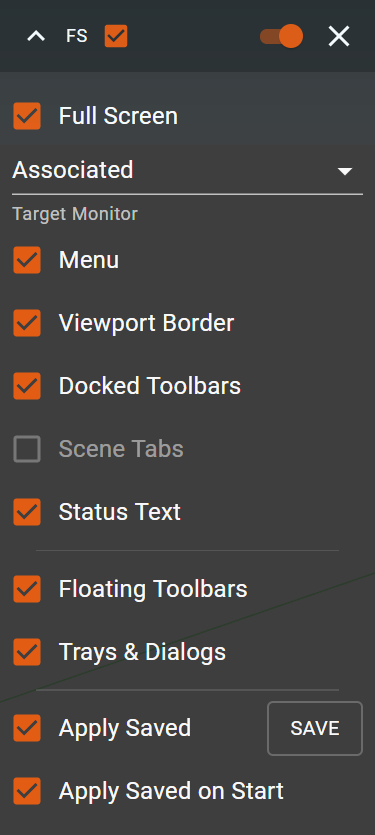
      Dark theme
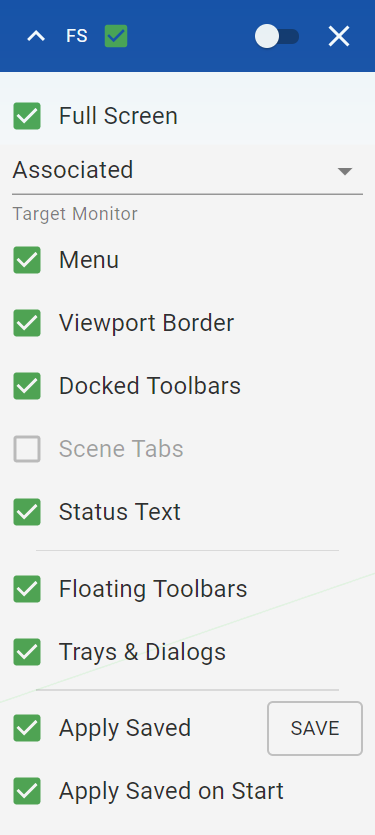
      Light theme

      Features

      • Click-and-drag UI by caption
      • Expand/collapse by clicking the caret at the upper-left corner
      • Snap UI to the edges of the viewport window (e.g by dragging to one of the view border)
      • Fade and unfade effects. If no cursor is present in the UI, the UI fades out - becomes semi-transparent.
      • Switching full screen now has 3 modes:
        • Primary: set full screen on main monitor
        • Associated: set full screen on the monitor the sketchup window is associated with
        • All: set full screen on all monitors by computing the bounding box all monitors and using that box as the new dimensions of the window.

      Requirements

      • SU2016 - SU2024 (tested on SU2024) Note: on SU2023 and later, the features are limited because SketchUp changed to a new, Qt-based framework, which I cannot hack
      • Windows operating system only! This will not work with Mac OS X.

      Download
      FullScreen can be installed via the SketchUcationTools extension or manually, from Plugin Store.

      You can also download at Google Drive

      posted in Plugins
      A
      Anton_S
    • RE: Win32API or DL library usage?

      Well you have to copy the win32API.so to plugins, or requre it by full path.

      posted in Developers' Forum
      A
      Anton_S
    • RE: Sketchup View origin

      @dan rathbun said:

      EVERYTHING you see on the screen, in Microsoft Windows, IS a window. A button, an edit box, a static text label, a checkbox, ... ALL of them are a window, but their style does not have a resizable frame or a caption bar, like a application window or a dialog (which are also a window.)

      You have to get the handle for the Sketchup Application window (the parent window,) then use that in
      view_window_handle = FindWindowEx.call(parent_window_handle,0,"AfxFrameOrView80u",0)

      Thank you really much!!!, That should help!!!! πŸ˜„

      posted in Developers' Forum
      A
      Anton_S
    • RE: Sketchup View origin

      Rightnow, I get the hwnd to viewport like that:

      MyTool
        def onMouseEnter(view)
          p = 0.chr*8
          GetCursorPos.call(p)
          cp = p.unpack('ll')
          @viewport_hwnd = GetWindowFromPoint.call(cp[0], cp[1])
          rect = 0.chr*16
          GetWindowRect.call(@viewport_hwnd, rect)
          @viewport_rect = rect.unpack("l*")
        end
      end
      
      Sketchup.active_model.select_tool(MyTool.new)
      

      Not a good way. I would only be able to get vieport handle, once mouse enters the view.

      posted in Developers' Forum
      A
      Anton_S
    • RE: Sketchup View origin

      @dan rathbun said:

      Use the info to find the view window. Once you have it's handle, you can request it's position on the screen.

      Sketchup View is not a Window. I tried getting its handle by using function FindWindow.call(className, 0) but got 0. Then tried testing on toolbar dialogs. When toolbar was a child window (or not embeded into SU), I could get its handle, but when it was embedded into SU, FindWindow function returned 0. So, the FindWindow function doesn't works at finding handles to the panels, or 'ControllType.Pane'

      posted in Developers' Forum
      A
      Anton_S
    • RE: Sketchup View origin

      @driven said:

      This script, by Matthew Scarpino, [written initially for PC's] gives the true design window on my mac.

      On Windows view.corner always return's the corners relative to view origin.
      So, view.corner(0) always return's [0,0], view.corner(1)[0] gives the view.width, view.corner(2)[1] return's the height. View.center returns [width/2, height/2]. From these, there is no way of knowing the Sketchup view origin relative to actual, screen coords.

      What I wan't is the Windows API or some other Function(s) that would give me the hwnd to Sketchup viewport. The Windows API Function FindWindow only works at finding the handles to the windows. It can't find the handle to a panel, button, icon or other stuff, but only to a window. Since viewport is a panel, FindWindow function wouldn't be able to get its handle.

      If I got the handle to viewport, I could then use GetWindowRect(hwnd, rect) method to get 1st and last corners of viewport in actual screen coordinates.

      posted in Developers' Forum
      A
      Anton_S
    • RE: Sketchup View origin

      @dan rathbun said:

      Viewport:

      classname : "AfxFrameOrView80u"
      ControlType : "ControlType.Pane"
      LocalizedControlType: "pane"
      Name: ""
      AutomationId: "59648"

      Really interesting, what do i do with that?

      posted in Developers' Forum
      A
      Anton_S
    • RE: Sketchup View origin

      http://www.filesanywhere.com/FS/M.aspx?v=8a6d688f5a9aa7a6aa9e

      I want to get the origin of view, relative to screen coordinates

      posted in Developers' Forum
      A
      Anton_S
    • Sketchup View origin

      Is there a way to get Sketchup View origin relative to screen coords, through win32-api? I was searching through a bunch of functions and couldn't find it. The only good one I found was getting the origin of SU ClientArea, but not the view origin.

      posted in Developers' Forum
      A
      Anton_S
    • RE: Need to add keyboard shortcuts to Scenes

      Perhaps, there is the way to set the keyboard shortcuts to scenes and prevent the user from interfering with sketchup model, but it will require the user to have Sketchup on windows operating system, and Input Procedure plugin. Input Proc can block the mouse and keyboard messages from interfering with SU and still get their input. You could make the hook proc turn on as soon as the user opens your presentation model. You could set keys 1 - 9 or/and a -z for shortcuts and key escape to turn off the model. But again it requires Windows Operating System, Sketchup, inputproc plugin, and your own script plugin that would turn on the hook once your presentarion file is being open. I could easily write a script for that, you'd just have to fill in the names of scenes and the name of your skp presentation file.

      posted in Developers' Forum
      A
      Anton_S
    • RE: Need to add keyboard shortcuts to Scenes

      @kesian said:

      Because Sketchup will be run through another presentation software package, the user will not have access to menu or mouse click

      Need some details:

      Through what presentation software do you want to run the Sketchup?

      I know that some presentation softwares like Power Point, allow to import videos, pictures, and sounds, but how can it be possible to run SU through presentation software? Or are you talking about the different one, the one that monitors your monitor and that allows you to highligt, point, and do other stuff?

      If its about the second one, then I have some ideas, and only If its the windows operating system you'll be presenting on.

      posted in Developers' Forum
      A
      Anton_S
    • 1 / 1