sketchucation logo sketchucation
    • Login
    1. Home
    2. Anton_S
    3. Posts
    Oops, your profile's looking a bit empty! To help us tailor your experience, please fill in key details like your SketchUp version, skill level, operating system, and more. Update and save your info on your profile page today!
    🔌 Smart Spline | Fluid way to handle splines for furniture design and complex structures. Download
    A
    Offline
    • Profile
    • Following 0
    • Followers 7
    • Topics 52
    • Posts 1,261
    • Groups 2

    Posts

    Recent Best Controversial
    • RE: MSPhysics 1.0.3 (16 October 2017)

      @wolfy_71 said:

      I'm really enjoying MSPhysics plug-in and have been following Sam Ketner's very insightful tutorials on Youtube. I'm wondering if there is a manual easily available, so I can bone up on some more stuff. More pressingly, I'm wondering how to attach one hinge with a bar (which appears to be in a fixed point) on a bar attached to another hinge... so that it is freely movable. I'm trying to draw an umbrella-like hinge at the moment and I'm stuck.

      To create movable hinges, you have to create them within the context of a desired parent group/component. Then connect it to the desired child group/component (using the MSPhysics Joint Connection Tool). That way the parent group will move and the connected child group will move relative to the parent group, while rotating around the hinge axis, which will also be relative to the parent group.
      posted in Plugins
      A
      Anton_S
    • RE: MSPhysics 1.0.3 (16 October 2017)

      @ecati said:

      I made this file by taking advantage of the Planned Steps.skp file you have prepared. I want the movement to begin when the space key is pressed and continue and stop until the space key is pressed again.

      This command will be available in MSPhysics 1.0.0. Basically you will utilize the toggle_key('space') command. It will be released soon.

      posted in Plugins
      A
      Anton_S
    • RE: MSPhysics 1.0.3 (16 October 2017)

      It depends on how complex you want the controller to be. The simplest one is the slider controller. You can generate it by pressing the generate slider button in joint UI. Others are controlling with key, like key('f') as noted in some prior post. You can also write a function of time dirctly into the cpntroller, like: t = world.time; cos(t)*5 There are many controllers you can write without relying on the MSPhysics scripting API.

      posted in Plugins
      A
      Anton_S
    • RE: MSPhysics 1.0.3 (16 October 2017)

      Hello, Ecati,

      For the first one, try setting material thickness of simulation tab, in the MSPhysics UI, to zero. It will improve the behavior by a bit. But because the gears are too small, the collision intersections aren't quite proper. You could increase world scale, say to 40, which should result in an improved behavior, but it will unfortunately result in a crash. I will try to fix that scaling bug before releasing 1.0.0.

      For the second one, you can increase update rate, to say 4, and/or reduce update timestep, to say 1/120. The smaller the update timestep is, the more accurate the simulation is. The smaller update timestep should prevent collisions from deteriorating. Both of the settings can be adjusted through the Simulation tab of the MSPhysics UI dialog. After you do these, increasing the motor speed should have things running properly.

      Nice examples by the way. I'm stunned with your improved MSPhysics skills.

      Regards,
      Anton

      posted in Plugins
      A
      Anton_S
    • RE: MSPhysics 1.0.3 (16 October 2017)

      Oops, the get_normal_matrix should be normal_matrix

      Also, to quote other people, use the double-quote button or put them in quote tags surrounded with square brackets. And posting the whole video on the error isn't necessary either. Just post a message that is reported.

      posted in Plugins
      A
      Anton_S
    • RE: Creating a plaid on a chair - cloth simulator?

      Solo, good idea! lol

      Pixero, ClothWorks sounds nice and actually very accurate. Even though it will also allow simulating soft bodies, such as the torus, the collisions acts as if cloth is wrapped around it. The name is also more informal about what the plugin does, which should also attract more users.

      Jorgensen, it should take 1-3 months to get the first version released. Everything should be easy because most of it is integrating the features of MSPhysics, the other thing is getting a licence system like in Thomthoms SUdb. That, I will need to do more research on.

      Faust, I will never forget MSPhysics. I will always work on it. In fact ClothWorks with its simplicity, will allow experienced users to get a grip of how MSPhysics works and transition to it MSPhysics for more possibilities.

      posted in SketchUp Discussions
      A
      Anton_S
    • RE: Creating a plaid on a chair - cloth simulator?

      Thank you all for your suggestions! Now suggestions for the name of the plugin and some upfront ideas would be great.

      Right now I'm thinking of naming it, SoftWorks.

      The plugin will have a UI for controlling the selected deformable groups' mass, stiffness and linear/angular acceleration/damper.

      There will also be a toolbar.

      One toolbar button will allow dropping/simulating the selected or all the deformable bodies until a stop button is pressed, which will freeze​ all/selected in place.

      Another button will allow resetting the original placement of all/selected bodies.

      And another button will allow toggling the UI.

      Another two will allow adding Fixed and Slider constraints in places. The touching cloth will automatically will be connected to the constraints.

      As for the back ground, all other non-ignored visible groups/components will act as static/movable solid bodies.

      There will also be options for exporting animations.

      These are the ideas for now. Suggestions that will guide me in the right way would be nice.

      Thanks!

      posted in SketchUp Discussions
      A
      Anton_S
    • RE: Creating a plaid on a chair - cloth simulator?

      Yes, Jorgensen,

      The resolution is dependent on the number of vertices of your cloth or any other deformable mesh. If you have a plane made up of many vertices, the the number of bending vertices will be as much. Before getting it fully working, I need to make the faces in between the vertices to be collidable as well. That way things in between, such as the edges of the table shown in the video, won't intersect the cloth. I also need to make different constraints for the nodes that will allow the deformable mesh to stretch and unbend, such as for making a tire, a gummybear, or a sofa, or anything squishy.

      I'm still trying to decide whether to include it in the upcoming release of MSPhysics or write a new plugin that will specifically focus on soft body simulations.

      Regards,
      Anton

      posted in SketchUp Discussions
      A
      Anton_S
    • RE: Creating a plaid on a chair - cloth simulator?

      Here is the proof!

      I intend of writing a new plugin for this kind of stuff.

      posted in SketchUp Discussions
      A
      Anton_S
    • RE: MSPhysics 1.0.3 (16 October 2017)

      Okay, faust.

      Your script for connecting bodies attempts to connnect multiple bodies to the same joint. That's how it is in the user interface of MSPhysics, but behind the scenes a new joint instance is added for each constraint. So here is the script to have:

      onTick {
        if frame == 1
          this.touching_bodies(true).each { |body|
            next if body.group.name != 'capsule'
            joint = MSPhysics;;BallAndSocket.new(this.world, this, this.get_matrix, this.group)
            joint.connect(body)
          }
        end
      }
      

      Paste it into one knot, and assign it to all knots, using the Assign Script to All With Name button.

      That said, this is a very inefficient way of creating cloth, not to mention that you also have to create faces and then reposition vertices and map the UVs of textures (if any).

      I already got my own, more efficient, version of cloth working, like 3 years ago. But it's not perfect. Here is the demo updated and refined for the current version of MSPhysics:

      posted in Plugins
      A
      Anton_S
    • RE: MSPhysics 1.0.3 (16 October 2017)

      Faust, I will ckeck out that cloth thingy soon.

      posted in Plugins
      A
      Anton_S
    • RE: MSPhysics 1.0.3 (16 October 2017)

      Hello, Nicolas,

      To get local velocity, along the body's Y-axis, you got to transform the global velocity relative to the body first, then get the Y component:

      loc_vel = this.get_velocity.transform(this.get_normal_matrix.inverse)
      vy = loc_vel.y
      

      Regards,
      Anton

      posted in Plugins
      A
      Anton_S
    • RE: MSPhysics 1.0.3 (16 October 2017)

      Hello, Martin,

      @ballbearing said:

      I got the worm gear to do it's work quite nicely (MSPhysics & Sketchy). Just making the collision mesh groups is time consuming. I wonder if there exist possibility for something like in Blender & mesh collision option? The collision frame is not so super exact...

      Those images show it in SketchyPhysics, but it will work the same in MSPhysics.
      So, another way of doing it (in MSPhysics) is by using geared joints:

      1. Set both gears to non-collidable and remove all original joints connecting the gears.
      2. Add a Piston joint at the location and in the direction of the wormgear and connect it to the wormgear (using the Joint Connection Tool).
      3. Add a Hinge joint at the center and in the normal direction of the gear and connect it to the gear.
      4. Using the Joint Connection Tool, connect Piston joint to the Hinge joint to create a geared joint.
      5. Adjust the gear ratio of the piston-to-hinge gear using the MSPhysics UI.
        Make sure you're using MSPhysics toolbars for doing all that...

      Regards,
      Anton

      posted in Plugins
      A
      Anton_S
    • RE: MSPhysics 1.0.3 (16 October 2017)

      Hi, Ecati,

      @ecati said:

      I do not want to bother you with such simple questions. But I have not found a tutorial that will answer my questions. If I'm not wrong, you're preparing a tutorial, are not you?

      I first need release version 1.0.0. Then I will transition to making tutorials. The tutorials is a bold part on my TODO list.

      @ecati said:

      Now, how can I bring the green piston into its original position with a spring after it is pulled out?

      You can't have the green thing be connected to a piston and the spring at the same time. You can simply tell the piston to move back to its original position by dragging its associated slider controller to its original position. You can as well change the controller of the piston joint to do it with a click of a key, such as key('f') * 5, so that it moves 5 preset units (millemeters in your case) when key F is held down and back to initial location when the key is released. You can add a negative sign to 5 or in front of the controller for it to move in the opposite direction.

      @ecati said:

      Collision problem.
      When the first part is moved, it enters into the second part and the third part escapes from the center. How is this prevented?

      There must be something in the way. Here is a few potential causes to this:

      1. Part2 is connected to multiple joints, such as the hinge and the piston. It must be connected to just the hinge.
      2. Either part2 is pushed out by part3 (if the hinge is not inside part3 or part3 state is not set to non-collidable). Either move hinge inside part3 and set it static or set part3 non-collidable so it doesn't push out part2.
      3. Another collision outside the shown view is stopping part2.
        There could be many reasons. I won't know until I inspect the actual model myself, but the actual cause may very likely denote one of the provided potential causes above.

      Regards,
      Anton

      posted in Plugins
      A
      Anton_S
    • RE: Creating a plaid on a chair - cloth simulator?

      Actually this can be done with MSPhysics. All this does is creates a bunch of speres linked by BallAndSocket joints. Then it uses a script to move cloth vertices to new position. This is artificial cloth and has its downsides, primarily the performance. But I can modify that small script for compatibility with MSPhysics.

      posted in SketchUp Discussions
      A
      Anton_S
    • RE: MSPhysics 1.0.3 (16 October 2017)

      Hello, Ecati,

      To rotate everything with the servo joint, you have to move the two hinges and the piston inside the yellow, main body group. That way the hinges and the piston will have a parent body, which will allow them to move relative to it. Also, convex decomposition is not necessary there. When a joint, with a specific parent, is connected to a child body, the child body is by default set to be non-collideable with the parent body.

      Here is how your model should ultimately be:
      makine.skp

      Regards,
      Anton

      posted in Plugins
      A
      Anton_S
    • RE: MSPhysics 1.0.3 (16 October 2017)

      Hi, Faust,

      @faust07 said:

      A little issue in "Export Replay To SkIndigo" (MSPhysics 1.0.0.WIP7) - some components of the scene disappear during and after the export process.
      They are not deleted, but optically hidden and re-emerge only after the zoom out or the scene change

      This is probably due to some groups falling too far away from the camera. There may be an object that falls through the floor into infinity. If you search for a falling object, you may very likely find it.

      @faust07 said:

      What is the progress of the final version 1.0.0 of MSPhysics?

      I'm currently improving the algorithm of CurvySlider joint for a more optimal behavior with looped curves. I also need to figure out why long cylindrical rods go crazy when interacting with buoyancy or simply applied an irregular torque. This could be the issue of the physics engine, but I need to verify it before reporting it there. Then, I can't seem to get around on improving the functionality of geared joints with parent bodies. I need to rethink the approach on utilizing geared joints for making differential and other geared systems. I just need to find time to think on it for a bit so it's simple yet powerful. I might as well lay it of to the post 1.0.0 releases. Either way, I intended to release MSPhysics sometime in the beginning of May. That's the story.

      Regards,
      Anton

      posted in Plugins
      A
      Anton_S
    • RE: MSPhysics 1.0.3 (16 October 2017)

      @kadri_slhn said:

      Burada soru sorabilirbiyim? Yoksa konu mu açmam gerek. Bu site nedir nasıl kullanılır? Özür dilerim.

      Hello, Kadri,

      This site is for posting MSPhysics questions and other stuff. So, if you have a question you can post it here with a sample model.

      Bu site MSPhysics sorularını ve diğer şeyler göndermek içindir. Yani, bir sorunuz varsa burada örnek bir modelle gönderebilirsiniz.

      Regards,
      Anton

      posted in Plugins
      A
      Anton_S
    • RE: MSPhysics 1.0.3 (16 October 2017)

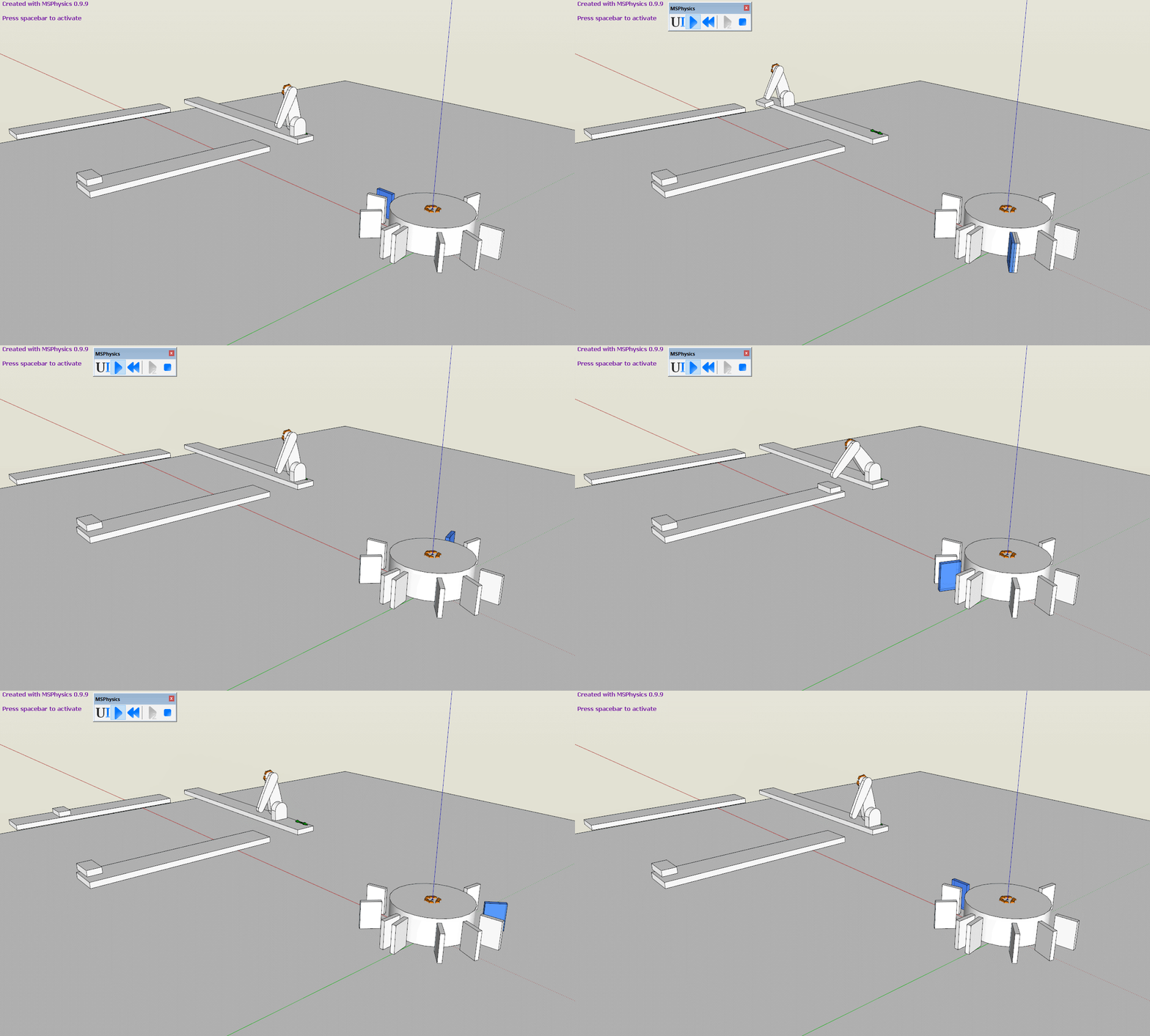
      For that you can use wheel with flaps that will each do a particular task when touched. Here is an example gif:
      Planned Steps.gif

      I might do a tutorial on it later. But basically, you assign onTouch event to each of the flops with its task, such as setting the arm a particular angle.

      The example assembly line model is attached below.
      Planned Steps.skp

      posted in Plugins
      A
      Anton_S
    • RE: MSPhysics 1.0.3 (16 October 2017)

      Yes, the tutorials are quite weak at the moment. I will focus on tutorials after version 1.0.0 is released.

      Doors should be the easiest to make. Basically, you attach one Servo joint at where the door's hinge is supposed to be and use the joint connection tool to connect the door to the Servo joint. Then open MSPhysics UI, select the Servo joint, and assign a desired controller to it. To open a door 70 degress with a press of an 's' key, add this command to the controller: key('s') * 70. To open the door with a slider controller, use the "Add Slider Controller" button. You can do other stuff too. I will make a detailed tutorial once I release 1.0.0.

      You may as well watch this tutorial. It's not what you're looking for, but it will enrich your understanding of MSPhysics and controllers: https://www.youtube.com/watch?v=NLeGfJd8aQg

      posted in Plugins
      A
      Anton_S
    • 1 / 1