sketchucation logo sketchucation
    • 登入
    Oops, your profile's looking a bit empty! To help us tailor your experience, please fill in key details like your SketchUp version, skill level, operating system, and more. Update and save your info on your profile page today!
    🔌 Smart Spline | Fluid way to handle splines for furniture design and complex structures. Download

    Creating seamless textures

    已排程 已置頂 已鎖定 已移動 SketchUp Components, Materials & Styles
    sketchup
    28 貼文 12 Posters 6.6k 瀏覽 12 Watching
    正在載入更多貼文
    • 從舊到新
    • 從新到舊
    • 最多點贊
    回覆
    • 在新貼文中回覆
    登入後回覆
    此主題已被刪除。只有擁有主題管理權限的使用者可以查看。
    • jujuJ 離線
      juju
      最後由 編輯

      I found this brilliant little standalone app called Seamless Texture Generator. It comes in two flavours, Demo and Pro. The Demo version is pretty much like the Pro version, but can only create textures up to 512 x 512 resolution, Pro version does not have this ailment. It does not create textures from new, you load an image and manipulate it through the program.

      Its easy to use and light weight. Pro version priced at $24.95 (USD). Currently I'm only using the Pro, but might be using it in conjunction with some other texturing apps.

      I am curious though, what size do you (the people who generate textures) make your textures normally?

      Save the Earth, it's the only planet with chocolate.

      1 條回覆 最後回覆 回覆 引用 0
      • soloS 離線
        solo
        最後由 編輯

        Unless I have a focal face with exacting textures in a scene will I exceed 512x512.

        Which makes the demo version just perfect.

        http://www.solos-art.com

        If you see a toilet in your dreams do not use it.

        1 條回覆 最後回覆 回覆 引用 0
        • soloS 離線
          solo
          最後由 編輯

          modelhead,

          I would be interested to see your technique, willing to explain or show me?

          http://www.solos-art.com

          If you see a toilet in your dreams do not use it.

          1 條回覆 最後回覆 回覆 引用 0
          • jujuJ 離線
            juju
            最後由 編輯

            The height and width of the texture is not linked in this app, I've used it to custom (odd) sizes as well.

            Pray-tell your techniques...

            Save the Earth, it's the only planet with chocolate.

            1 條回覆 最後回覆 回覆 引用 0
            • EdsonE 離線
              Edson
              最後由 編輯

              for what it is worth: video #41 at http://go-2-school.com is exactly on tileable and seamless textures. it is worth a look.

              edson mahfuz, architect| porto alegre • brasil
              http://www.mahfuz.arq.br

              1 條回覆 最後回覆 回覆 引用 0
              • J 離線
                Julius
                最後由 編輯

                @unknownuser said:

                I found this brilliant little standalone app called Seamless Texture Generator. It comes in two flavours, Demo and Pro. The Demo version is pretty much like the Pro version, but can only create textures up to 512 x 512 resolution, Pro version does not have this ailment. It does not create textures from new, you load an image and manipulate it through the program.

                Its easy to use and light weight. Pro version priced at $24.95 (USD). Currently I'm only using the Pro, but might be using it in conjunction with some other texturing apps.

                I am curious though, what size do you (the people who generate textures) make your textures normally?

                take a look at this pic: is this an error? i mean, the logo all over the texture...
                i thought the resolution was the only reason for purchasing the pro version, but...

                http://img153.imageshack.us/img153/6023/blablazr4.jpg

                1 條回覆 最後回覆 回覆 引用 0
                • jujuJ 離線
                  juju
                  最後由 編輯

                  I wouldn't know, I have the "Pro" (read purchased) version so I don't have any problems like this.

                  Save the Earth, it's the only planet with chocolate.

                  1 條回覆 最後回覆 回覆 引用 0
                  • soloS 離線
                    solo
                    最後由 編輯

                    http://www.contentparadise.com/us/user/luxology_imagesynth_product_41349

                    This works great, a little pricey you may think, but the saved textures you create after one project would have paid for it.

                    http://www.solos-art.com

                    If you see a toilet in your dreams do not use it.

                    1 條回覆 最後回覆 回覆 引用 0
                    • jujuJ 離線
                      juju
                      最後由 編輯

                      Thanks for the link Pete, it seems like it's available on a discount sale at the moment ($49.99 instead of $99).

                      Save the Earth, it's the only planet with chocolate.

                      1 條回覆 最後回覆 回覆 引用 0
                      • FrederikF 離線
                        Frederik
                        最後由 編輯

                        It might be worth mentioning that it requires Adobe PS CS1...
                        (BTW - I thought that you didn't have Adobe PS, Pete, and used Paint Shop Pro..?? 😕 )

                        Cheers
                        Kim Frederik

                        1 條回覆 最後回覆 回覆 引用 0
                        • P 離線
                          pav_3j
                          最後由 編輯

                          ooh, this thread is awesome, loving the texture mapping at the moment!

                          cheers everyone

                          pav

                          Just won the 'Who is Least Competitive Championships' where trying to win will make you lose. Trying to lose makes you win which makes you lose. Not trying at all makes you lose which makes you win which makes you lose.

                          1 條回覆 最後回覆 回覆 引用 0
                          • J 離線
                            Julius
                            最後由 編輯

                            probably you know how to do this, but for those who don't, take a look here: http://www.brushes.obsidiandawn.com/tutorials/seamless-textures/index.htm a tutorial on how to make seamless textures with photoshop.

                            1 條回覆 最後回覆 回覆 引用 0
                            • soloS 離線
                              solo
                              最後由 編輯

                              Frederick, I do have PS, I just do not use it much if at all as I started off using Corel Draw back in the day and stuck with it due to it's familiarity and ease of use, I bought PS to see if I could get into it and for plugins that are exclusive to it like the above. I use PS only for certain features but my preference and staple product is Paint shop pro.

                              http://www.solos-art.com

                              If you see a toilet in your dreams do not use it.

                              1 條回覆 最後回覆 回覆 引用 0
                              • pilouP 離線
                                pilou
                                最後由 編輯

                                Take a look in the free procedural Genetica Viewer 😉 terrific free prog and very easy size 3000*3000 if you want ☀
                                And this free Wood WorkShop 😉
                                Have seamless tiling texturing 😎

                                Ps A little trick : load the pro version 30 days of Genetica and copy the content folders "Viewer Presets" et "Wgroups" in Genetica Viewer so will have a whole bunch of textures 😒


                                Liquid Metal 2.jpg

                                Frenchy Pilou
                                Is beautiful that please without concept!
                                My Little site :)

                                1 條回覆 最後回覆 回覆 引用 0
                                • urgenU 離線
                                  urgen
                                  最後由 編輯

                                  http://www.filterforge.com/
                                  ...really good resource! 😉 👍

                                  --pupil forever...------

                                  1 條回覆 最後回覆 回覆 引用 0
                                  • EdsonE 離線
                                    Edson
                                    最後由 編輯

                                    @unknownuser said:

                                    Take a look in the free procedural Genetica Viewer 😉 terrific free prog and very easy size 3000*3000 if you want ☀
                                    And this free Wood WorkShop 😉
                                    Have seamless tiling texturing 😎

                                    i have seen that genetica's textures come in a format that i did not know: GTX. would all rendering engines accept it? what about sketchup, would i be able to import one of those textures into it?

                                    edson mahfuz, architect| porto alegre • brasil
                                    http://www.mahfuz.arq.br

                                    1 條回覆 最後回覆 回覆 引用 0
                                    • GaieusG 離線
                                      Gaieus
                                      最後由 編輯

                                      Edson,

                                      You need to work with (tweak) the pre-made materials (gtx files) in the free Genetica viewer and then export to a "standard" image format.

                                      I have actually found most materials there rather unnatural (at least for architectural purposes) and from a bit of distance they seem to tile really badly (not to speak about the nasty moire effect)

                                      Gai...

                                      1 條回覆 最後回覆 回覆 引用 0
                                      • urgenU 離線
                                        urgen
                                        最後由 編輯

                                        ... I sometimes use GENETICA2,5 PRO... It,s specific program intended basically for professionals who make computer games. But periodically I use them successfully enough...it,s some schematic textures 😒 , but they are well color edited 😕 ... very interesting and amusing 😉 ...

                                        http://img505.imageshack.us/img505/1188/01ho5.jpg


                                        346.png

                                        --pupil forever...------

                                        1 條回覆 最後回覆 回覆 引用 0
                                        • pilouP 離線
                                          pilou
                                          最後由 編輯

                                          @unknownuser said:

                                          and from a bit of distance they seem to tile really badly (not to speak about the nasty moire effect)

                                          You have some buttons like "seed" for choice another variations of forms
                                          and other for increase or attenuate the nasty moire effect 😉
                                          and the tiling itself is "perfect"!

                                          @unknownuser said:

                                          Unnatural
                                          maybe it's just procedural 😄
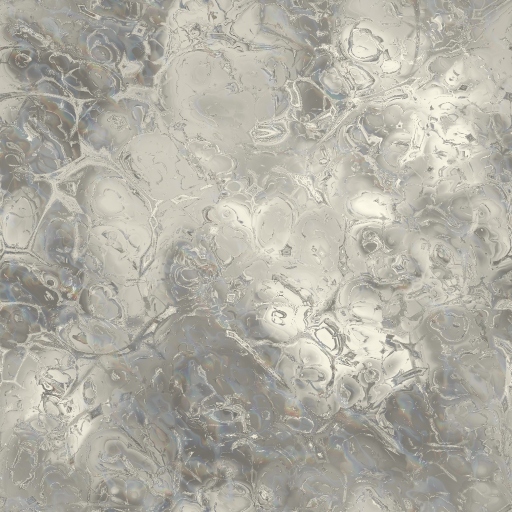

                                          Magnified Frost.jpg


                                          exo.jpg

                                          Frenchy Pilou
                                          Is beautiful that please without concept!
                                          My Little site :)

                                          1 條回覆 最後回覆 回覆 引用 0
                                          • FrederikF 離線
                                            Frederik
                                            最後由 編輯

                                            @solo said:

                                            Frederick, I do have PS

                                            Hi Pete,

                                            It's funny, cause I started the same way you did by using Corel Draw and Paint Shop Pro... 😄
                                            Last year I got a chance to purchase the full Adobe Creative Suite 3 Design Premium but I'm only using fractions of the package 😳 and are still learning a lot about how to use PS... 😄
                                            Paint Shop Pro is still much in use for converting and cropping... 😉

                                            Any way - it's somehow sad that you don't get a provision, cause I've just purchased the Luxology imageSynth from Content Paradise (now that it was on sale, and now that the USD is low...)... 😍

                                            Thanks for the heads up..!! 👍

                                            Cheers
                                            Kim Frederik

                                            1 條回覆 最後回覆 回覆 引用 0
                                            • 1
                                            • 2
                                            • 1 / 2
                                            • 第一個貼文
                                              最後的貼文
                                            Buy SketchPlus
                                            Buy SUbD
                                            Buy WrapR
                                            Buy eBook
                                            Buy Modelur
                                            Buy Vertex Tools
                                            Buy SketchCuisine
                                            Buy FormFonts

                                            Advertisement