sketchucation logo sketchucation
    • 登入
    Oops, your profile's looking a bit empty! To help us tailor your experience, please fill in key details like your SketchUp version, skill level, operating system, and more. Update and save your info on your profile page today!
    🔌 Smart Spline | Fluid way to handle splines for furniture design and complex structures. Download

    [Plugin] Slicer v4.3 20110619

    已排程 已置頂 已鎖定 已移動 Plugins
    102 貼文 20 Posters 142.2k 瀏覽 20 Watching
    正在載入更多貼文
    • 從舊到新
    • 從新到舊
    • 最多點贊
    回覆
    • 在新貼文中回覆
    登入後回覆
    此主題已被刪除。只有擁有主題管理權限的使用者可以查看。
    • C 離線
      Cubcrafter
      最後由 編輯

      Thanks TIG.
      Attached is a quick and dirty sample of what I think you were talking about.

      Larry


      Slicing.skp

      1 條回覆 最後回覆 回覆 引用 0
      • TIGT 離線
        TIG Moderator
        最後由 編輯

        That's about it... but I trust your fuselages are a little more complex! 😉
        Use layers to hide the fuselage [which I hope is grouped/componented] when you no longer need to see it...
        Tip: when you are editing a group/instance you can switch everything else off during an edit - under the menu 'View' - 'Component' Edit - 'Hide Rest of Model' - that makes seeing what you are doing much easier! The fact it's hidden in the edit won't affect the intersecting you might do... 🤓

        TIG

        1 條回覆 最後回覆 回覆 引用 0
        • X 離線
          xrok1
          最後由 編輯

          @tig said:

          @xrok1 said:

          @unknownuser said:

          I have a [privately written and hopefully paid for] 'Slicer v4' that has such lines added etc for CNC work - watch this space.

          hey, are you finally going to make your own and bust that slicemodeler @&&hole

          I have written a paid commercial version [private] - Slicer_v4 - for someone for CNC use etc... it [or some of its ideas] might leak out to you too... 😉

          Did u ever decide to do this? 😛

          “There are three classes of people: those who see. Those who see when they are shown. Those who do not see.”

          http://www.Twilightrender.com try it!

          1 條回覆 最後回覆 回覆 引用 0
          • TIGT 離線
            TIG Moderator
            最後由 編輯

            Yes and no...
            I have two slicer-like commercial projects on... one day when they finish I hope to up date using some of the ideas in them... but don't hold your breath waiting...
            😕

            TIG

            1 條回覆 最後回覆 回覆 引用 0
            • X 離線
              xrok1
              最後由 編輯

              OK. I still appreciate all you do though. 😍

              “There are three classes of people: those who see. Those who see when they are shown. Those who do not see.”

              http://www.Twilightrender.com try it!

              1 條回覆 最後回覆 回覆 引用 0
              • Rich O BrienR 線上
                Rich O Brien Moderator
                最後由 編輯

                I'm waiting....

                http://blog.nutrex.com/wp-content/uploads/2011/08/holding_breath1.jpg

                Download the free D'oh Book for SketchUp 📖

                1 條回覆 最後回覆 回覆 引用 0
                • TIGT 離線
                  TIG Moderator
                  最後由 編輯

                  Exlax...

                  TIG

                  1 條回覆 最後回覆 回覆 引用 0
                  • Rich O BrienR 線上
                    Rich O Brien Moderator
                    最後由 編輯

                    Aaaaaaaaaahhhhhhh 👍

                    Download the free D'oh Book for SketchUp 📖

                    1 條回覆 最後回覆 回覆 引用 0
                    • cottyC 離線
                      cotty
                      最後由 編輯

                      Hi TIG,
                      I have tried the slicer script with a very simple geometry, but there are no flattened slices. Is the choosen geometry the reason for this? Is there an easy way to get the holes in the slices automatically? (SU8 M2 free)
                      Thank you!


                      slicer.jpg

                      my SketchUp gallery

                      1 條回覆 最後回覆 回覆 引用 0
                      • TIGT 離線
                        TIG Moderator
                        最後由 編輯

                        I have no problem with flattened geometry although the central hole needed manual fixing as the rhomboid form messes with the pushpull hole making - I'm unsure of the exact cause at this exact moment...
                        Try lying the group on its side and taking slices on say X or Y axis ?Capture.PNG
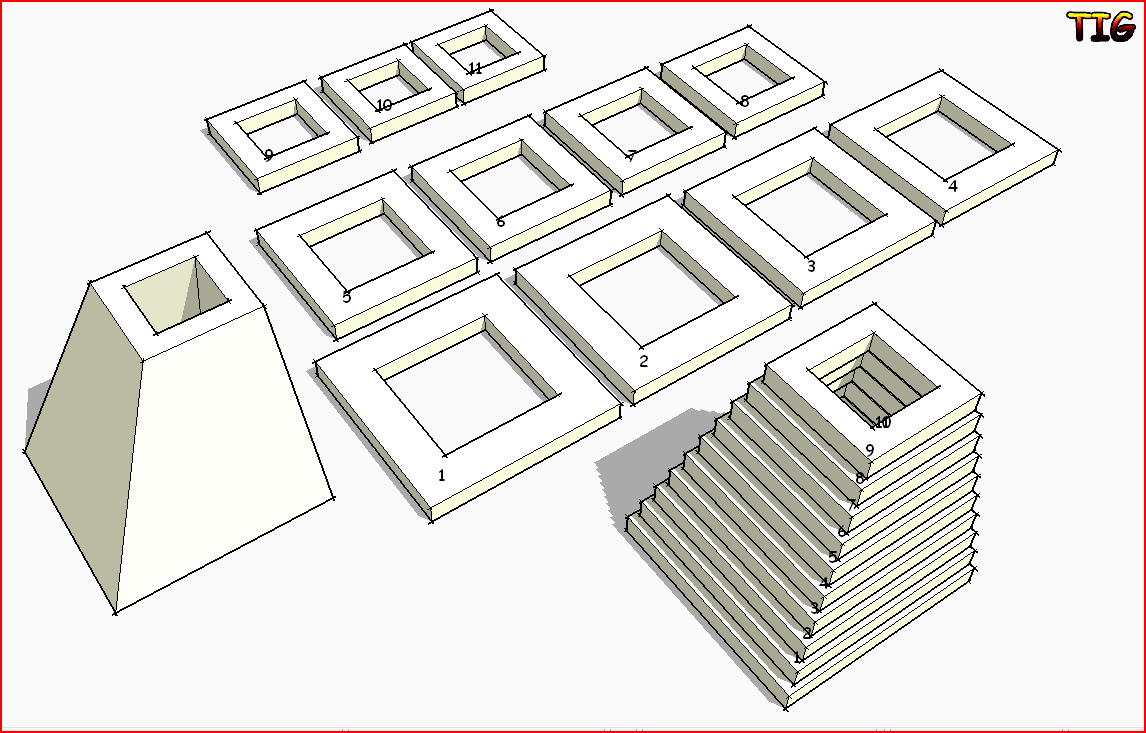
                        TIG

                        1 條回覆 最後回覆 回覆 引用 0
                        • cottyC 離線
                          cotty
                          最後由 編輯

                          I have tried some rotations and slice-directions, but never get a flattened version of the slices. I attached my testmodel.


                          slicer2.jpg


                          slicer_example.zip

                          my SketchUp gallery

                          1 條回覆 最後回覆 回覆 引用 0
                          • TIGT 離線
                            TIG Moderator
                            最後由 編輯

                            I agree it's not working !
                            I can get it to make a flattened set but they are all empty and the original disappears !
                            I thought it might be because you had three copies of the same group, but unique-ing them by editing was no better...
                            This glitch is a new mystery ??
                            I am working on a new 'Slicer5 so watch for that...

                            TIG

                            1 條回覆 最後回覆 回覆 引用 0
                            • cottyC 離線
                              cotty
                              最後由 編輯

                              Thank you for taking a look at this problem. I looked in the ruby console and there is this error shown:
                              Error: #<NoMethodError: undefined method name=' for nil:NilClass> C:/Program Files (x86)/Google/Google SketchUp 8/Plugins/Slicer.rb:575:in calculate'
                              C:/Program Files (x86)/Google/Google SketchUp 8/Plugins/Slicer.rb:992

                              Does it give you a hint to the source of the behaviour?

                              my SketchUp gallery

                              1 條回覆 最後回覆 回覆 引用 0
                              • TIGT 離線
                                TIG Moderator
                                最後由 編輯

                                It's trying to name a non-existent object - presumably a slice it's failed to complete successfully...
                                Oddly I get a failure but no message.

                                Don't despair new/improved v5 is well advanced and will be published soon...

                                TIG

                                1 條回覆 最後回覆 回覆 引用 0
                                • TIGT 離線
                                  TIG Moderator
                                  最後由 編輯

                                  This tool is now superseded by 'Slicer5', available here http://forums.sketchucation.com/viewtopic.php?p=374969#p374969

                                  TIG

                                  1 條回覆 最後回覆 回覆 引用 0
                                  • E 離線
                                    erinbanwell
                                    最後由 編輯

                                    Thanks TIG for an awesome plugin! I am also crashing when I try to make a lot of slices. I am wondering if this is something I could avoid by using a more powerful computer, or if there is just an inherent limit to how much it can slice. Any other tips would be appreciated. Does the geometry of the object make crashing more likely?
                                    Thanks again.

                                    1 條回覆 最後回覆 回覆 引用 0
                                    • TIGT 離線
                                      TIG Moderator
                                      最後由 編輯

                                      Can I suggest that you try the latest Slicer5 version [see the Plugins Index], and not this old one. See you over there in that thread.
                                      When you say 'crashing' do you mean a 'white-out' and not-responding - this a=is a feature seen with many tools requiring intensive calculations - Sketchup IS still processing and will eventually complete.
                                      Tip: Make your slided object a 'solid' as 'leaks' will mean slices not forming properly.

                                      I'm locking this thread [20120129].
                                      You'll still be able to read/download/etc here... BUT no longer able to make posts; as all focus should be on 'Slicer5'
                                      http://forums.sketchucation.com/viewtopic.php?p=374969#p374969

                                      TIG

                                      1 條回覆 最後回覆 回覆 引用 0
                                      • 1
                                      • 2
                                      • 3
                                      • 4
                                      • 5
                                      • 6
                                      • 3 / 6
                                      • 第一個貼文
                                        最後的貼文
                                      Buy SketchPlus
                                      Buy SUbD
                                      Buy WrapR
                                      Buy eBook
                                      Buy Modelur
                                      Buy Vertex Tools
                                      Buy SketchCuisine
                                      Buy FormFonts

                                      Advertisement

