sketchucation logo sketchucation
    • 登入
    Oops, your profile's looking a bit empty! To help us tailor your experience, please fill in key details like your SketchUp version, skill level, operating system, and more. Update and save your info on your profile page today!
    🔌 Smart Spline | Fluid way to handle splines for furniture design and complex structures. Download

    [Plugin] Volume Calculator2...

    已排程 已置頂 已鎖定 已移動 Plugins
    64 貼文 23 Posters 85.3k 瀏覽 23 Watching
    正在載入更多貼文
    • 從舊到新
    • 從新到舊
    • 最多點贊
    回覆
    • 在新貼文中回覆
    登入後回覆
    此主題已被刪除。只有擁有主題管理權限的使用者可以查看。
    • G 離線
      gurkesaft
      最後由 編輯

      Hello again,

      I'm having trouble with volume calculator, and I can reproduce the odd behavior:

      Make a 1"x1" rectangle, push it 1" into a cube, draw a 0.25" circle in the middle and push it to the bottom of the cube to make a hole. Group it, and run volume calculator. It goes wonky! (I'm pretty sure it does this for all through-holes, but I wanted to be sure we're all doing it the same)

      I'm using v2.1 and sketchup free 6. Any ideas?

      Thanks!
      Jack

      1 條回覆 最後回覆 回覆 引用 0
      • pilouP 離線
        pilou
        最後由 編輯

        Simply add it inside the folder Plugins of (Google) Sketchup 😄
        Instructions are in the header of the file: you can read it by a simple text editor (bloc note)

        In this case just after a speedy use : you must create a goupe or a component before
        Clic on this Group or Component and then "Volume" will appear on the "Right clic" 😉

        Seems work like a charm 👍
        This guy is this one 😄


        Brice.jpg

        Frenchy Pilou
        Is beautiful that please without concept!
        My Little site :)

        1 條回覆 最後回覆 回覆 引用 0
        • pilouP 離線
          pilou
          最後由 編輯

          Seems that is the same for all volumes with holes 😐
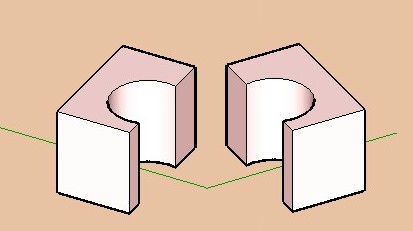
          A solution is to cut the volume in 2 parts and add the volumes results 😉
          Now the calculator works! 😎


          cube.jpg

          Frenchy Pilou
          Is beautiful that please without concept!
          My Little site :)

          1 條回覆 最後回覆 回覆 引用 0
          • W 離線
            watkins
            最後由 編輯

            Dear Gurkesaft,

            Try TIG's version 1.8. It works fine with through holes

            Regards,
            Bob

            1 條回覆 最後回覆 回覆 引用 0
            • S 離線
              svetik
              最後由 編輯

              This is sad- what does v2.1 exist for? 😢

              1 條回覆 最後回覆 回覆 引用 0
              • W 離線
                watkins
                最後由 編輯

                Dear TIG,

                Do you think you might have time to look at your latest, fast version of the volume calculator? I am still using V1.8 as V2.1 seems to fail when challenged with one of my models.

                Kind regards,
                Bob

                1 條回覆 最後回覆 回覆 引用 0
                • TIGT 離線
                  TIG Moderator
                  最後由 編輯

                  V2 was a quicker alternative way of accurately calculating volumes. v2 does it by 'slicing'...

                  Use v1 for more complex shapes (slow)
                  or use v2 for simpler shapes (quicker)

                  • see which suits you best...

                  I currently don't have time to sort out v2 - if anyone else wants to tweak it, please feel free...

                  .

                  TIG

                  1 條回覆 最後回覆 回覆 引用 0
                  • W 離線
                    watkins
                    最後由 編輯

                    Dear TIG,

                    Okay, I will do that. Thanks for the response.

                    Kind regards,
                    Bob

                    1 條回覆 最後回覆 回覆 引用 0
                    • free agentF 離線
                      free agent
                      最後由 編輯

                      is there any way to force a volume, i have a bottle design here and the client needs it to be 500ml and wants to know what the resulting dimensions would be.

                      http:i167.photobucket.comalbumsu143FreeAgent84bug.gif

                      1 條回覆 最後回覆 回覆 引用 0
                      • AdamBA 離線
                        AdamB
                        最後由 編輯

                        @unknownuser said:

                        is there any way to force a volume, i have a bottle design here and the client needs it to be 500ml and wants to know what the resulting dimensions would be.

                        If you know the current volume with the current dimensions, then you'll need to scale the current design by:

                        3√(targetvolume / currentvolume)

                        Adam

                        Developer of LightUp Click for website

                        1 條回覆 最後回覆 回覆 引用 0
                        • free agentF 離線
                          free agent
                          最後由 編輯

                          see a good reason to have payed attension in math class... i'll try

                          http:i167.photobucket.comalbumsu143FreeAgent84bug.gif

                          1 條回覆 最後回覆 回覆 引用 0
                          • thomthomT 離線
                            thomthom
                            最後由 編輯

                            @unknownuser said:

                            see a good reason to have payed attension in math class... i'll try

                            Did you ever say: "I'll naver have use of that!"..?

                            Thomas Thomassen — SketchUp Monkey & Coding addict
                            List of my plugins and link to the CookieWare fund

                            1 條回覆 最後回覆 回覆 引用 0
                            • AdamBA 離線
                              AdamB
                              最後由 編輯

                              BTW Thats "cube root" not "3 times squareroot"

                              Perhaps TIG could be persuaded to add a function to Volume Calc that does this since I can see it must be pretty common to be wanting to get to a target volume.

                              Now if three men take four days to dig.. nevermind..

                              Adam

                              Developer of LightUp Click for website

                              1 條回覆 最後回覆 回覆 引用 0
                              • W 離線
                                watkins
                                最後由 編輯

                                Dear Adamm & TIG,

                                Could the volume calculator be updated so that the newer, faster script doesn't fall over with multiple internal volumes? I am currently using V1.8 as that seems to work well for complicated shapes, but it does take a long time when the precision goes up. Further, while easily calculated by hand (once one knows the volume), could an editable drop-down list of densities be added so that the script works out the mass as an option. Typical densities would be for concrete, steel, wood, water, sand etc.

                                Another option would be to assign materials properties to components (is this possible?), and then to get the script to work on an assembly (such as a wooden cabinet), treating each component separately (volume and mass) returning a table (spreadsheet) of volumes and masses with the total mass. This could be useful in assessing loading, lifting and shipping requirements. The calculations for C of G are very similar to those for volume (slicing the model), so that is yet another option, as is moments of inertia.

                                I'm sure you are both very busy, but I offer these few thoughts for consideration.

                                Regards,
                                Bob

                                1 條回覆 最後回覆 回覆 引用 0
                                • AdamBA 離線
                                  AdamB
                                  最後由 編輯

                                  First off, "Volume Calculator" is TIG's baby not mine!

                                  The analytic method for Volume calc (the fast one) will not give the right answer if you have "open geometry". You can find all open edges by running a script like this (doesn't recurse into groups/components):

                                  def findleaks(ents = Sketchup.active_model.entities)
                                  
                                  	for ent in ents 
                                  		next unless ent.kind_of? Sketchup;;Edge
                                  		
                                  		if ent.faces.length == 1
                                  			Sketchup.active_model.selection.add ent
                                  		end
                                  	end
                                  end
                                  

                                  The problem is there isn't a real simple way of automatically closing those "leaks".

                                  Adam

                                  Developer of LightUp Click for website

                                  1 條回覆 最後回覆 回覆 引用 0
                                  • free agentF 離線
                                    free agent
                                    最後由 編輯

                                    woohoo it worked thanx adamB

                                    http:i167.photobucket.comalbumsu143FreeAgent84bug.gif

                                    1 條回覆 最後回覆 回覆 引用 0
                                    • TIGT 離線
                                      TIG Moderator
                                      最後由 編輯

                                      I'd better jump in here...

                                      I made the early versions of Volume calculate by slicing the selected component or group into pieces and totting up the face-cut areas - like crude 'calculus'... It had levels of accuracy as it takes a while to slice and calculate a lot of faces. Often simple shapes return reasonably accurate volumes with few slices...

                                      Adam suggested a 'clever' way of calculating the volume - it has the advantage of being very fast and accurate but is prone to falling over it the faces aren't complete etc...

                                      That's why there are two versions out there.

                                      I would like to fix the fast version much as you ask. It could also include density and CofG etc: however, I am very busy on other things - I will publish something as soon as I can... but no promises...

                                      If anyone else would like to adopt my 'Volume' code and re-do it please feel free [I did something similar with Mirror.rb a while back - completely rewriting the method, but still gave Frank Wiesner the initial credit for having the original ideas up to 2.5 - now on 3.1 ?]...
                                      .

                                      TIG

                                      1 條回覆 最後回覆 回覆 引用 0
                                      • W 離線
                                        watkins
                                        最後由 編輯

                                        Dear TIG and Adam,

                                        Thank you for taking my request/suggestions seriously.

                                        Regards to you both.

                                        Bob

                                        1 條回覆 最後回覆 回覆 引用 0
                                        • W 離線
                                          watkins
                                          最後由 編輯

                                          Dear TIG,

                                          Do you think you might find a moment to take a look at your volume calculator. As I wrote before, the 'faster' version falls over when applied to a shape with cavities. A faster, working version would be good as then one could use the higher precision without the time overhead.

                                          Other improvements might include:

                                          1. Mass calculation (volume x density), with a editable drop down menu of typical densities (glass, concrete, soil, sand, water, steel, plastic etc)

                                          2. Centre of Gravity

                                          3. Moments of inertia

                                          Kind regards,
                                          Bob

                                          1 條回覆 最後回覆 回覆 引用 0
                                          • P 離線
                                            piyono
                                            最後由 編輯

                                            Sorry to go OT, but I can't seem to get Sketchup 7.1.4871 to recognize the volume plugins. I've dropped them into the /Plugins folder with the rest of my plugins, all the rest of which work fine.

                                            Any ideas?

                                            Piyono

                                            1 條回覆 最後回覆 回覆 引用 0
                                            • 1
                                            • 2
                                            • 3
                                            • 4
                                            • 4 / 4
                                            • 第一個貼文
                                              最後的貼文
                                            Buy SketchPlus
                                            Buy SUbD
                                            Buy WrapR
                                            Buy eBook
                                            Buy Modelur
                                            Buy Vertex Tools
                                            Buy SketchCuisine
                                            Buy FormFonts

                                            Advertisement