sketchucation logo sketchucation
    • Login
    Oops, your profile's looking a bit empty! To help us tailor your experience, please fill in key details like your SketchUp version, skill level, operating system, and more. Update and save your info on your profile page today!
    Mac User? | Join the Rayscaper Beta for Mac Learn More

    Sunflow's exporter

    Scheduled Pinned Locked Moved Plugins
    28 Posts 3 Posters 6.7k Views 3 Watching
    Loading More Posts
    • Oldest to Newest
    • Newest to Oldest
    • Most Votes
    Reply
    • Reply as topic
    Log in to reply
    This topic has been deleted. Only users with topic management privileges can see it.
    • I
      ilay7k
      last edited by

      Thank you, Didier!
      GSU's dev.team, you need to make more "comfortable" functions of UV-mapping!!!

      1 Reply Last reply
      Reply Quote 0
      • I
        ilay7k
        last edited by

        I try to find sunflow render version 07.3 and found it...
        If you haven't, try this http://rapidshare.com/files/44324513/sunflow07_3.zip.html

        1 Reply Last reply
        Reply Quote 0
        • K
          kwistenbiebel
          last edited by

          Hi all,
          I am trying sunflow out on a test model.
          This is the first output I get after pushing 'render' in the Sunflow GUI.
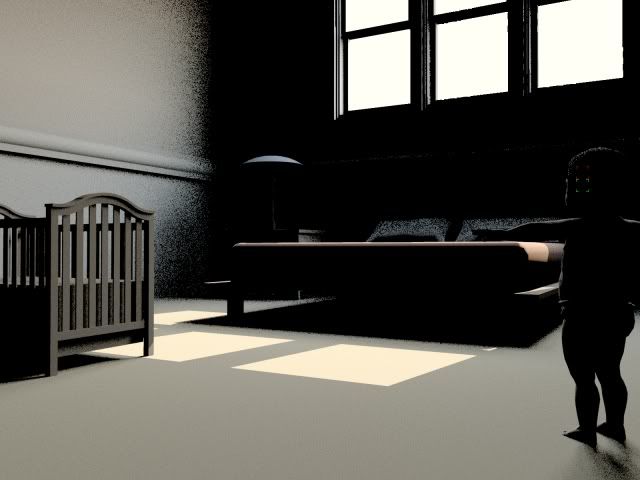
          http://i140.photobucket.com/albums/r3/kwistenbiebel1/testsunflow.jpg

          As you can see, there is direct light but the indirect light needs more bounces/trace depth.
          I tried to find a way to change that but I couldn't find how.
          Searching on Sunflow forum, I found code lines but I can't seem to be able to use the ctrlC+ctrlV (copy-paste) command to enter it in the' script editor' of the Sunflow editor.
          What am I doing wrong.
          Should I be editing the .sc file (it's HUGH !) or instead put code in the 'script' editor.
          Where can I change the presets like resolution, GI settings, etc...?

          I tried reading briefly through the Sunflow forum but couldn't find the answers.
          Could someone give me a hand to get started with this?

          Thanks in advance,
          Kwistenbiebel

          1 Reply Last reply
          Reply Quote 0
          • I
            ilay7k
            last edited by

            @kwistenbiebel said:

            Hi all,
            Should I be editing the .sc file (it's HUGH !) or instead put code in the 'script' editor.
            Where can I change the presets like resolution, GI settings, etc...?

            I tried reading briefly through the Sunflow forum but couldn't find the answers.
            Could someone give me a hand to get started with this?
            Thanks in advance,
            Kwistenbiebel

            Kwistenbiebel look at cornell_box_jensen.sc or julia.sc from examples
            you can download from off.site of sunflow render.

            but need add some modification to lights or mats
            -------julia.sc

            gi { type path samples 16 } 
            
            light {
              type spherical
              color { "sRGB nonlinear" 1 1 .6 }
            radiance 60  <----------for gi
              center -5 7 5
              radius 2
              samples 8
            } 


            from cornell_box_jensen.sc

            trace-depths {
              diff 4
              refl 3
              refr 2
            }
            
            photons {
              caustics 1000000 kd 100 0.5
            }
            
            % uncomment this block and comment the following GI block to switch gi engines
            ............
            ...........
            %% use these to view the effect of the individual gi components
            % override debug_caustics false
            % override debug_globals false
            % override debug_gi false


            and mat-s had

            shader {
              name debug_caustics
              type view-caustics
            }
            
            shader {
              name debug_globals
              type view-global
            }
            
            shader {
              name debug_gi
              type view-irradiance
            }


            1 Reply Last reply
            Reply Quote 0
            • K
              kwistenbiebel
              last edited by

              Thanks Ilay,

              I tried to copy and paste some of those code lines but it produces errors when opening in sunflow.
              Not sure if those lines would just need to be added or they need to replace existing lines.
              My lack of experience in using code lines makes this somewhat too hard 😳 .

              This is the result from a 'default' SU2Sunflow export.(render time ca. 4 minutes 1600X1200 )
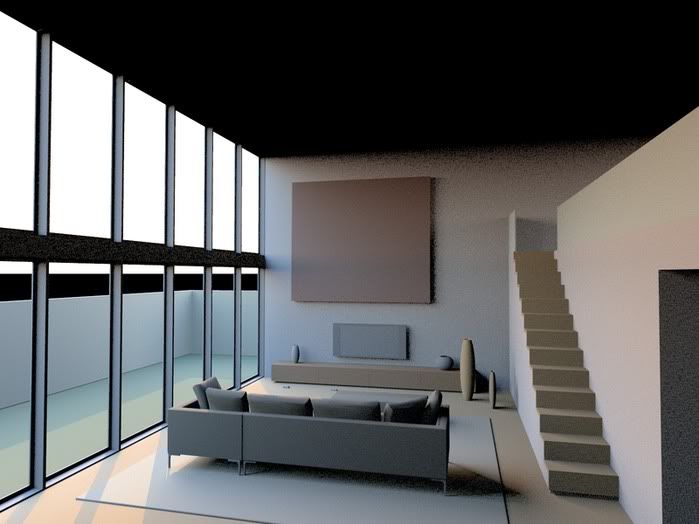
              http://i140.photobucket.com/albums/r3/kwistenbiebel1/test2-1.jpg

              I can see Sunflow has potential when looking at the gallery section.
              Hoping to see a full blown Sketchup plugin soon.

              Regards,
              Kwistenbiebel

              1 Reply Last reply
              Reply Quote 0
              • I
                ilay7k
                last edited by

                Hello Kwistenbiebel!
                I have same errors.
                Nice w.i.p.-render, sunflow has instacing-structure like 3dsmax's proxy and i like it.
                Indigo is alternave to Maxwell render/fryrender
                I think sunflow - vray-killer πŸ˜„)))...too
                PS
                I am from vray4skp-forum too.

                1 Reply Last reply
                Reply Quote 0
                • I
                  ilay7k
                  last edited by

                  Didier i read(fro s~r's forum) about new version of su2sf.
                  Can you share it?

                  1 Reply Last reply
                  Reply Quote 0
                  • Didier BurD
                    Didier Bur
                    last edited by

                    Yes, it will be uploaded here tomorrow (now upload facility on the SF forum 😞 ).
                    Don't expect too much with this one because it is in its early stage of development πŸ˜‰

                    DB

                    1 Reply Last reply
                    Reply Quote 0
                    • I
                      ilay7k
                      last edited by

                      Hello Didier! It's great news.
                      In any case, thank you!
                      ilay

                      1 Reply Last reply
                      Reply Quote 0
                      • Didier BurD
                        Didier Bur
                        last edited by

                        The update is here:
                        http://www.sketchucation.com/forums/scf/viewtopic.php?f=153&t=1514
                        Also available at my site, "Files-Converters-Misc" section.
                        Regards,

                        DB

                        1 Reply Last reply
                        Reply Quote 0
                        • I
                          ilay7k
                          last edited by

                          Thanks a'lot!!!
                          But some errors are appeared...

                          Error; #<TypeError; cannot convert Fixnum into String>
                          su2sf.rb;81;in `+'
                          su2sf.rb;81;in `output_image_settings'
                          su2sf.rb;728;in `export'
                          su2sf.rb;793
                          su2sf.rb;793;in `call'
                          

                          when i change render-settings(Antialiasing).

                          1 Reply Last reply
                          Reply Quote 0
                          • Didier BurD
                            Didier Bur
                            last edited by

                            Fixed (uploaded at the same place) 😳 . Sorry for the inconvenience and thanks for reporting,

                            DB

                            1 Reply Last reply
                            Reply Quote 0
                            • I
                              ilay7k
                              last edited by

                              Didier, thanks for fix!
                              So i try it.
                              sunflow render works fine with outdoor models.
                              But indoor...error appears about sky-light(about photon-emiting)

                              http://www.sketchucation.com/forums/scf/sas/Ruby/variants1.jpg

                              1 Reply Last reply
                              Reply Quote 0
                              • Didier BurD
                                Didier Bur
                                last edited by

                                Path tracing need emitting light to shoot photons (afaik). So when you select "solid color" as background there's no sunsky, thus no light to emit. Same occurs outdoor too.

                                DB

                                1 Reply Last reply
                                Reply Quote 0
                                • I
                                  ilay7k
                                  last edited by

                                  Thank you!
                                  I understand it(outdoor scences are only tests)
                                  I trying to render indoor scences like - http://rapidshare.com/files/45915944/sb1_sf.rar.html
                                  I also try to "play" with different settings of gi-types
                                  For example, i use "standard" ui-setting:

                                  1. render-sett.: res.- 800x600; gi - high; aa- none
                                  2. background sett.: bg type - sky
                                    and when i render and start-up message about "photon mapping enabled, but no globals photons to emit". it's for light-object
                                    Ilay

                                  P.S. maybe some technical questions are asked on official forum?

                                  1 Reply Last reply
                                  Reply Quote 0
                                  • Didier BurD
                                    Didier Bur
                                    last edited by

                                    I suppose that when one is indoor and the sunsky is not visible (no openings to the outside) and when there is no light inside the room, SF considers that there are no photons to emit ?
                                    I'm not familiar enough yet with SF to be sure of that. Maybe you could ask Eugene or fpsunflower at the official forum.
                                    Cheers,

                                    DB

                                    1 Reply Last reply
                                    Reply Quote 0
                                    • I
                                      ilay7k
                                      last edited by

                                      Ok! I ask.
                                      I try to illuminate by one light - "sky+sun" - sky-object(for daylighting)

                                      Ohhh, Didier! What are you think about simulated(artificial) lighting?
                                      maybe it' like materials, only to group = sf-"light.name_group".

                                      Sorry for my bad English, my russian is native.

                                      1 Reply Last reply
                                      Reply Quote 0
                                      • Didier BurD
                                        Didier Bur
                                        last edited by

                                        Artificial lighting will be supported in next release (point light, spot, and so on).

                                        DB

                                        1 Reply Last reply
                                        Reply Quote 0
                                        • I
                                          ilay7k
                                          last edited by

                                          I test AO-settings

                                          http://img411.imageshack.us/img411/7990/testaorj6.th.jpg

                                          1 Reply Last reply
                                          Reply Quote 0
                                          • Didier BurD
                                            Didier Bur
                                            last edited by

                                            Hi all,
                                            When coding the SketchUp2SF plugin, I started to experiment shaders.
                                            These first experiments can be downloaded as a library here:
                                            http://www.crai.archi.fr/RubyLibraryDepot/Ruby/Sunflow/thumb.html

                                            Or go to my site and click on the Sunflow Shaders menu.
                                            Enjoy,

                                            DB

                                            1 Reply Last reply
                                            Reply Quote 0

                                            Hello! It looks like you're interested in this conversation, but you don't have an account yet.

                                            Getting fed up of having to scroll through the same posts each visit? When you register for an account, you'll always come back to exactly where you were before, and choose to be notified of new replies (either via email, or push notification). You'll also be able to save bookmarks and upvote posts to show your appreciation to other community members.

                                            With your input, this post could be even better πŸ’—

                                            Register Login
                                            • 1
                                            • 2
                                            • 1 / 2
                                            • First post
                                              Last post
                                            Buy SketchPlus
                                            Buy SUbD
                                            Buy WrapR
                                            Buy eBook
                                            Buy Modelur
                                            Buy Vertex Tools
                                            Buy SketchCuisine
                                            Buy FormFonts

                                            Advertisement