New: HouseBuilder metric 1.2 (customizable)
-
how can i insert other sections... 16x20cm, 20x24cm 20x28cm... these in program are small for european structure. thank you very much
-
@sketcpeppe75 said:
how can i insert other sections... 16x20cm, 20x24cm 20x28cm... these in program are small for european structure. thank you very much
Look in the subfolder, in the file 'housebuilder_sections.txt' there are the lists of section-types and sizes etc...
Make a copy of that file, edit the file to show the sections you want in the single-line as shown for each of the four types; use the same 'syntax' as the original sizes in 'mm' [aaxbb|aaaxbbb|... etc], test it and if it works with your new custom sizes you've cooking-with-gas; if NOT then you've always got the original version to revert to...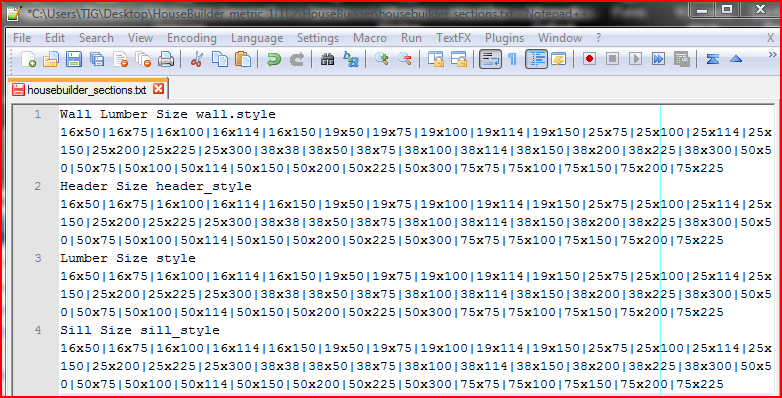
-
@tig said:
@sketcpeppe75 said:
how can i insert other sections... 16x20cm, 20x24cm 20x28cm... these in program are small for european structure. thank you very much
Look in the subfolder, in the file 'housebuilder_sections.txt' there are the lists of section-types and sizes etc...
Make a copy of that file, edit the file to show the sections you want in the single-line as shown for each of the four types; use the same 'syntax' as the original sizes in 'mm' [aaxbb|aaaxbbb|... etc], test it and if it works with your new custom sizes you've cooking-with-gas; if NOT then you've always got the original version to revert to...[attachment=0:36niodui]<!-- ia0 -->Capture.PNG<!-- ia0 -->[/attachment:36niodui]thank you very much TIG
 )
) -
@sketcpeppe75 said:
@tig said:
@sketcpeppe75 said:
how can i insert other sections... 16x20cm, 20x24cm 20x28cm... these in program are small for european structure. thank you very much
Look in the subfolder, in the file 'housebuilder_sections.txt' there are the lists of section-types and sizes etc...
Make a copy of that file, edit the file to show the sections you want in the single-line as shown for each of the four types; use the same 'syntax' as the original sizes in 'mm' [aaxbb|aaaxbbb|... etc], test it and if it works with your new custom sizes you've cooking-with-gas; if NOT then you've always got the original version to revert to...[attachment=0:e0cz8i6k]<!-- ia0 -->Capture.PNG<!-- ia0 -->[/attachment:e0cz8i6k]thank you very much TIG
)I'm using the TIG version of metric 1.2 plugin. I edited the housebuilder_sections.txt file as described but the new values I entered seem to be ignored by the script. They don't show up on the selection menu.
Thanks,
Karl




Advertisement