sketchucation logo sketchucation
    • Login
    Oops, your profile's looking a bit empty! To help us tailor your experience, please fill in key details like your SketchUp version, skill level, operating system, and more. Update and save your info on your profile page today!
    Mac User? | Join the Rayscaper Beta for Mac Learn More

    [Plugin] Align 2d

    Scheduled Pinned Locked Moved Plugins
    21 Posts 8 Posters 31.7k Views 8 Watching
    Loading More Posts
    • Oldest to Newest
    • Newest to Oldest
    • Most Votes
    Reply
    • Reply as topic
    Log in to reply
    This topic has been deleted. Only users with topic management privileges can see it.
    • TIGT
      TIG Moderator
      last edited by

      Thanks Didier, it works OK but sometimes gives an error =

      Error: #<ArgumentError: Cannot convert argument to Sketchup::Point3d>

      referring to the line:

      translate = Geom::Transformation.translation( origin.vector_to( inters_point ) )

      Can't see immediately why ?

      The 'test for selection' doesn't give you the context-menu IF only one object is selected - why have the test for "and ss.length==1" ? Is this connected to the error message ?

      TIG

      1 Reply Last reply
      Reply Quote 0
      • Didier BurD
        Didier Bur
        last edited by

        Thanks for the bug report TIG
        I'll check that soon (and the selection issue as well) 😳

        DB

        1 Reply Last reply
        Reply Quote 0
        • Didier BurD
          Didier Bur
          last edited by

          Bug found: it happens when either the 2 points that define the alignment line or the origin of groups/components are not on the same plane.

          I'm considering to provide an additionnal option to align groups/components axis with the alignment line. Does it make sense or do you think this will be useful ?

          Regards,

          DB

          1 Reply Last reply
          Reply Quote 0
          • Didier BurD
            Didier Bur
            last edited by

            Here is an update with some fixes, thanks to TIG for pointing out.
            All alignments are now done regardless of altitudes of selected groups/components.
            It also checks for impossible alignments, for instance aligning vertically along a line which is parallel to Y axis is not allowed. 😉

            DB

            1 Reply Last reply
            Reply Quote 0
            • Didier BurD
              Didier Bur
              last edited by

              Coen,
              NO, I cannot upload a rb file 😢
              Here is the zip instead 😎


              align_2D.zip

              DB

              1 Reply Last reply
              Reply Quote 0
              • N
                not registered yet
                last edited by

                Hi, Didier and Thanks for the script again !
                Just an idea for improvment - an option, after aligning objects obove the line to place them with uniformly space between them, like we can do in PhotoShop. 😄

                [kaizer_soze]

                1 Reply Last reply
                Reply Quote 0
                • Didier BurD
                  Didier Bur
                  last edited by

                  Hi TIG,
                  I see that you're online now and I've got a small problem:

                  Rotating groups/components work with this attached version EXCEPT with Y match, and I don' know why. Can you have a look at it ?
                  Thanks in advance.


                  align_2D.zip

                  DB

                  1 Reply Last reply
                  Reply Quote 0
                  • TIGT
                    TIG Moderator
                    last edited by

                    Will look and get back to you a.s.a.p...

                    Edit: After an hour I'm 'stumped' - I'll sleep on it and get back to you [on year]...

                    TIG

                    1 Reply Last reply
                    Reply Quote 0
                    • M
                      marcelpatulacci
                      last edited by

                      Hi Didier,

                      First, thank you for this plugin,
                      However, I have some problems to make it work.

                      For example, it doesn't work when i try to align windows on a facade. But if the facade is placed horizontally, then it works perfectly. Have you already heard about that?
                      Maybe i'm using it in a wrong way?
                      Can you help me please?

                      Thank you.

                      1 Reply Last reply
                      Reply Quote 0
                      • TIGT
                        TIG Moderator
                        last edited by

                        Didier has agreed that I might update his Plugins.
                        The version in the PluginStore is now v2014/v2015 compatible.
                        http://sketchucation.com/pluginstore?pln=align_2D

                        TIG

                        1 Reply Last reply
                        Reply Quote 0
                        • D
                          dubreu
                          last edited by

                          Bonjour,

                          J'ai installé ce pluging facilement.
                          Je n'arrive pas à m'en servir. Il me manque un élément de compréhension.
                          Je suis plutôt à l'aise avec Sketchup.

                          Je sélectionne plusieurs composants.
                          Je lance la fonction Align 2D avec le menu.

                          Je trace une droite; le menu apparait avec les différentes options. je valide et rien ne se passe.

                          En fait, je souhaiterais bien comprendre le principe d’alignement que je ne maitrise pas suffisamment.

                          J'ai cherché, mais il ne me semble pas qu'il existe de tutorial.

                          Pourrais-je avoir un peu d'aide ?

                          D'avance merci !!!

                          François

                          1 Reply Last reply
                          Reply Quote 0
                          • Dave RD
                            Dave R
                            last edited by

                            @dubreu said:

                            Je trace une droite; le menu apparait avec les différentes options. je valide et rien ne se passe

                            Perhaps you could show us the components/groups you are trying to align. Probably you are choosing the wrong alignment setting at the top of the dialog box.

                            Etaoin Shrdlu

                            %

                            (THERE'S NO PLACE LIKE)

                            G28 X0.0 Y0.0 Z0.0

                            M30

                            %

                            1 Reply Last reply
                            Reply Quote 0
                            • D
                              dubreu
                              last edited by

                              screen captureHi dave,

                              Thank you for your so quick answer !
                              I will try to explain it in english. Be indulgent ...

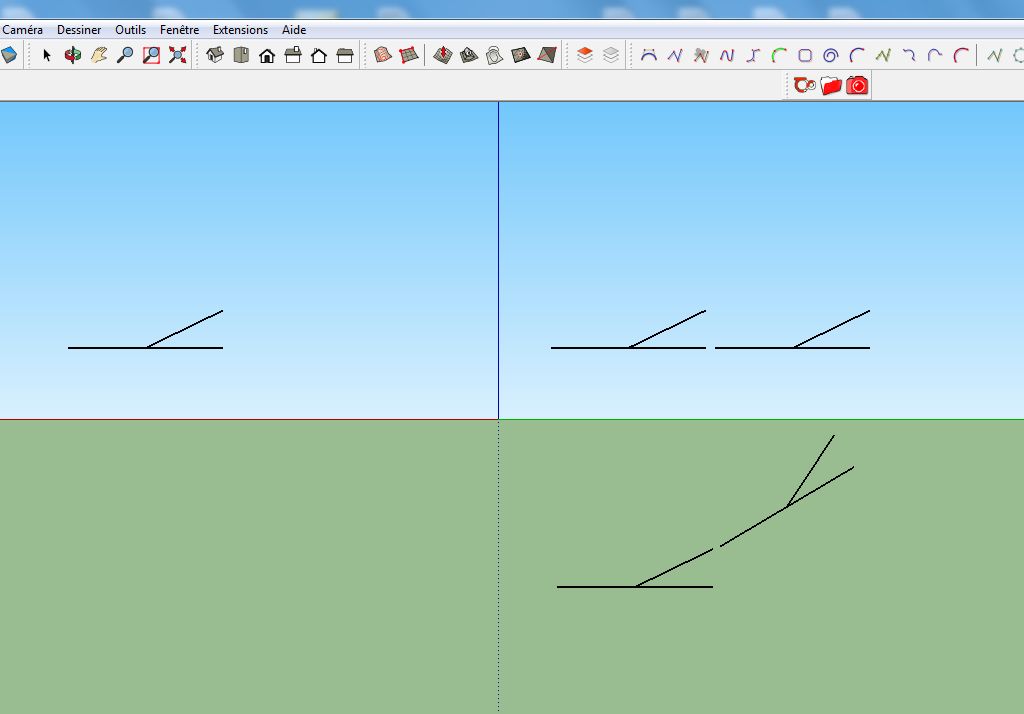
                              You will find enclosed a screen capture.

                              I'm currently working on a project with a schematic railway layout (2D) which will be included in a 3D project. That why i would wike to do all the job with only one tool, sketchup.

                              At the left of the screen, a component. It's a schematic railway turnout.

                              I would like to duplicate the component and align the new instance on the current schematic layout.

                              A the right of the screen(figure 1 above), i would like to align the 2 turnouts like that.
                              A the right of the screen (figure 2 under the previous one), i would like to align the 2 turnouts like that as well (More difficult ?).

                              Can it be done with the 2D Align Plugin ?

                              Best.
                              François

                              1 Reply Last reply
                              Reply Quote 0
                              • pilouP
                                pilou
                                last edited by

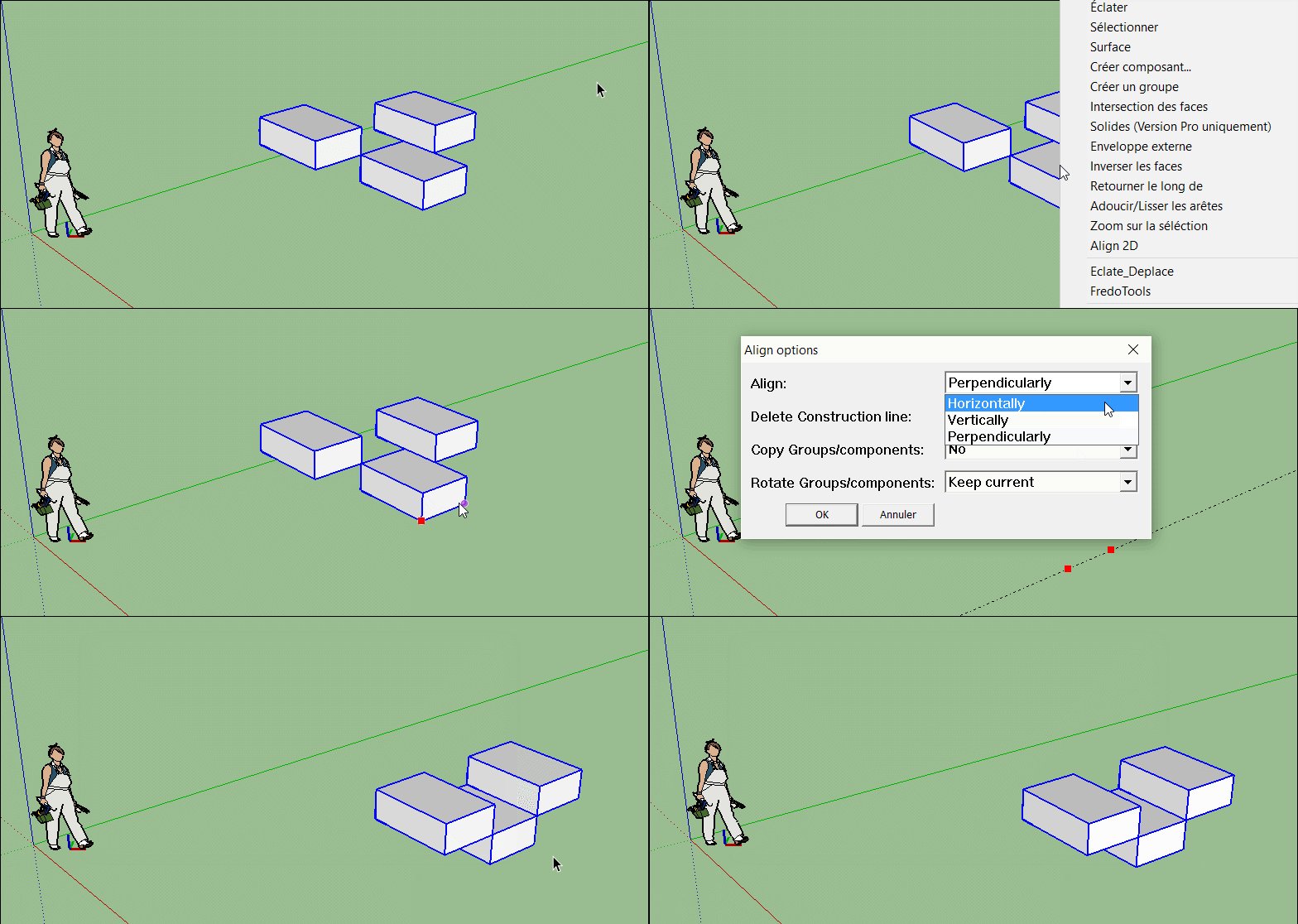
                                Aucun souci! On peut aussi essayer l'Align 3D!

                                Any Trouble!

                                (you can also try the Align 3D by Didier Bur also! )

                                Click image for animation of 2D Align! 🤓
                                GIF_align.gif

                                Frenchy Pilou
                                Is beautiful that please without concept!
                                My Little site :)

                                1 Reply Last reply
                                Reply Quote 0
                                • D
                                  dubreu
                                  last edited by

                                  Grands remerciements
                                  c'est reparti !

                                  François

                                  1 Reply Last reply
                                  Reply Quote 0
                                  • H
                                    hecham zw
                                    last edited by

                                    please tell me how to hide or remove the axis that always been showing and annoying me by this plug in the area .. 😕

                                    1 Reply Last reply
                                    Reply Quote 0
                                    • Didier BurD
                                      Didier Bur
                                      last edited by

                                      Hi,

                                      I don't understand what is your problem. Please be more precise and post a screenshot.
                                      Regards,

                                      DB

                                      1 Reply Last reply
                                      Reply Quote 0

                                      Hello! It looks like you're interested in this conversation, but you don't have an account yet.

                                      Getting fed up of having to scroll through the same posts each visit? When you register for an account, you'll always come back to exactly where you were before, and choose to be notified of new replies (either via email, or push notification). You'll also be able to save bookmarks and upvote posts to show your appreciation to other community members.

                                      With your input, this post could be even better 💗

                                      Register Login
                                      • 1
                                      • 2
                                      • 1 / 2
                                      • First post
                                        Last post
                                      Buy SketchPlus
                                      Buy SUbD
                                      Buy WrapR
                                      Buy eBook
                                      Buy Modelur
                                      Buy Vertex Tools
                                      Buy SketchCuisine
                                      Buy FormFonts

                                      Advertisement