sketchucation logo sketchucation
    • 登入
    Oops, your profile's looking a bit empty! To help us tailor your experience, please fill in key details like your SketchUp version, skill level, operating system, and more. Update and save your info on your profile page today!
    🔌 Smart Spline | Fluid way to handle splines for furniture design and complex structures. Download

    My ruby's

    已排程 已置頂 已鎖定 已移動 Plugins
    22 貼文 12 Posters 4.7k 瀏覽 12 Watching
    正在載入更多貼文
    • 從舊到新
    • 從新到舊
    • 最多點贊
    回覆
    • 在新貼文中回覆
    登入後回覆
    此主題已被刪除。只有擁有主題管理權限的使用者可以查看。
    • PixeroP 離線
      Pixero
      最後由 編輯

      Here are three ruby scripts that I've written. Thanks to those who have helped me learn.

      JS MoveTool

      Description: Moves a selection with the arrow keys.
      Usage:

      1. Select a object or group of objects.
      2. Select the JS MoveTool and enter a distance in the VCB. Press Return/Enter.
      3. Now move with arrow keys.
      4. Use Alt + Up/Down to move in Z axis.
      5. You can enter a new distance at any time.

      Hopefully it will work on both Windows and OSX.
      Assign it to a shortcut hot key. For example Alt+M.

      JS Extrude (based on the Push Pull Z script by Didier Bur)

      Description : Extrudes a face/faces along either X, Y or Z axis or the normal direction.
      Usage : Select a face, select JS Extrude from the Plugins menu, choose direction, enter distance and here you go.

      JS Align

      Description: Use for aligning/flattening edges.
      Issues:

      1. If used on faces they will be triagulated.
        Since the script moves each vertice at a time,
        SketchUp's autofold feature will trangulate all non planar faces.
        I've tried to find a way of auto erasing all edges created by autofold but havens succeded.
        If you know how to fix it please let me know.
      2. The script doesnt work well with faces inside groups/components.

      Get them at my site: http://www.pixero.com

      Enjoy! 😄

      1 條回覆 最後回覆 回覆 引用 0
      • Mike LuceyM 離線
        Mike Lucey
        最後由 編輯

        Thanks Jan, much appreciated.

        Mike

        Support us so we can support you! Upgrade to Premium Membership!

        1 條回覆 最後回覆 回覆 引用 0
        • D 離線
          Daniel S
          最後由 編輯

          Thank you Pixero!
          they work well all of them..
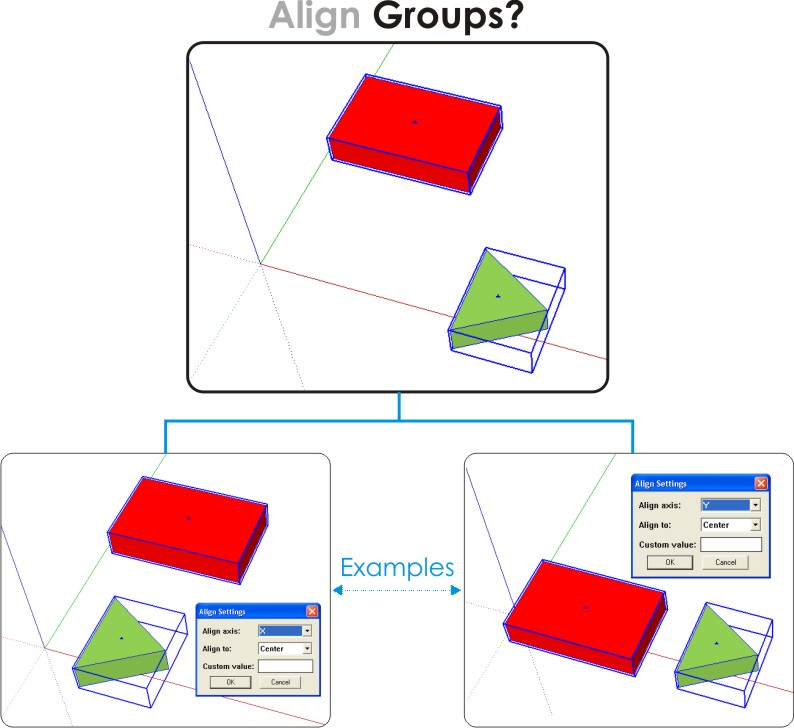
          I really like the align tool... Could be possible to make it work for aligning groups?
          I attach a image example.

          Daniel S


          Aligngroups.jpg

          1 條回覆 最後回覆 回覆 引用 0
          • PixeroP 離線
            Pixero
            最後由 編輯

            I've updated JS Align so it works with groups/components as well.
            If using custom value with groups, also use the Align groups: Max, Min or Center.

            Enjoy! 😄

            1 條回覆 最後回覆 回覆 引用 0
            • KrisidiousK 離線
              Krisidious
              最後由 編輯

              fantastic... thanks...

              By: Kristoff Rand
              Home DesignerUnique House Plans

              1 條回覆 最後回覆 回覆 引用 0
              • D 離線
                Daniel S
                最後由 編輯

                I was wishing this feature for a long time.
                Thank you very much!!!

                Daniel S

                1 條回覆 最後回覆 回覆 引用 0
                • B 離線
                  bellwells
                  最後由 編輯

                  The extrude tool is not working for me neither in SU5 nor SU6. I can get the dialogue box (select a face>Plugins>JS Extrude) and enter my data but nothing happens. Any thoughts? I'll check back in the AM.

                  Ron

                  1 條回覆 最後回覆 回覆 引用 0
                  • PixeroP 離線
                    Pixero
                    最後由 編輯

                    Just a thought... are you extruding in a direction that is possible?
                    (I mean not in 90 degrees from the surface normal.)
                    And of cause you'll have to click ok.
                    Other than that I dont know. Are you on Mac or Windows?

                    And Coen, I want people to come to my site to download.

                    1 條回覆 最後回覆 回覆 引用 0
                    • PixeroP 離線
                      Pixero
                      最後由 編輯

                      Two more scripts added.

                      JS Shadow Threshold
                      Set the threshold for when a transparent object will cast shadows.
                      Works on either entire model or a selection.

                      JS Shadow Control
                      Set if a selection should cast or receive shadows.

                      Get them at my site: http://www.pixero.com

                      Enjoy! 😄

                      Jan

                      1 條回覆 最後回覆 回覆 引用 0
                      • ToboboT 離線
                        Tobobo
                        最後由 編輯

                        Thanks for the align tool. It'll make my job a lot easier. Those trees will be in line now. (muah ha ha)

                        Toby

                        Philippians 4:13

                        I can do everything through him who gives me strength.

                        1 條回覆 最後回覆 回覆 引用 0
                        • I 離線
                          Insitebuilders
                          最後由 編輯

                          JS

                          Not sure if I'm missing somethg, is there a way to get a translucent surface (like the glass in a window) to receive a shadow (using JS ShadowControl)? Or is this for opaque objects? Also, at say 75% translucence (>) should the object be casting a faded shadow? I haven't been able to make that work....

                          BTW thanks for these tools, especially your Zoom Selected tool, I've always had to ident the object in the Outliner, the use 3 shortcuts, to Edit, Hide the rest of the model, and then zoom extents. When you issued that one it became one step and I thank you ea time I use it.

                          Thx again.

                          /D

                          1 條回覆 最後回覆 回覆 引用 0
                          • B 離線
                            bellwells
                            最後由 編輯

                            @pixero said:

                            Just a thought... are you extruding in a direction that is possible?
                            (I mean not in 90 degrees from the surface normal.)
                            And of cause you'll have to click ok.
                            Other than that I dont know. Are you on Mac or Windows?

                            And Coen, I want people to come to my site to download.

                            Jan,

                            Sorry it took me so long to acknowledge your reply. As is often the case, it was my fault-operator error.
                            Thanks.

                            Ron

                            1 條回覆 最後回覆 回覆 引用 0
                            • PixeroP 離線
                              Pixero
                              最後由 編輯

                              Added small update to jsBackgroundColor.rb so you now can control ground color as well.

                              favicon

                              (www.pixero.com)

                              1 條回覆 最後回覆 回覆 引用 0
                              • PixeroP 離線
                                Pixero
                                最後由 編輯

                                While working on another script I stumbled on this (camera.focal_length) in the docs.
                                I haven't seen this before and since I repeatedly have had problems with using field of view I though I'd share it.
                                Here is a small script called jsFocalLength that lets you set the cameras focal length in mm. You'll find it under Camera menu.

                                favicon

                                (www.pixero.com)

                                1 條回覆 最後回覆 回覆 引用 0
                                • tbdT 離線
                                  tbd
                                  最後由 編輯

                                  is not the same as entering "35mm" in VCB while on Zoom tool ?

                                  SketchUp Ruby Consultant | Podium 1.x developer
                                  http://plugins.ro

                                  1 條回覆 最後回覆 回覆 引用 0
                                  • PixeroP 離線
                                    Pixero
                                    最後由 編輯

                                    Ok, I never knew it was there. Anyway, if anyone wants it...

                                    1 條回覆 最後回覆 回覆 引用 0
                                    • PixeroP 離線
                                      Pixero
                                      最後由 編輯

                                      Added js Frame Step. A script for showing a specified frame of an animation.
                                      You need at least two scenes for it to work. Type in the frames per second you use (Typically: NTSC 30, PAL 25, Film 24) and then the frame you want to go to.

                                      Added js Camera Tool. A script for offseting camera rotation and translation numericly.

                                      favicon

                                      (www.pixero.com)

                                      1 條回覆 最後回覆 回覆 引用 0
                                      • PixeroP 離線
                                        Pixero
                                        最後由 編輯

                                        Updated my jsMoveTool at a request. Now press ctrl (Apple key on Mac) to move 1/10 the entered value and Shift to move 10 * the entered value. (And press alt for moving in Z direction as before.)
                                        Thanks to Rick W for fixing a bug.

                                        Get it at my site http://www.pixero.com

                                        Enjoy! 😄

                                        1 條回覆 最後回覆 回覆 引用 0
                                        • 2 離線
                                          2myChaGrin
                                          最後由 編輯

                                          Thanks so much for you work Jan. I use your scripts quite often and have never officially said thank you.

                                          1 條回覆 最後回覆 回覆 引用 0
                                          • Z 離線
                                            zed252000
                                            最後由 編輯

                                            👍
                                            this will be helpful.
                                            thanks!

                                            Whatever we IMAGINE....

                                            1 條回覆 最後回覆 回覆 引用 0
                                            • 1
                                            • 2
                                            • 1 / 2
                                            • 第一個貼文
                                              最後的貼文
                                            Buy SketchPlus
                                            Buy SUbD
                                            Buy WrapR
                                            Buy eBook
                                            Buy Modelur
                                            Buy Vertex Tools
                                            Buy SketchCuisine
                                            Buy FormFonts

                                            Advertisement