sketchucation logo sketchucation
    • 登入
    Oops, your profile's looking a bit empty! To help us tailor your experience, please fill in key details like your SketchUp version, skill level, operating system, and more. Update and save your info on your profile page today!
    🔌 Smart Spline | Fluid way to handle splines for furniture design and complex structures. Download

    [Plugin] ExtrudelineTool Update

    已排程 已置頂 已鎖定 已移動 Plugins
    72 貼文 28 Posters 86.0k 瀏覽 28 Watching
    正在載入更多貼文
    • 從舊到新
    • 從新到舊
    • 最多點贊
    回覆
    • 在新貼文中回覆
    登入後回覆
    此主題已被刪除。只有擁有主題管理權限的使用者可以查看。
    • P 離線
      Pherim
      最後由 編輯

      Great, thanks! I already had that installed but I must admit I have never really taken a closer look at it, although your plugins are always top notch.

      1 條回覆 最後回覆 回覆 引用 0
      • josephkim626J 離線
        josephkim626
        最後由 編輯

        Just to note,

        This extension no longer generates face in 2017 version.

        I suppose it is just not being updated.

        1 條回覆 最後回覆 回覆 引用 0
        • TIGT 線上
          TIG Moderator
          最後由 編輯

          This a previously reported issue.
          It is being updated for v2017 compatibility... just that I haven't finished it yet !
          The way v2017 handles references and IDs changed and broke some of the EEby tools...
          I have most of them fixed - just tweaking the last few...

          There is actually a separate thread discussing this too...

          TIG

          1 條回覆 最後回覆 回覆 引用 0
          • josephkim626J 離線
            josephkim626
            最後由 編輯

            @tig said:

            There is actually a separate thread discussing this too...

            Ah, sorry. I wasn't aware that there is another thread.

            Thanks for all the work TIG!

            1 條回覆 最後回覆 回覆 引用 0
            • L 離線
              lapx
              最後由 編輯

              Thanks Tig! I am having same issue with extruding a line to face also.

              1 條回覆 最後回覆 回覆 引用 0
              • boofredlayB 離線
                boofredlay
                最後由 編輯

                TIG, any chance you can put this on the front burner? This is one tool I use(d) very frequently and I am missing it.

                Thanks.

                http://www.coroflot.com/boofredlay

                1 條回覆 最後回覆 回覆 引用 0
                • TIGT 線上
                  TIG Moderator
                  最後由 編輯

                  97% updated...
                  I have to earn a crust too...

                  TIG

                  1 條回覆 最後回覆 回覆 引用 0
                  • pilouP 離線
                    pilou
                    最後由 編輯

                    Extrude line(s) is maybe the more useful tool in case of headache's situation!
                    And of course with the new Quads world of SUbD ! 🤓
                    (works yet fine in 2015, 2016! 😉

                    Frenchy Pilou
                    Is beautiful that please without concept!
                    My Little site :)

                    1 條回覆 最後回覆 回覆 引用 0
                    • boofredlayB 離線
                      boofredlay
                      最後由 編輯

                      Thanks for the update on the update TIG. I appreciate what you do.

                      http://www.coroflot.com/boofredlay

                      1 條回覆 最後回覆 回覆 引用 0
                      • TIGT 線上
                        TIG Moderator
                        最後由 編輯

                        I've updated this oldie for v2017 compatibility.
                        https://sketchucation.com/pluginstore?pln=extrudelinetool-Modified-TIG

                        TIG

                        1 條回覆 最後回覆 回覆 引用 0
                        • G 離線
                          greatoe
                          最後由 編輯

                          @tig said:

                          I've updated this oldie for v2017 compatibility.

                          sorry but this won't work on a Mac

                          1 條回覆 最後回覆 回覆 引用 0
                          • pilouP 離線
                            pilou
                            最後由 編輯

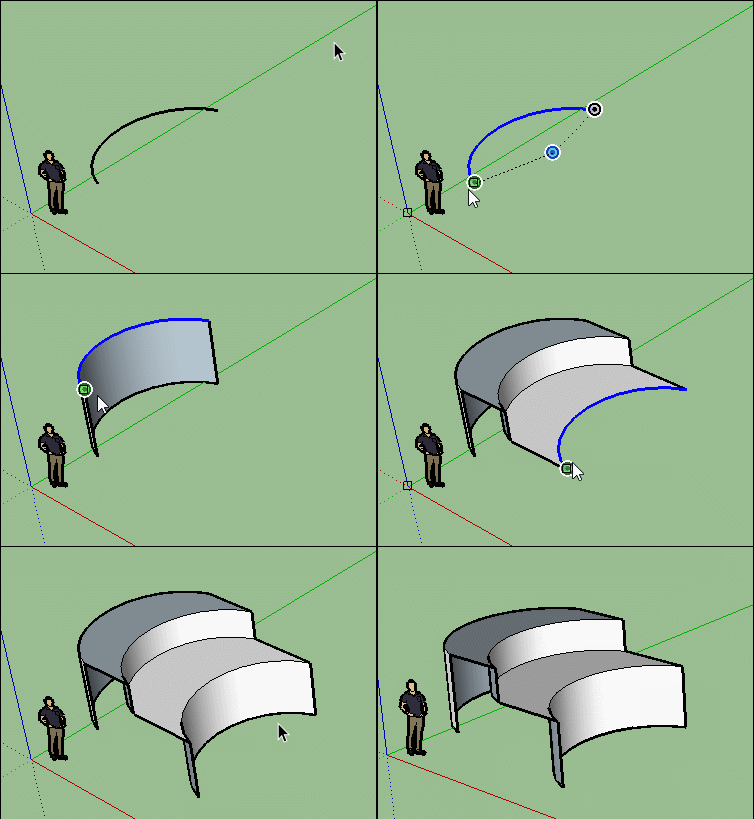
                            Works fine in PC! 😄

                            GIF_extrude_line.gif

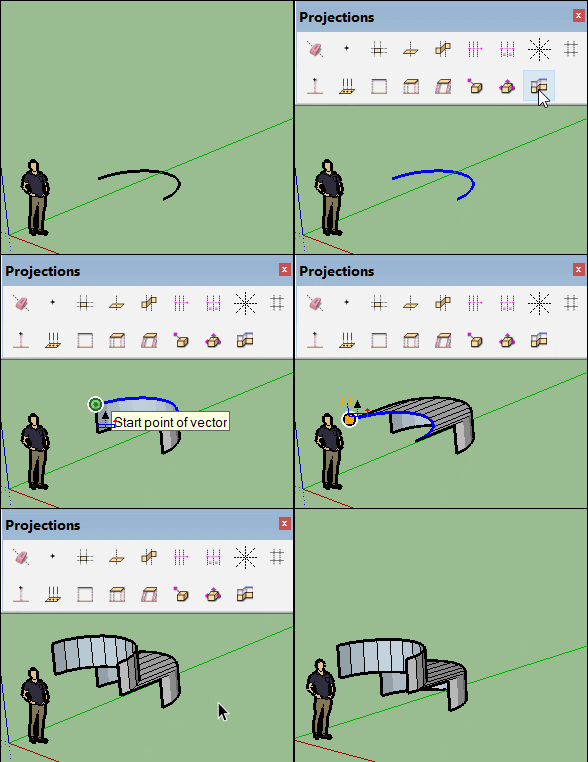
                            Seems Projections by Didier Bur / Tig works fine also! 😄

                            GIF_extrude_proj.gif

                            Frenchy Pilou
                            Is beautiful that please without concept!
                            My Little site :)

                            1 條回覆 最後回覆 回覆 引用 0
                            • pbacotP 離線
                              pbacot
                              最後由 編輯

                              Thanks TIG! I haven't tried this one, though I have used extrude Tools and other plugins this way.

                              MacOSX MojaveSketchUp Pro v19 Twilight v2 Thea v3 PowerCADD

                              1 條回覆 最後回覆 回覆 引用 0
                              • TIGT 線上
                                TIG Moderator
                                最後由 編輯

                                @greatoe said:

                                @tig said:

                                I've updated this oldie for v2017 compatibility.

                                sorry but this won't work on a Mac
                                Please explain your issues...
                                How does it 'not work' ?
                                Does it install ?
                                Does it load ?
                                Is there a menu item ?
                                What happens when you use it ?
                                Any error messages in the Ruby Console ?

                                I see no reason that this should not work on a MAC...
                                The minor recoding was done because v2017 now references / handles some entity explosion results differently...

                                TIG

                                1 條回覆 最後回覆 回覆 引用 0
                                • G 離線
                                  greatoe
                                  最後由 編輯

                                  @tig said:

                                  @greatoe said:

                                  @tig said:

                                  I've updated this oldie for v2017 compatibility.

                                  sorry but this won't work on a Mac
                                  Please explain your issues...
                                  How does it 'not work' ?
                                  Does it install ?
                                  Does it load ?
                                  Is there a menu item ?
                                  What happens when you use it ?
                                  Any error messages in the Ruby Console ?

                                  I see no reason that this should not work on a MAC...
                                  The minor recoding was done because v2017 now references / handles some entity explosion results differently...


                                  1.gif

                                  1 條回覆 最後回覆 回覆 引用 0
                                  • TIGT 線上
                                    TIG Moderator
                                    最後由 編輯

                                    That's exactly how the previous version failed in v2017 on all OSs - it's not MAC specific.
                                    So have you got the latest version installed ?
                                    The latest RBZ which can be downloaded from the PluginStore fixed this issue [v1.0xx]...
                                    https://sketchucation.com/pluginstore?pln=extrudelinetool-Modified-TIG

                                    If you are sure you downloaded, installed [perhaps restarted SketchUp?] and are then using the latest version... then if you have the Ruby Console open are there any messages ?

                                    For the avoidance of doubt - in v2017 you install the RBZ file's contents using the SketchUp menu item, Window > Extension Manager... red Install Extension button, find the RBZ and answer in the affirmative when prompted. If you have a plugin already installed then restarting SketchUp will ensure any changes are fully registered.

                                    If you have the SketchUcation ExtensionStore³ installed you can install an update like this directly without recourse to downloading the RBZ manually at all...

                                    Can you open the RB file in a plain-text editor and search for the first line that includes "explode", and copy/paste the whole line, that way I can see if it's the updated version...
                                    It should now say: "ssa=gp.explode" ??

                                    TIG

                                    1 條回覆 最後回覆 回覆 引用 0
                                    • G 離線
                                      greatoe
                                      最後由 編輯

                                      I restarted SketchUp and it works fine now.

                                      I installed your plugin via the build-in Extension Manager, and I thought, as you said, it will ensure changes are registered. However it turn out not working and needs a restart of SketchUp.

                                      1 條回覆 最後回覆 回覆 引用 0
                                      • TIGT 線上
                                        TIG Moderator
                                        最後由 編輯

                                        The SketchUcation ExtensionStore³ AutoInstaller should reload any refreshed plugins, but the built-in Extension Manager does not - if the script is a simple RB file...
                                        It's always a good idea to restart after updating any scripts, as sometimes they need to read in data as SketchUp starts up and first loads them... That will also resolve any menu changes which are usually 'frozen' as SketchUp starts, and usually not updated with any file reloads...

                                        Glad that it's resolved...

                                        TIG

                                        1 條回覆 最後回覆 回覆 引用 0
                                        • G 離線
                                          greatoe
                                          最後由 編輯

                                          Thanks for the advices.

                                          1 條回覆 最後回覆 回覆 引用 0
                                          • boofredlayB 離線
                                            boofredlay
                                            最後由 編輯

                                            Sorry I did not see this sooner.

                                            THANK YOU FOR THE UPDATE!!!

                                            http://www.coroflot.com/boofredlay

                                            1 條回覆 最後回覆 回覆 引用 0
                                            • 1
                                            • 2
                                            • 3
                                            • 4
                                            • 2 / 4
                                            • 第一個貼文
                                              最後的貼文
                                            Buy SketchPlus
                                            Buy SUbD
                                            Buy WrapR
                                            Buy eBook
                                            Buy Modelur
                                            Buy Vertex Tools
                                            Buy SketchCuisine
                                            Buy FormFonts

                                            Advertisement