FREDO6 update "Check the Computer Clock"
-
With the update of FREDO6 and its plugins, I am seeing "Check the Computer Clock". I do everything that is required of me, and there is no way to make the notification disappear.
This is my problem! Is anyone else experiencing this? It started ever since I updated the Fredo plugins (also in 2026).
If I reinstall the previous versions, everything works fine. With the update, I get that error.
It only happens with all the plugins under FREDO6. -
@fredo6 ??
-
As the message says, check the computer clock if it is at the right time.
-
@fredo6 Naturally, the first thing I did was check the time—I’m not an idiot. In fact, when I saw that it kept showing the same warning, I tried various things, such as changing the source from which the computer gets its time. Even so, I get the same error every single time.
The previous version works correctly; it has no problems with the clock. -
@TIG ??
-
Hello @fredo6,
I am experiencing the same "Check the Computer Clock" error after recently updating the Fredo6 plugins. Everything was working correctly before the update.
My configuration:
- Windows 11
- SketchUp 2024 (24.0.484)
- LibFredo6 v16.3b
- FredoTools v4.6a
- FredoScale v3.7c
- SCFLicense v6.4a
My computer displays the correct date, time and time zone (Latvia, UTC+02:00). Automatic time setting is enabled, although Windows recently failed to synchronize with the internet time server.
Additionally, the Ruby Console reports:
NameError: undefined local variable or method 'licdir2' for Fredo6:Moduletop_LibFredo6.rb:903I have already backed up my SketchUp plugins.
Could this be a bug in LibFredo6 v16.3b, or is there another compatibility issue?
Would you recommend a corrected version or reverting to an earlier compatible set of Fredo6 plugins?
Thank you for your assistance!
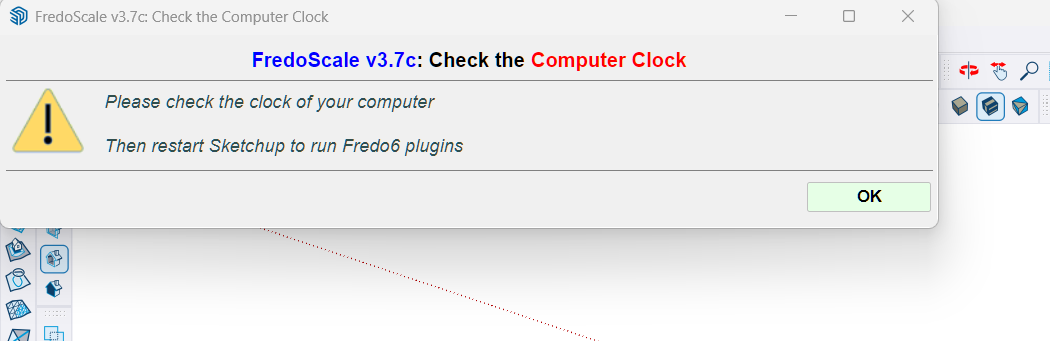
-
Could you try with LibFredo6 v16.4a, just released.
It also fixes the licdir2 issue.
By the way, you should really upgrade to SketchucationTools v5.0.8. You have an old version


Hello! It looks like you're interested in this conversation, but you don't have an account yet.
Getting fed up of having to scroll through the same posts each visit? When you register for an account, you'll always come back to exactly where you were before, and choose to be notified of new replies (either via email, or push notification). You'll also be able to save bookmarks and upvote posts to show your appreciation to other community members.
With your input, this post could be even better 💗
Register Login


Advertisement