[Plugin] TIG_Slicer v7
-
Version 7.2 is now available.
https://sketchucation.com/pluginstore?pln=TIG_Slicer
The ancient toolbar icons have been modernized as SVG/PDF for PC/MAC and old PNGs auto-deleted. -
SlicerSVG.zip
SVG's not loading. Use these, edit with VectorCraft, it's free. -
@TBoy
SVGs work fine for me in newer versions of SketchUp ?
What OS, what SketchUp version please ? -
v2020 on W10, I see toolbar with 4 empty buttons.. When I edit svg files I see just 1 scaled up, pixelated image layer of the old-png-icon inside svg. No vector drawing inside. (Toolbar name is still Slicer5)
-
I haven't tired it on a Windows or SketchUp version that old.
If you icons work OK on my newer system I'll look at packaging them with an update... -
Just tested your SVG alternatives and they do work fine on my newer versions too.
They are also slightly sharper [but not very noticeably so].
I'll package them with v7.2 RBZ and update the PluginStore's entry...
I'll also update the MAC's PDF equivalents... -
v7.3 will be published in the PluginStore / ExtensionStore shortly...
It incorporates the better icons from @tboy and Slicer5 references are changed to Slicer7 in various places...
https://sketchucation.com/pluginstore?pln=TIG_Slicer -
@TIG Hi Tig, I haven’t been able to load the extension in SketchUp; an error appears stating: "This file could not be identified as an extension. It cannot be loaded or updated. Uninstall the file and contact the developer for an update."
How can I resolve this? -
I have tried installing it in several ways - they all work without errors.
More info from you first...
What OS, what version of SketchUp.
How are you trying to install it ?
There are two main ways, with subsets.- You use the SketchUcation toolset's ExtensionStore - find the extension's entry and auto-install it. No need to get an RBZ etc. Restart SketchUp afterwards to sync everything.
- You downland its RBZ from the SketchUcation PluginStore...
2a. You use the Extensions > SketchUcation submenu item to install it from the archive [that works for RBZ & ZIP archives]. Restart SketchUp afterwards to sync everything.
2b. You use the native SketchUp Extension-Manager to Install the extension from its RBZ. Restart SketchUp afterwards to sync everything.
2c. You extract the contents of the RBZ [which is actually a ZIP file] into a temporary subfolder -
either change its suffix to .ZIP or set your 'Open with...' settings to let your Z-app process .RBZ files too.
Move the extracted contents - a Slicer.rb file and Slicer folder with all of its contents in tact -
into your Plugins folder [again there's an Extensions > SketchUcation submenu item to open that folder for you.
Restart SketchUp afterwards to sync everything.
Which way are you trying ?
One thought - if your computer's Firewall is blocking downloads from SketchUcation's PluginStore you might end up with an 'empty' RBZ - what is its size ?
It should be about 75kB -
I have already tried both methods, and I also checked the firewall settings—everything looks fine. The file downloaded without any issues and has a size of 75 KB. I am using SketchUp version 2026 on Windows 11 Pro.
The same error keeps appearing. -
Set you loading policy to not be so strict.
-
@AlejoRonny09
If you are managing to download the RBZ and it's the expected 75kB size can you do the following...
Select the .RBZ file and right-click -Open with... In the list choose your normal Z-app - e.g. 7zip.exe. It should open and show the following...
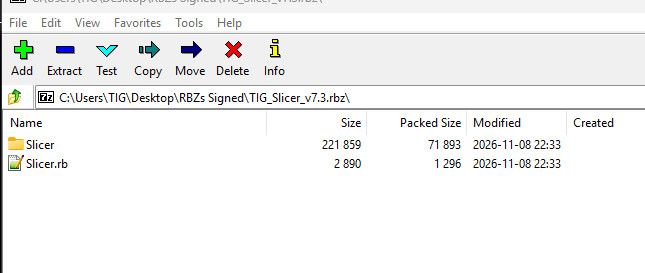
Choose Extract and you should get a folder containing the Slicer.rb file and Slicer subfolder.
Close the RBZ.
Open your SketchUp's Plugins folder and copy those two into it.
Open SketchUp and report errors [if any].
If this persists then look in your Plugins folder and remove any 'Slicer' files and subfolder - also check there is no old 'TIG-Slicer' equivalents in there too. Then try repeating the copying over of the 'Slicer' file and its subfolder. Any better ?


Hello! It looks like you're interested in this conversation, but you don't have an account yet.
Getting fed up of having to scroll through the same posts each visit? When you register for an account, you'll always come back to exactly where you were before, and choose to be notified of new replies (either via email, or push notification). You'll also be able to save bookmarks and upvote posts to show your appreciation to other community members.
With your input, this post could be even better 💗
Register Login


Advertisement