sketchucation logo sketchucation
    • Login
    Oops, your profile's looking a bit empty! To help us tailor your experience, please fill in key details like your SketchUp version, skill level, operating system, and more. Update and save your info on your profile page today!
    Mac User? | Join the Rayscaper Beta for Mac Learn More

    Modlumi - Easy 3D modelling


    Scheduled Pinned Locked Moved Corner Bar
    308 Posts 9 Posters 27.9k Views 7 Watching
    Loading More Posts
    • Oldest to Newest
    • Newest to Oldest
    • Most Votes
    Reply
    • Reply as topic
    Log in to reply
    This topic has been deleted. Only users with topic management privileges can see it.
    • ntxdaveN
      ntxdave
      last edited by

      @pixelcruncher Thanks so much for the updates. I have installed the 0.23 version and am starting to test some of the new features. Here is one I am having a problem with:

      Double-click to repeat. After an extrusion, double-click another face with Extrude to extrude it by the same distance (thanks @pilou). After rounding a corner with Arc, double-click another corner to round it with the same radius, as in your rounded rectangle question (thanks @ntxdave).

      Press F1...thank me later

      1 Reply Last reply
      Reply Quote 0
      • pilouP
        pilou
        last edited by pilou

        @ntxdave
        I am not sure there yet this function!
        But you can make like in SketchUp :
        Copy Move your arc
        Use Scale: take the good Handle and write -1
        You have your MIrrored arc!

        Frenchy Pilou
        Is beautiful that please without concept!
        My Little site :)

        ntxdaveN 1 Reply Last reply
        Reply Quote 0
        • ntxdaveN
          ntxdave
          last edited by

          I would like to make anoher suggestions:

          • Since you can use the Play button on the Scenes panel to play the scenes, it would be neat if there was a way to create an animation via the Play button or some other method to create an animation.

          Press F1...thank me later

          1 Reply Last reply
          Reply Quote 0
          • ntxdaveN
            ntxdave @pilou
            last edited by ntxdave

            @pilou said:

            @ntxdave
            I am not sure there yet this function!
            But you can make like in SketchUp :
            Copy Move your arc
            Use Scale: take the good Handle and write -1
            You have your MIrrored arc!

            This is where I saw it but I have not been able to get it to work. I assume I am doing something wrong.

            @pixelcruncher said:

            Improvements
            Draw perpendicular to an edge. Start a line on an edge or guide line, or pass over one first, and Modlumi offers the direction square to it, in 3D too. The line turns magenta, and Shift locks it. Thanks @pilou! https://modlumi.com/docs/user-guide/drawing/#snapping-and-axis-locks

            Press F1...thank me later

            1 Reply Last reply
            Reply Quote 0
            • ntxdaveN
              ntxdave
              last edited by ntxdave

              Some more questions:

              • Can you add the ability to upload your Modlumi file when you click on the Feedback button so that the Modlumi staff can see the problem firsthand?

              • It is great to be able to play the scenes in your model by clicking the Play button in the Scenes panel. Are there any plans/or would it be possible to export the scenes as an animation? :-

              • Are there any plans in the future to combine Modlumi and Rayscaper so that you can render the models you create with Modlumi? πŸ™‚

              • One more silly question: @pixelcruncher & @pilou what software you guys use to create the animation/gif files you post in this forum?

              Press F1...thank me later

              1 Reply Last reply
              Reply Quote 0
              • pilouP
                pilou
                last edited by

                I use this little free one! πŸ™‚
                https://moiscript.weebly.com/gifcam.html

                Frenchy Pilou
                Is beautiful that please without concept!
                My Little site :)

                1 Reply Last reply
                Reply Quote 0
                • pixelcruncherP
                  pixelcruncher Extension Creator
                  last edited by

                  @ntxdave (and others), I'll try to get around answering most questions later. For the GIFs, I'm using https://getsharex.com/ (hat tip to @rich-o-brien).

                  I'm the developer of Rayscaper: https://rayscaper.com/ - Fast and easy rendering for SketchUp.

                  1 Reply Last reply
                  Reply Quote 0
                  • pilouP
                    pilou
                    last edited by pilou

                    @ntxdave
                    Maybe like this
                    Draw a guide line then move it to the rectangular surface
                    Draw the first "violet" Arc (snap equal corner distance) from the intersection guide line to the top
                    Draw the left arc
                    Draw second arc on the right frorm the intersection Guide Line to the top with Double Click
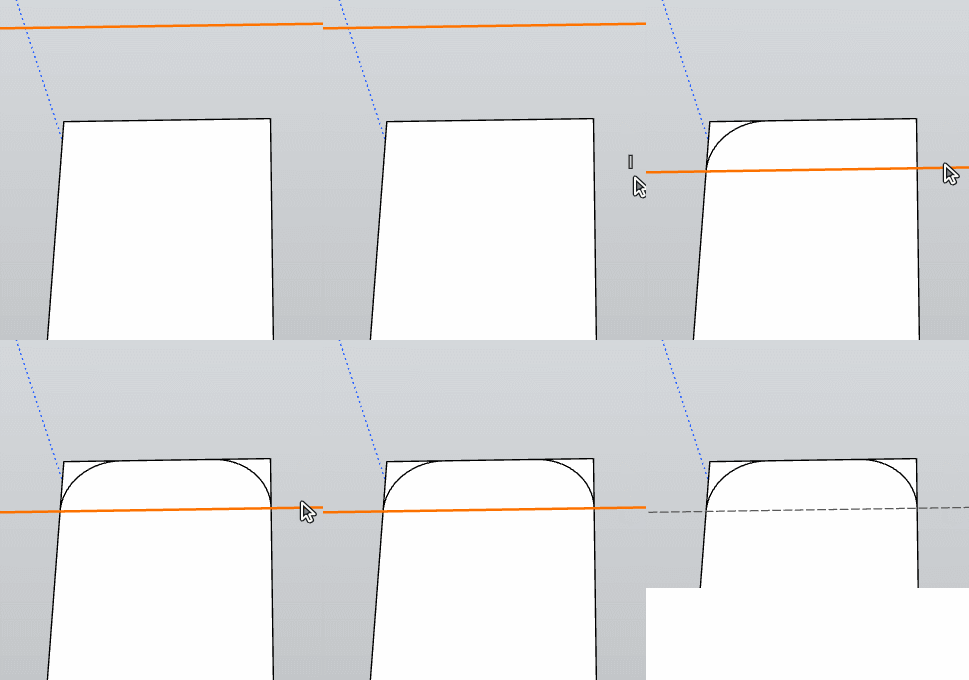
                    GIF_maybelikethis.gif

                    Frenchy Pilou
                    Is beautiful that please without concept!
                    My Little site :)

                    ntxdaveN 1 Reply Last reply
                    Reply Quote 0
                    • pilouP
                      pilou
                      last edited by pilou

                      Cool we can Move Copy, Rotate, Guide Lines !
                      Before request draw Guide Line by / between 2 Snaps ! πŸ™‚
                      You can make that! πŸ™‚ Some yet powerful !
                      Sure that win 2 seconds (against my little trick but...
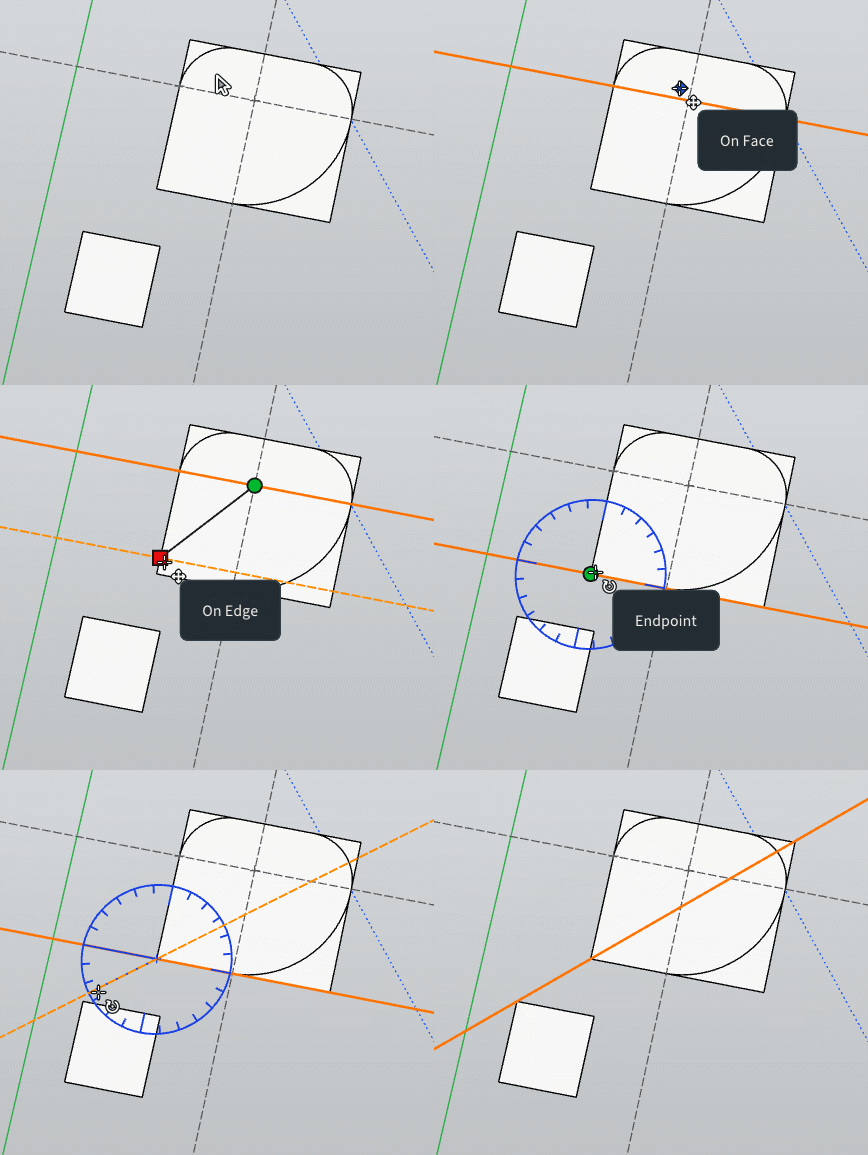
                      GIF_between_2.gif

                      Frenchy Pilou
                      Is beautiful that please without concept!
                      My Little site :)

                      1 Reply Last reply
                      Reply Quote 0
                      • pilouP
                        pilou
                        last edited by pilou

                        We can have models from the free Solidworks spirit ! Purrametric (File STL linked Bottom post)
                        https://purrametric.deepmagic.de/
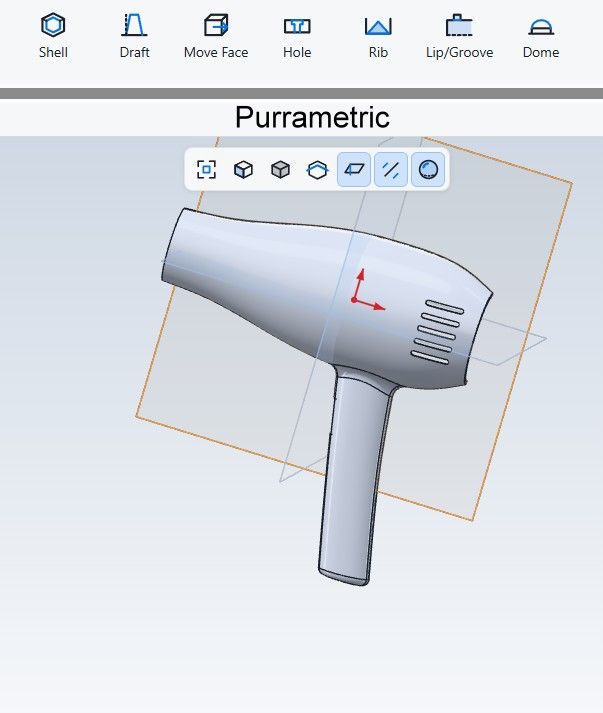
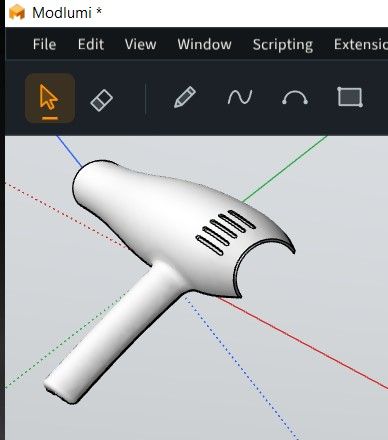
                        Chaud0.jpg

                        chaud4.jpg

                        Gemini
                        chaud2.jpg

                        File STL
                        chaud4.zip

                        Frenchy Pilou
                        Is beautiful that please without concept!
                        My Little site :)

                        1 Reply Last reply
                        Reply Quote 1
                        • ntxdaveN
                          ntxdave @pilou
                          last edited by ntxdave

                          @pilou said:

                          @ntxdave
                          Maybe like this
                          Draw a guide line then move it to the rectangular surface
                          Draw the first "violet" Arc (snap equal corner distance) from the intersection guide line to the top
                          Draw the left arc
                          Draw second arc on the right frorm the intersection Guide Line to the top with Double Click

                          GIF_maybelikethis.gif

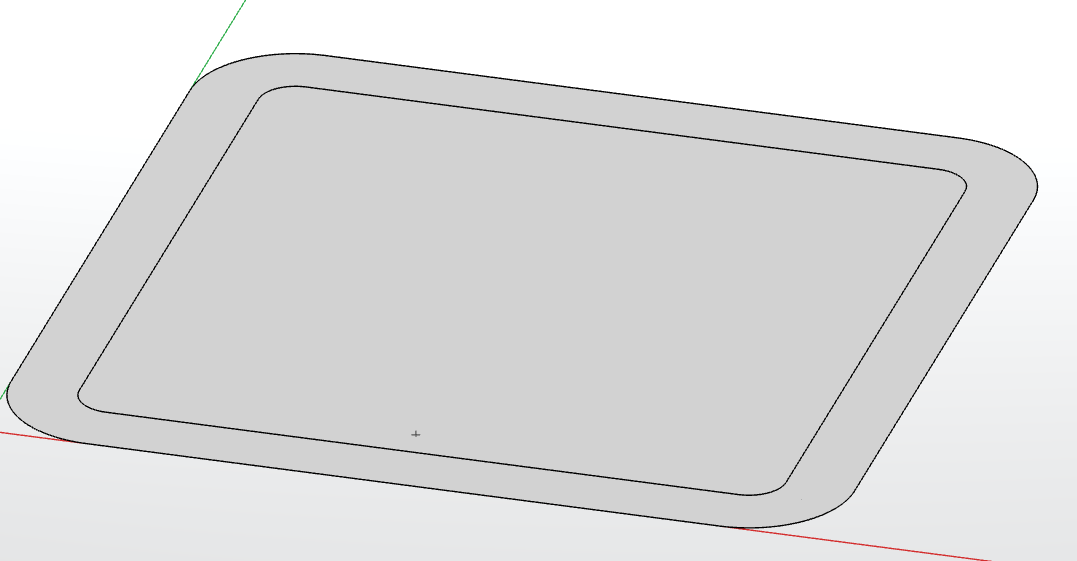
                          Thanks @pilou, after doing some messing around I got things to work. I only drew guides in one corner. As it turns out, it seems that the real key was to make sure that I could draw a tangent arc on one corner. Then I went to each of the other 3 corners and double clicked and it added the corner like I had created.

                          I did learn that you must make sure that when you go to the other corners you make sure the cursor is exactly on the corner for each of the other corners. If you are a little off the double click, will not apply the corner.

                          I then went a step further. Once I had all 4 corners of the rectangle had been rounded, I used the eraser to delete the guidelines and the edges of the rectangle I no loner needed/wanted.

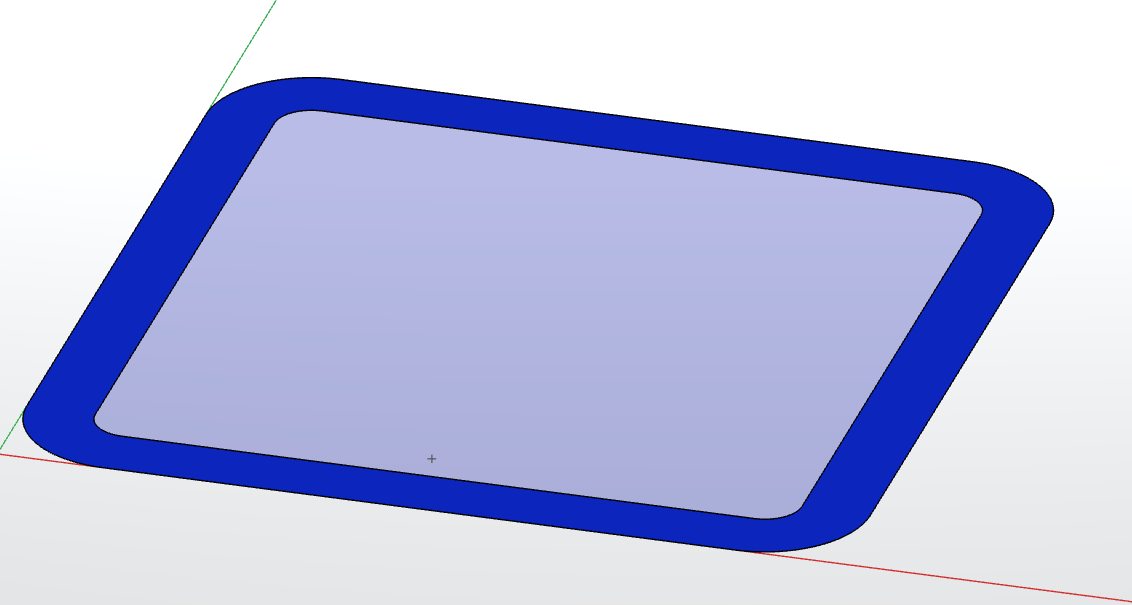
                          Next, I went a step further. as you will see in the images below, I then used the Offset tool to create an interior that also had rounded corners.

                          Here are the images:
                          Screenshot 2026-10-29 194723.png
                          Screenshot 2026-10-29 194925.png

                          So, IMO this is a neat step forward. However, I did learn something else in the process. If I tried to enter a distance for the offset, it made the interior object have square corners instead of matching the exterior corners. But then again, maybe I did something wrong. πŸ™‚

                          Bottom line is Thanks ThomasCX for making these things work. I also wanted to say that I really like the way the guidelines work/look now.

                          Press F1...thank me later

                          1 Reply Last reply
                          Reply Quote 1
                          • pilouP
                            pilou
                            last edited by pilou

                            @ntxdave
                            I am not sure to have found the trick of the exact double click for make the previous Arc / Fillet / Bevel at the corner!
                            I am waiting the Cruncher video resolve! πŸ™‚

                            @pixelcruncher
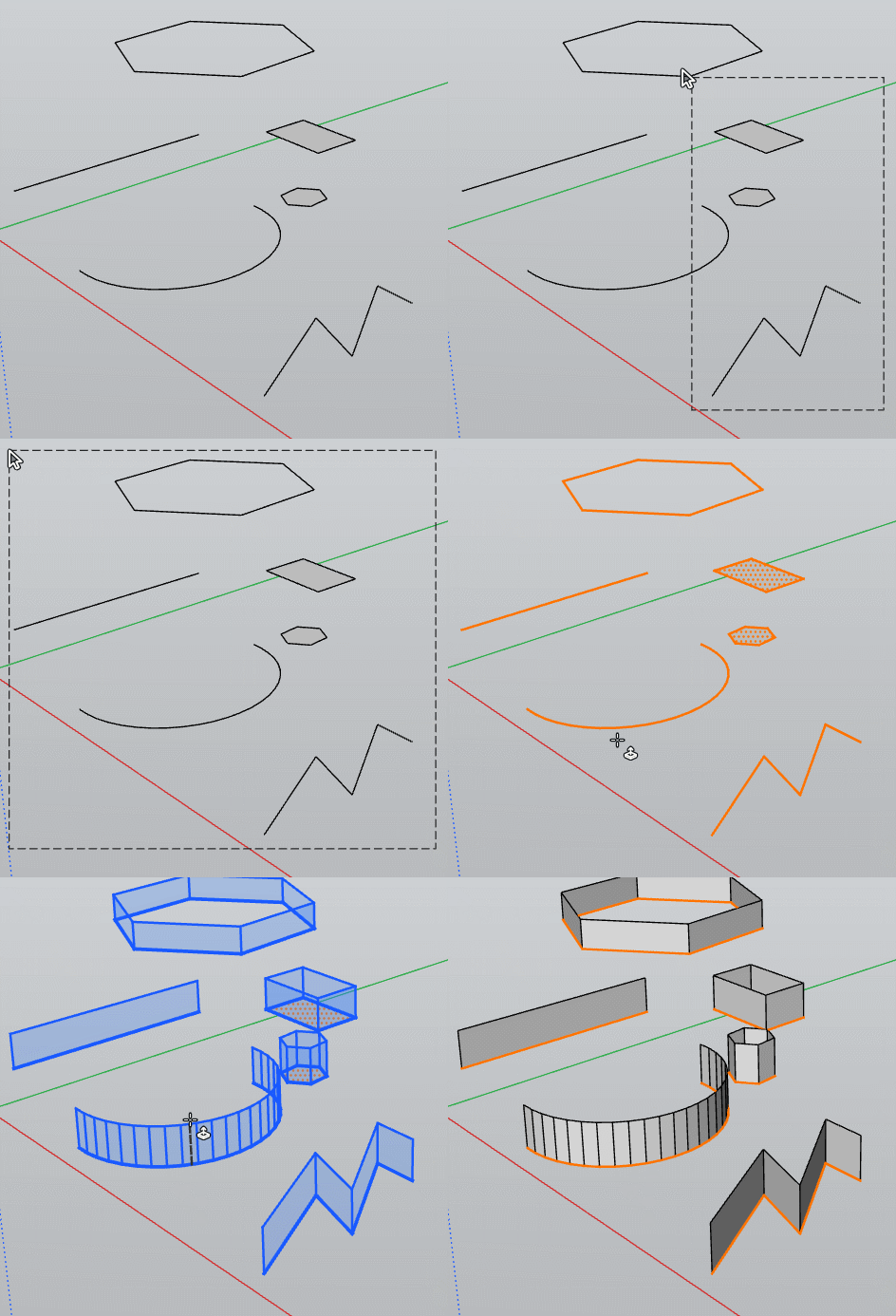
                            the multiple Curves , Lines Extrude is a dream ! Bravo!
                            Next request will be of course the same for the surfaces! ( closed Rectangles, Polys surfaces etc...)

                            But a little thing : will be very fine if the selections at the end of the one Pull are also "at the end of the surfaces" ready for a new Pull! (truelly very useful so big request) ! πŸ˜‰
                            PS Extrude along a direction is alo requested of course!
                            Because now we have only vertical Pull! πŸ™‚

                            GIF_pushpull.gif

                            Frenchy Pilou
                            Is beautiful that please without concept!
                            My Little site :)

                            1 Reply Last reply
                            Reply Quote 0

                            Hello! It looks like you're interested in this conversation, but you don't have an account yet.

                            Getting fed up of having to scroll through the same posts each visit? When you register for an account, you'll always come back to exactly where you were before, and choose to be notified of new replies (either via email, or push notification). You'll also be able to save bookmarks and upvote posts to show your appreciation to other community members.

                            With your input, this post could be even better πŸ’—

                            Register Login
                            • 1
                            • 2
                            • 3
                            • 4
                            • 5
                            • 15
                            • 16
                            • 1 / 16
                            • First post
                              Last post
                            Buy SketchPlus
                            Buy SUbD
                            Buy WrapR
                            Buy eBook
                            Buy Modelur
                            Buy Vertex Tools
                            Buy SketchCuisine
                            Buy FormFonts

                            Advertisement