sketchucation logo sketchucation
    • Login
    Oops, your profile's looking a bit empty! To help us tailor your experience, please fill in key details like your SketchUp version, skill level, operating system, and more. Update and save your info on your profile page today!
    🚨 Skimp | 25% Off until March 30 Buy Now

    Extension Material Replacer

    Scheduled Pinned Locked Moved Developers' Forum
    1 Cross-posts 5 Posts 2 Posters 22 Views 2 Watching
    Loading More Posts
    • Oldest to Newest
    • Newest to Oldest
    • Most Votes
    Reply
    • Reply as topic
    Log in to reply
    This topic has been deleted. Only users with topic management privileges can see it.
    • B Offline
      Berserk
      last edited by Berserk

      Hi everybody!

      I am pleased to present my first Sketchup extension.
      This is an advanced synthesis of two already existing great plugins Global Material Changer and Material Tools, plus a few of my ideas.
      Here are functions:
      1 - Filtering by lists of replacement and new material
      2 - The ability to select materials with a pipette
      3 - Work globally or only on selected objects
      4 - The ability to isolate the selected by making it unique. At the same time, the connection between the copies of the components inside the selection remains
      5 - Rubber web dialog
      6 - When selecting the "Unique" mode, the object isolation operation is displayed withe a progress bar

      Many thanks to authors of GMC and MT.

      My main activity is large architectural design, and thanks to AI I was able to create tools for work and just as a hobby.

      If errors or suggestions are found I will try to update ASAP

      The plugin was written for SU 2026 on Windows 10/ 11.

      Launches from the Extension menu - Ultra Material Change

      I'm ashamed, but I haven't figured out how to properly upload plugins here yet! Can someone please tell me?
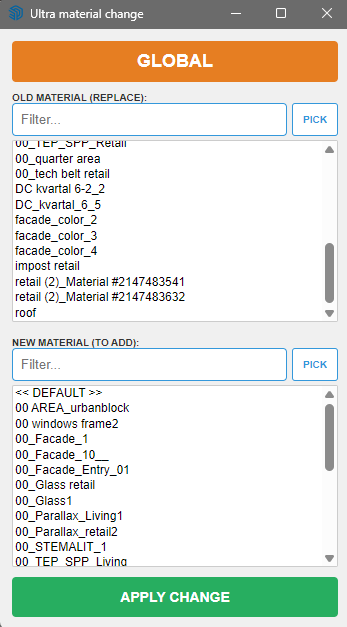
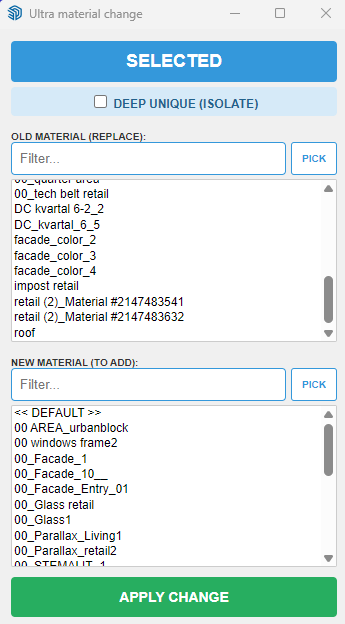
      c8bb29ba-b87a-4431-9708-8897c3dba2e8-image.png
      e0bccf9d-f49c-4445-8902-c1c70daa0ef6-image.png

      ultra_mat_change.rbz

      1 Reply Last reply Reply Quote 1
      • Rich O BrienR Offline
        Rich O Brien Moderator
        last edited by TIG

        These AI vibe coding extensions are getting pretty solid. Amazing to see what people are creating.

        If you want to add it to out ExtensionStore let me know.

        Download the free D'oh Book for SketchUp πŸ“–

        B 1 Reply Last reply Reply Quote 0
        • B Offline
          Berserk @Rich O Brien
          last edited by

          @Rich-O-Brien Thank you! I'm ashamed, but I haven't figured out how to put the plugin there yet! Can you tell me?

          1 Reply Last reply Reply Quote 1
          • Rich O BrienR Offline
            Rich O Brien Moderator
            last edited by

            No need for shame. It is not accessible directly.

            I have reset some privileges on your account to give you access. You need to sign out of your account.

            Then visit Sketchucation.com homepage and login. You should see Dev Tools in the header.

            image.png

            Have a look there. Extensions need to be approved before going live but feel free to look around.

            Download the free D'oh Book for SketchUp πŸ“–

            B 1 Reply Last reply Reply Quote 0
            • B Offline
              Berserk @Rich O Brien
              last edited by

              @Rich-O-Brien Thank you a lot! I was able to Dev Tools and will study it!

              1 Reply Last reply Reply Quote 0
              • 1 / 1
              • First post
                Last post
              Buy SketchPlus
              Buy SUbD
              Buy WrapR
              Buy eBook
              Buy Modelur
              Buy Vertex Tools
              Buy SketchCuisine
              Buy FormFonts

              Advertisement