[Plugin] ms Dims-O
-
ms Dims-O
(v1.0.0)
Description: ms Dims-O (O stands for Overlay) provides an elegant, real-time HUD (Heads-Up Display) for SketchUp 2023+. Using the new Overlay API, it instantly displays the X, Y, and Z dimensions of your selection.
- Activate the extension (Extensions > ms Dims > Activate HUD, click on the icon or assign a shortcut);
- Select geometry or an object (group, component) or several;
- Information about the object dimensions appears on the screen in the lower right (you can change the position in Extensions > ms Dims-O > Settings).
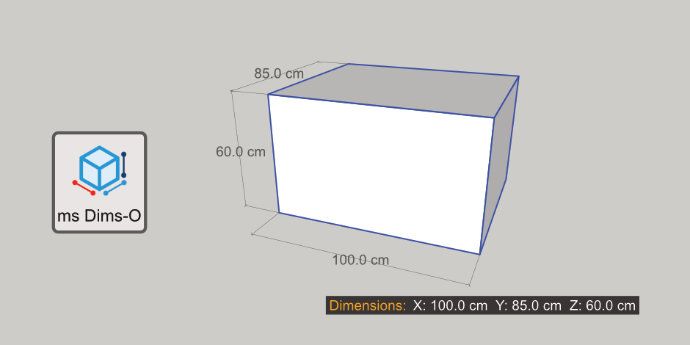
Key Features:
- Automatic Detection: Shows dimensions for Geometry, Groups and Component Instances.
- Scale Warning: The "Dimensions:" label turns RED if the selected object has been scaled, warning you that reported dimensions might not match the internal geometry.
- Customizable: Change text size, label text, and position (4 corners) via the Settings menu.
- Non-Intrusive: Works as a native Overlay that can be toggled on/off via the Overlays panel or the included toolbar.
Installation:
- Download the .rbz file;
- In SketchUp, go to Extensions > Extension Manager;
- Click Install Extension and select the downloaded file;
- Ensure the extension is enabled in the Overlays panel (Tray).
COMPATIBILITY:
SketchUp 2023+
AUTHOR: Gemini AI for ms
LICENSE: GNU GPL
Inspired by Qol Hud-Dimensions (Blender).Download: https://sketchucation.com/pluginstore?pln=ms_Dims_O
YouTube:
-
Thanks for the upload to the PluginStore/ExtensionStore.
I have Published it for you, so it's now available to all users.
I can see little to comment on - it works fine.
Note thatrequire 'sketchup.rb'etc is not needed in any of your code, because, unlike older versions, it's now auto-required at startup as SketchUp loads, before your scripts are considered. -
Thank you, TIG!
I will tell Google Gemini AI to take your information into account for future extensions.
Have a nice day! -
The 'require' code that is unneeded doesn't break anything, just takes a millisecond to process and immediately ignore, slowing the loading time all but imperceptibly...
Have a good day too...


Hello! It looks like you're interested in this conversation, but you don't have an account yet.
Getting fed up of having to scroll through the same posts each visit? When you register for an account, you'll always come back to exactly where you were before, and choose to be notified of new replies (either via email, or push notification). You'll also be able to save bookmarks and upvote posts to show your appreciation to other community members.
With your input, this post could be even better 💗
Register Login


Advertisement