Why Transparency
-
I am developing a model and it appears that some surfaces are transparent when I really do not want them to be. I need to understand what I am doing wrong.

As you look at the image, notice that the text at the bottom of the heart as actually on the back side (this is a 3D model) so I should not be able to see that text when viewing from the top. If I look from the other side (bottom) you can see the text that is on the top face.I have also been having s little bit of a problem placing text on the top and bottom surfaces.
-
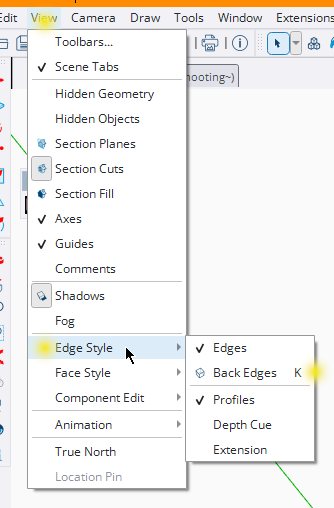
If you have accidentally pressed K then back-edges might be 'on'.
Try pressing K again to toggle them 'off' ... -
@TIG said in Why Transparency:
If you have accidentally pressed K then back-edges might be 'on'.
Try pressing K again to toggle them 'off' ...Thanks @tig that solved my problem. What is the K key used for?
-
@ntxdave
Showing back-edges can be useful in some modelling and presentations.
It's default View shortcut is K, but you can also toggled on/off in the Style dialog.
-
@tig Thank a lot sat.



Hello! It looks like you're interested in this conversation, but you don't have an account yet.
Getting fed up of having to scroll through the same posts each visit? When you register for an account, you'll always come back to exactly where you were before, and choose to be notified of new replies (either via email, or push notification). You'll also be able to save bookmarks and upvote posts to show your appreciation to other community members.
With your input, this post could be even better 💗
Register Login


Advertisement