Trouble with Tools on a Surface
-
I've been using the Fredo6 lib tools for a while now. This is the first time I've had any problems. Half of my menu options go blank when I open- Tools on a surface and I have no cursor to guide the placement of a point.
I've updated all the tools for my Fredo Library. Reinstalled Fredo6Lib (just incase this was an issue) Restarted Sketchup and still having the issue.
I work on a company computer so I'm waiting until last to reinstall SU25 as this will have to involve IT.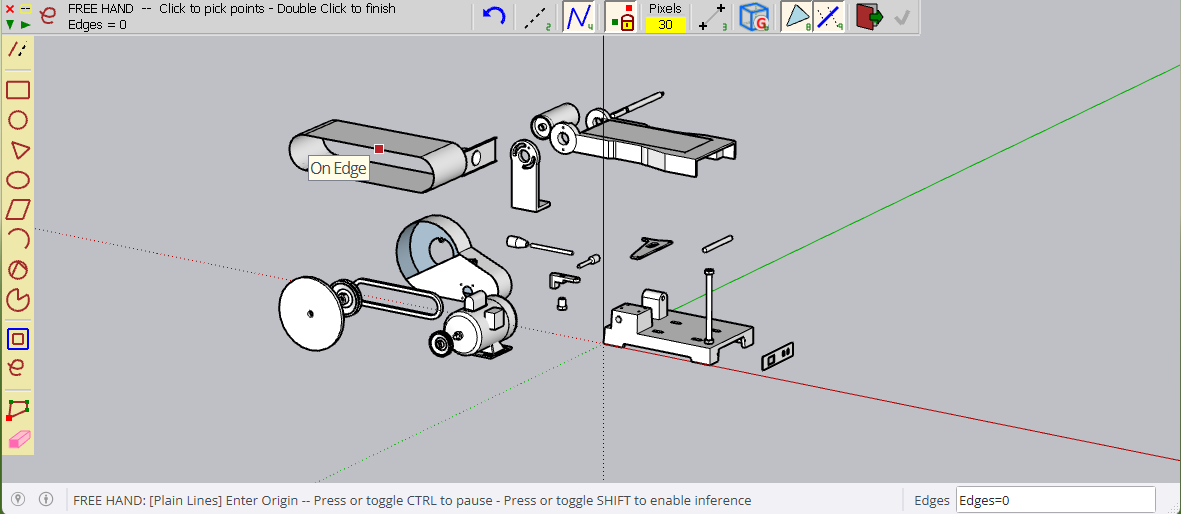
With Draw on a surface the cursor shows up (On Edge)
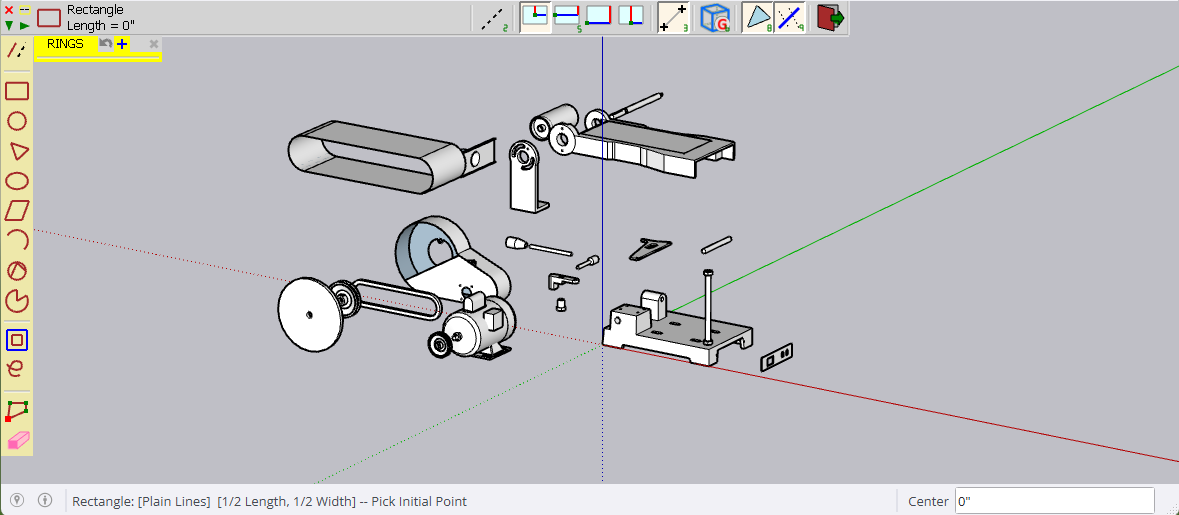
When I switch to Rectangle on a surface and I am still hovering over the left side menu things look fine.
It's when I leave the menu thing begin to look a bit wonky. I lose a button on the left and my options along the top disappear. And as mentioned before, now Point Cursor.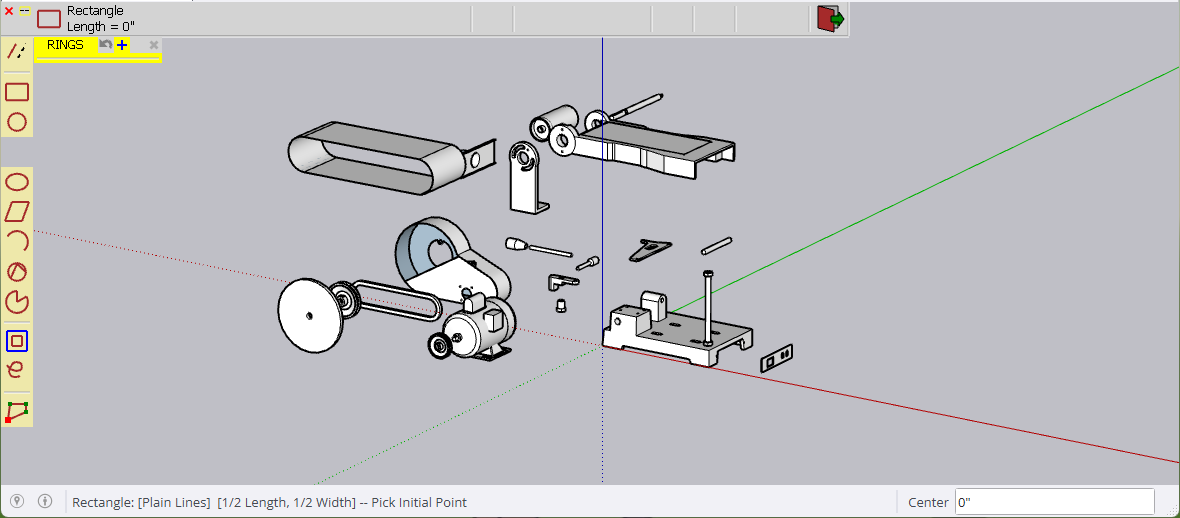
Any suggestions??
-
I would open the Ruby Console and copy paste the errors into your post here...
I'm seeing the following:
problem with draw GL code = icon_rect color = 30
Error:
#<ArgumentError: invalid texture ID>
c:/users/rclub/appdata/roaming/sketchup/sketchup 2023/sketchup/plugins/fredo6_!libfredo6/body_lib6g6.rbe:1721:in `draw2d'
c:/users/rclub/appdata/roaming/sketchup/sketchup 2023/sketchup/plugins/fredo6_!libfredo6/body_lib6g6.rbe:1721:in `block in process_GL_instructions'
c:/users/rclub/appdata/roaming/sketchup/sketchup 2023/sketchup/plugins/fredo6_!libfredo6/body_lib6g6.rbe:1713:in `each'
c:/users/rclub/appdata/roaming/sketchup/sketchup 2023/sketchup/plugins/fredo6_!libfredo6/body_lib6g6.rbe:1713:in `process_GL_instructions'
c:/users/rclub/appdata/roaming/sketchup/sketchup 2023/sketchup/plugins/fredo6_!libfredo6/body_lib6opengl.rbe:246:in `process_draw_GL'
c:/users/rclub/appdata/roaming/sketchup/sketchup 2023/sketchup/plugins/fredo6_!libfredo6/body_lib6palette.rbe:2962:in `draw_button_content'
c:/users/rclub/appdata/roaming/sketchup/sketchup 2023/sketchup/plugins/fredo6_!libfredo6/body_lib6palette.rbe:2667:in `draw_button'
c:/users/rclub/appdata/roaming/sketchup/sketchup 2023/sketchup/plugins/fredo6_!libfredo6/body_lib6palette.rbe:3224:in `block in draw'
c:/users/rclub/appdata/roaming/sketchup/sketchup 2023/sketchup/plugins/fredo6_!libfredo6/body_lib6palette.rbe:3217:in `each'
c:/users/rclub/appdata/roaming/sketchup/sketchup 2023/sketchup/plugins/fredo6_!libfredo6/body_lib6palette.rbe:3217:in `draw'
c:/users/rclub/appdata/roaming/sketchup/sketchup 2023/sketchup/plugins/fredo6_!libfredo6/lib6palette.rbe:84:in `draw'
c:/users/rclub/appdata/roaming/sketchup/sketchup 2023/sketchup/plugins/fredo6_toolsonsurface/shapeonsurface.rbe:577:in `draw'
Maybe @fredo6 has feedback
-
I can reproduce the issue and it should be present in all versions SU2023 ad SU2025.
I need to dig deeper into the cause for this problem. In the meantime, I published a quick fix in LibFredo6 v15.4c, just published.
PS: By the way, when you have a problem with a plugin, it is not useful to reinstall Sketchup, unless you are advised too.
-
Rich, Fredo6,,
Thanks for the response. I'll look in the console and update the post. Thanks for v15.4c link. I'll get right to it and reply soon. -
@Rich-O-Brien said in Trouble with Tools on a Surface:
I would open the Ruby Console and copy paste the errors into your post here...
I'm seeing the following:
problem with draw GL code = icon_rect color = 30
Error:
#<ArgumentError: invalid texture ID>
c:/users/rclub/appdata/roaming/sketchup/sketchup 2023/sketchup/plugins/fredo6_!libfredo6/body_lib6g6.rbe:1721:in `draw2d'
c:/users/rclub/appdata/roaming/sketchup/sketchup 2023/sketchup/plugins/fredo6_!libfredo6/body_lib6g6.rbe:1721:in `block in process_GL_instructions'
c:/users/rclub/appdata/roaming/sketchup/sketchup 2023/sketchup/plugins/fredo6_!libfredo6/body_lib6g6.rbe:1713:in `each'
c:/users/rclub/appdata/roaming/sketchup/sketchup 2023/sketchup/plugins/fredo6_!libfredo6/body_lib6g6.rbe:1713:in `process_GL_instructions'
c:/users/rclub/appdata/roaming/sketchup/sketchup 2023/sketchup/plugins/fredo6_!libfredo6/body_lib6opengl.rbe:246:in `process_draw_GL'
c:/users/rclub/appdata/roaming/sketchup/sketchup 2023/sketchup/plugins/fredo6_!libfredo6/body_lib6palette.rbe:2962:in `draw_button_content'
c:/users/rclub/appdata/roaming/sketchup/sketchup 2023/sketchup/plugins/fredo6_!libfredo6/body_lib6palette.rbe:2667:in `draw_button'
c:/users/rclub/appdata/roaming/sketchup/sketchup 2023/sketchup/plugins/fredo6_!libfredo6/body_lib6palette.rbe:3224:in `block in draw'
c:/users/rclub/appdata/roaming/sketchup/sketchup 2023/sketchup/plugins/fredo6_!libfredo6/body_lib6palette.rbe:3217:in `each'
c:/users/rclub/appdata/roaming/sketchup/sketchup 2023/sketchup/plugins/fredo6_!libfredo6/body_lib6palette.rbe:3217:in `draw'
c:/users/rclub/appdata/roaming/sketchup/sketchup 2023/sketchup/plugins/fredo6_!libfredo6/lib6palette.rbe:84:in `draw'
c:/users/rclub/appdata/roaming/sketchup/sketchup 2023/sketchup/plugins/fredo6_toolsonsurface/shapeonsurface.rbe:577:in `draw'
Maybe @fredo6 has feedback
Similarly, I'm seeing:
problem with draw GL code = icon_rect color = 114
#<ArgumentError: invalid texture ID>
c:/users/tmagdaleno/appdata/roaming/sketchup/sketchup 2025/sketchup/plugins/fredo6_!libfredo6/body_lib6g6.rbe:1721:in `draw2d'
c:/users/tmagdaleno/appdata/roaming/sketchup/sketchup 2025/sketchup/plugins/fredo6_!libfredo6/body_lib6g6.rbe:1721:in `block in process_GL_instructions'
c:/users/tmagdaleno/appdata/roaming/sketchup/sketchup 2025/sketchup/plugins/fredo6_!libfredo6/body_lib6g6.rbe:1713:in `each'
c:/users/tmagdaleno/appdata/roaming/sketchup/sketchup 2025/sketchup/plugins/fredo6_!libfredo6/body_lib6g6.rbe:1713:in `process_GL_instructions'
c:/users/tmagdaleno/appdata/roaming/sketchup/sketchup 2025/sketchup/plugins/fredo6_!libfredo6/body_lib6opengl.rbe:246:in `process_draw_GL'
c:/users/tmagdaleno/appdata/roaming/sketchup/sketchup 2025/sketchup/plugins/fredo6_!libfredo6/body_lib6palette.rbe:2962:in `draw_button_content'
c:/users/tmagdaleno/appdata/roaming/sketchup/sketchup 2025/sketchup/plugins/fredo6_!libfredo6/body_lib6palette.rbe:2667:in `draw_button'
c:/users/tmagdaleno/appdata/roaming/sketchup/sketchup 2025/sketchup/plugins/fredo6_!libfredo6/body_lib6palette.rbe:3224:in `block in draw'
c:/users/tmagdaleno/appdata/roaming/sketchup/sketchup 2025/sketchup/plugins/fredo6_!libfredo6/body_lib6palette.rbe:3217:in `each'
c:/users/tmagdaleno/appdata/roaming/sketchup/sketchup 2025/sketchup/plugins/fredo6_!libfredo6/body_lib6palette.rbe:3217:in `draw'
c:/users/tmagdaleno/appdata/roaming/sketchup/sketchup 2025/sketchup/plugins/fredo6_!libfredo6/lib6palette.rbe:84:in `draw'
c:/users/tmagdaleno/appdata/roaming/sketchup/sketchup 2025/sketchup/plugins/fredo6_toolsonsurface/shapeonsurface.rbe:577:in `draw'
I'll install Libfredo6 update v15.4c.
-
Precisely. The bug should be fixed in v15.4c.


Hello! It looks like you're interested in this conversation, but you don't have an account yet.
Getting fed up of having to scroll through the same posts each visit? When you register for an account, you'll always come back to exactly where you were before, and choose to be notified of new replies (either via email, or push notification). You'll also be able to save bookmarks and upvote posts to show your appreciation to other community members.
With your input, this post could be even better 💗
Register Login


Advertisement