Sketchup is automatically colouring edges??
-
Hi, as per the title, it appears that my Sketchup file is automatically applying colours to some object's edges?
Here's an example - I copied these seats from another Sketchup file

However when I pasted those seats into my current Sketchup file, it looks like this

Something is automatically applying a light colour to the edges when I copy paste objects over... if I go and select all the edges, I can reapply a dark material and it looks normal again.
Not sure if I've accidentally enabled a setting somewhere without realizing, perhaps someone else knows the reason for it.
If it makes any difference, I'm using Sketchup Pro 2021
-
Check if your Style > Edge Settings under Edit tab is set to By material
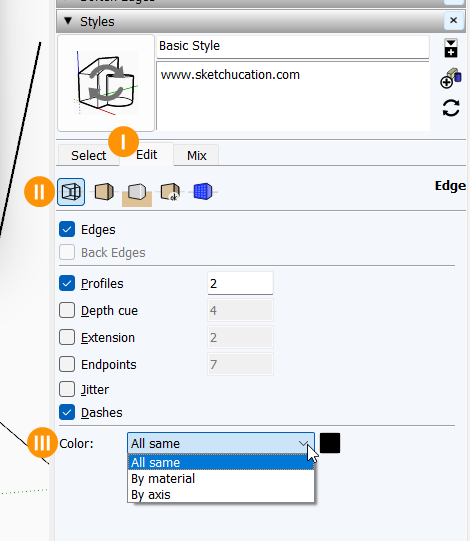
-
 R Rich O Brien marked this topic as a question on
-
@Rich-O-Brien Aha that was it, thank you!
-
R Rich O Brien has marked this topic as solved on
Hello! It looks like you're interested in this conversation, but you don't have an account yet.
Getting fed up of having to scroll through the same posts each visit? When you register for an account, you'll always come back to exactly where you were before, and choose to be notified of new replies (either via email, or push notification). You'll also be able to save bookmarks and upvote posts to show your appreciation to other community members.
With your input, this post could be even better 💗
Register Login


Advertisement