sketchucation logo sketchucation
    • Login
    Oops, your profile's looking a bit empty! To help us tailor your experience, please fill in key details like your SketchUp version, skill level, operating system, and more. Update and save your info on your profile page today!
    Mac User? | Join the Rayscaper Beta for Mac Learn More

    Rayscaper New Releases

    Scheduled Pinned Locked Moved Extensions & Applications Discussions
    rayscaperrender
    652 Posts 14 Posters 290.2k Views 15 Watching
    Loading More Posts
    • Oldest to Newest
    • Newest to Oldest
    • Most Votes
    Reply
    • Reply as topic
    Log in to reply
    This topic has been deleted. Only users with topic management privileges can see it.
    • pixelcruncherP
      pixelcruncher Extension Creator @Alattab
      last edited by

      @Alattab Wow, very impressive result. Well done!

      I'm the developer of Rayscaper: https://rayscaper.com/ - Fast and easy rendering for SketchUp.

      1 Reply Last reply
      Reply Quote 1
      • pixelcruncherP
        pixelcruncher Extension Creator @Alattab
        last edited by

        @Alattab I will add it to the feature list.

        I'm the developer of Rayscaper: https://rayscaper.com/ - Fast and easy rendering for SketchUp.

        1 Reply Last reply
        Reply Quote 0
        • KrassK
          Krass
          last edited by Krass

          Nasty Jingle

          Krass

          1 Reply Last reply
          Reply Quote 1
          • pixelcruncherP
            pixelcruncher Extension Creator
            last edited by

            Hey folks,

            A new Mac beta is up: Rayscaper 0.9.106. Same link as before: Rayscaper for Mac

            What's new since 0.9.105:

            • No more crash next to other extensions: starting a render could crash SketchUp when an extension such as Unreal Datasmith was installed. Such an extension loads its own copies of libraries that Rayscaper uses too, and macOS handed those to Rayscaper. Rayscaper now ships its libraries under names of its own, so they can't get mixed up. Thanks to the tester who sent their logs!
            • A calmer, more polished interface: clearer text hierarchy, quieter controls with their values lined up, dropdowns with readable lists, and a status bar that shows what Rayscaper is doing and, when a render fails, why.
            • Faster value editing: drag a label to change its value, double-click a slider to type one, and type values with units (35 %, 2 ft, 90°). Right-click a setting in Post Processing or Render to reset it to its default.
            • Feedback when you save: saving a render, preset or material shows a notification with Show in Folder, and errors tell you what to do next.
            • Scene tabs set the sun: selecting a SketchUp scene tab now also sets the sky to that scene's time and date. Before, it kept the sun of the previous scene.

            If you installed an earlier beta: install this one over it with the Extension Manager, then restart SketchUp.

            Thanks to everyone testing, keep the feedback coming!

            Cheers, Thomas

            I'm the developer of Rayscaper: https://rayscaper.com/ - Fast and easy rendering for SketchUp.

            1 Reply Last reply
            Reply Quote 0
            • A
              Alattab
              last edited by

              What about the Windows operating system community?

              1 Reply Last reply
              Reply Quote 0
              • A
                Alattab
                last edited by

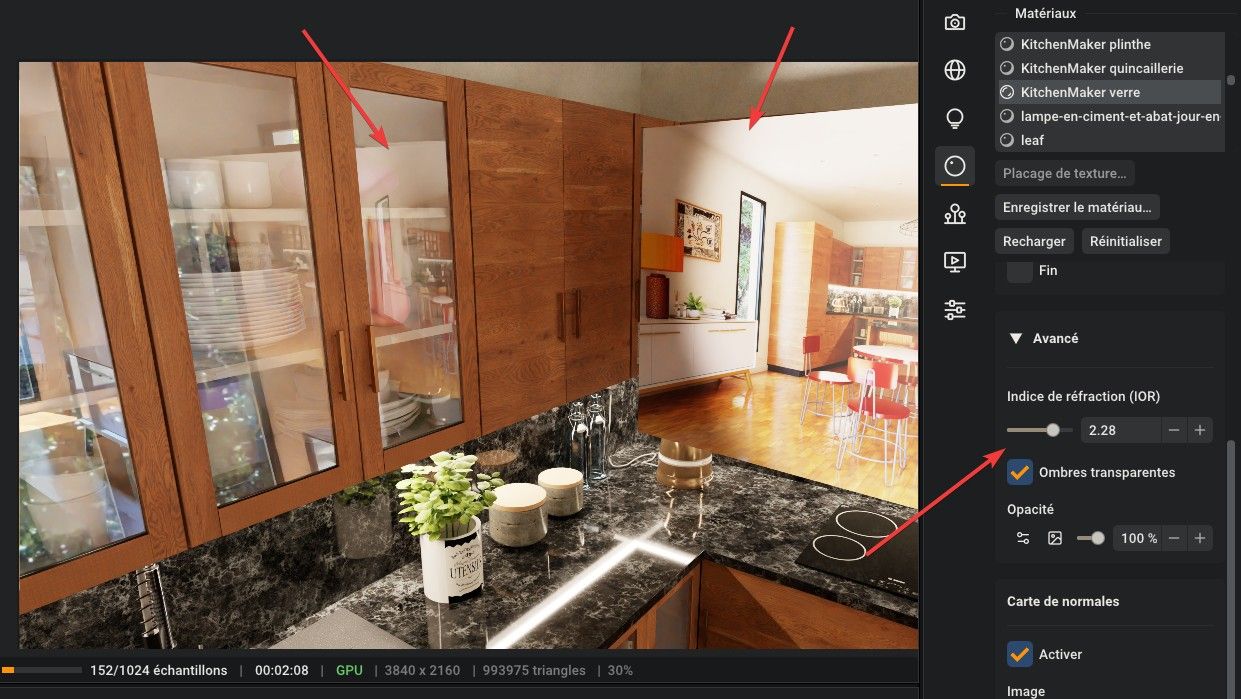
                When I place a static image in front of the glass, its reflection does not appear. I imported the image using the "import image" function.

                1 Reply Last reply
                Reply Quote 0
                • KrassK
                  Krass
                  last edited by Krass

                  Hello,
                  yes, reflections in rayscaper are very low...
                  You need to increase IQR level in the advanced tab of your glass
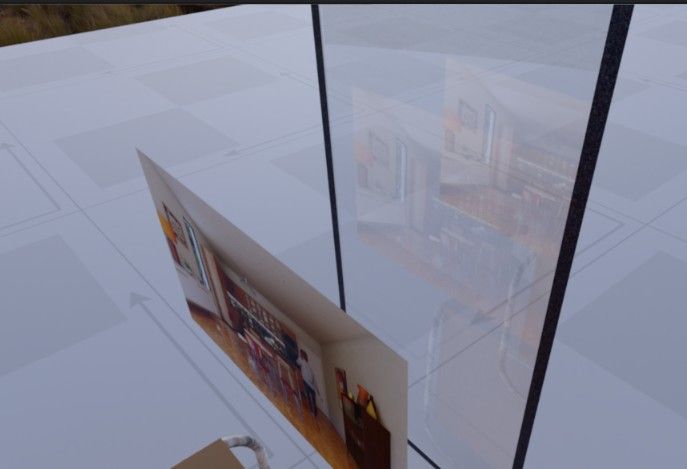
                  image.jpeg

                  Krass

                  1 Reply Last reply
                  Reply Quote 1
                  • KrassK
                    Krass
                    last edited by

                    image.jpeg

                    Krass

                    1 Reply Last reply
                    Reply Quote 0
                    • pixelcruncherP
                      pixelcruncher Extension Creator
                      last edited by

                      This is how real glass behaves, not a bug. Clear glass reflects only a small part of the light.

                      Your imported image is reflected; it's just faint. To make reflections stronger:

                      • Put something darker behind the glass, or view it at more of an angle.
                      • Raise the IOR in the glass's Advanced section a little, as @krass suggests. Very high values (above 2) make the glass bend whatever is behind it much more, so use them with care (like looking through a diamond).

                      Cheers,
                      Thomas

                      I'm the developer of Rayscaper: https://rayscaper.com/ - Fast and easy rendering for SketchUp.

                      1 Reply Last reply
                      Reply Quote 1
                      • A
                        Alattab
                        last edited by Alattab

                        In the materials name list, how can I select multiple materials at once so that I can apply the same type of settings to them?

                        pixelcruncherP 1 Reply Last reply
                        Reply Quote 0
                        • pixelcruncherP
                          pixelcruncher Extension Creator
                          last edited by

                          Hey, Rayscaper users!

                          Rayscaper 0.9.106 Beta is available. You can get it via:

                          • Direct download: Rayscaper_Win_0.9.106_Beta.rbz.
                          • The SketchUcation store. It still lists 0.9.105 for now and will get 0.9.106 shortly.

                          I recommend upgrading to the latest version.

                          Grass That Grows in the Render

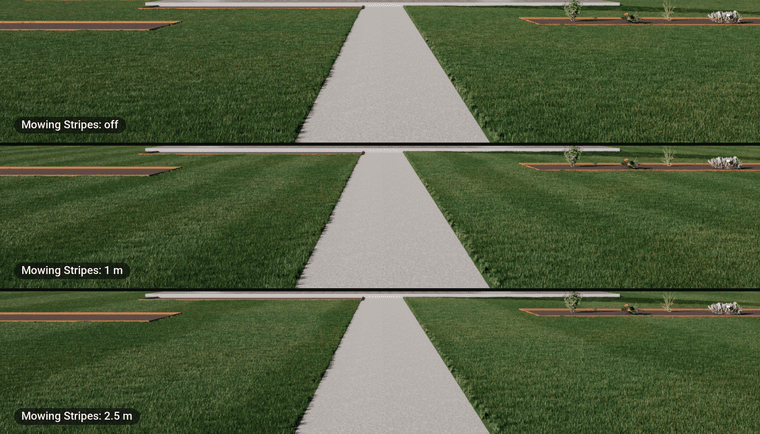
                          Paint a face with the new Grass material and Rayscaper grows real grass blades on it in the render. Your SketchUp model stays light, since the blades only exist in the render. Pick a Mowed Lawn, Garden Lawn, Meadow, Dry Grass or Artificial Turf, add mowing stripes, or let the blades take their color from the texture of the material. The grass stays off paths and the edges of the lawn, and grows on across a lawn that is split into groups. See Grass Material.
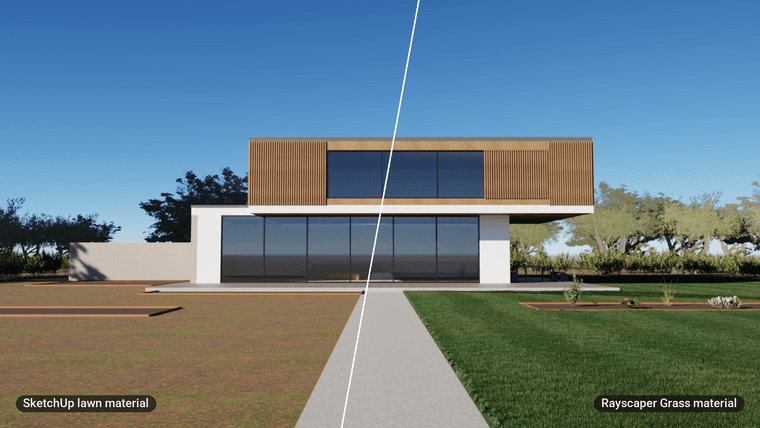
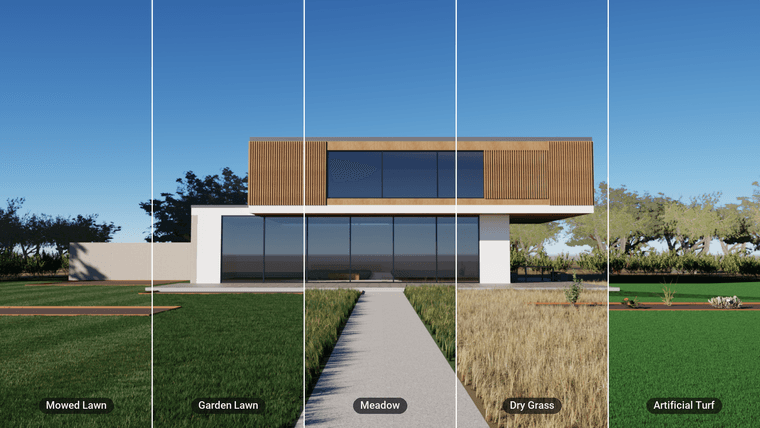
                          grass_hero_before_after.png

                          grass_presets_slices.png

                          grass_mowing_stripes.png

                          Presets for Post Processing, Environment and Render

                          The Post Processing, Environment and Render tabs now have a preset list: looks such as Crisp Daylight and Cinematic, skies such as Golden Hour and Sunset, and render qualities. Save your own, choose the ones a new model starts with, and go back to your previous settings if you don't like a preset. See Post Processing Presets and Environment Presets.
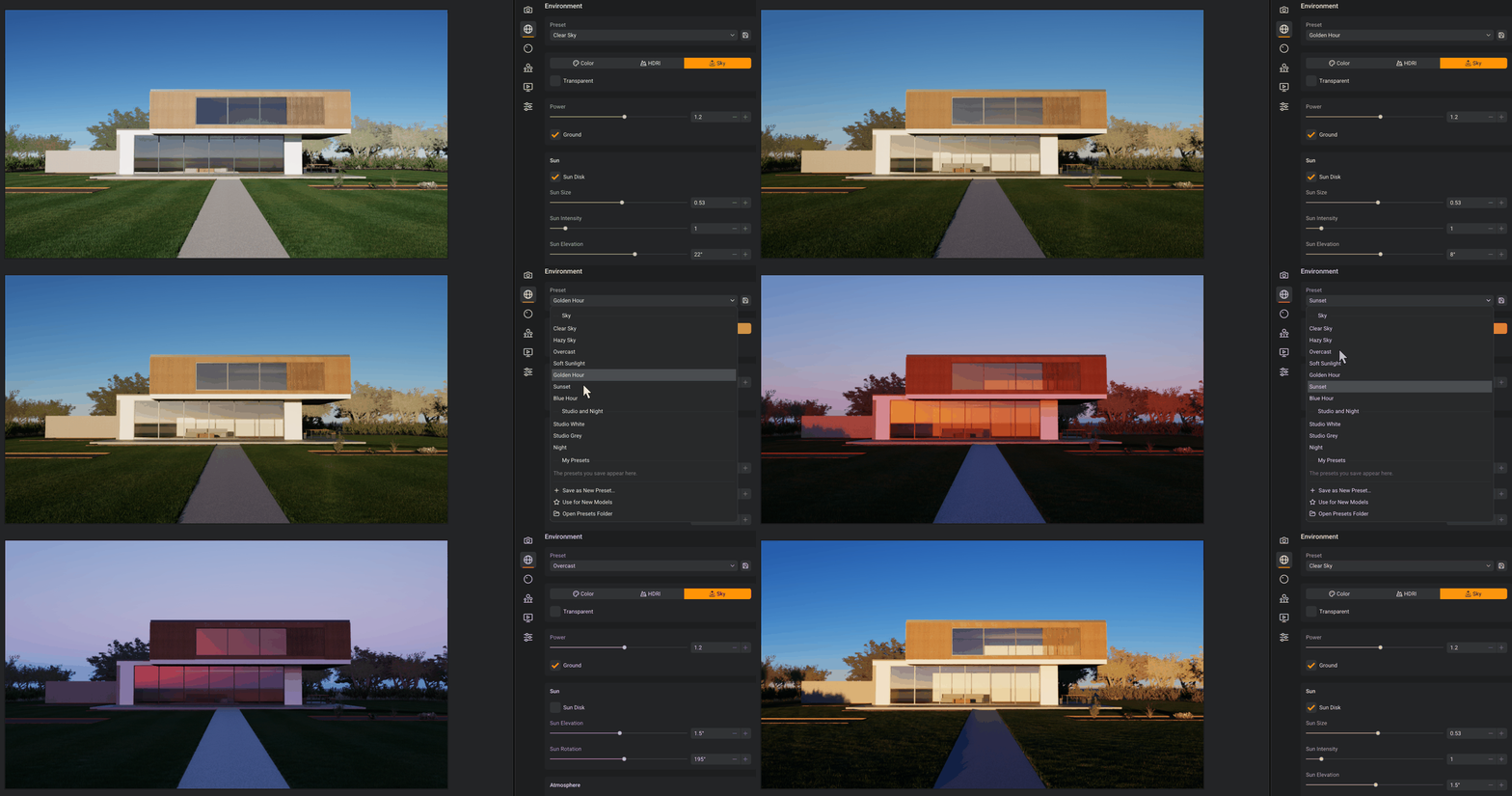
                          environment_presets_ui.gif

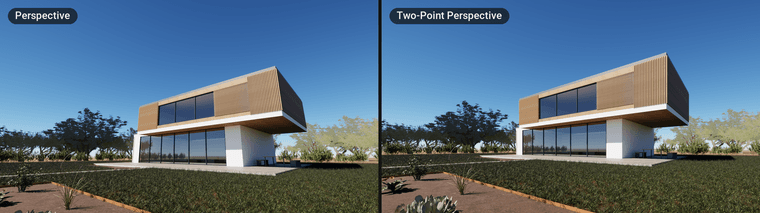
                          Two-Point Perspective

                          SketchUp's Two-Point Perspective keeps your walls upright. Rayscaper now renders that view exactly as SketchUp frames it, instead of a tilted camera with leaning walls. See Two-Point Perspective.
                          two_point_before_after.png

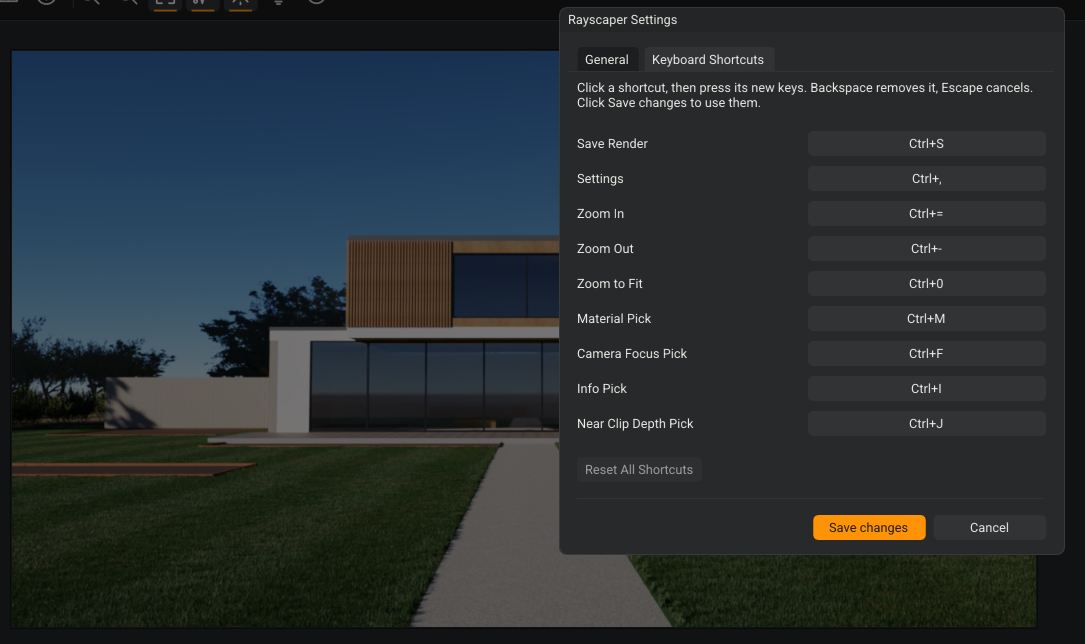
                          Your Own Keyboard Shortcuts

                          Change the shortcuts of the render window in the new Keyboard Shortcuts tab of the settings. See Changing keyboard shortcuts.
                          keyboard_shortcuts.png

                          What Changed?

                          • Add the Grass material: paint a face with it and Rayscaper grows real grass blades on it in the render, with presets for a mowed lawn, a garden lawn, a meadow, dry grass and artificial turf, mowing stripes, and blades that take the color of the material's texture where they grow. The grass stays off paths and the edges of the lawn, and grows on across lawns split into groups.
                          • Add presets to the Post Processing, Environment and Render tabs: looks such as Crisp Daylight and Cinematic, skies such as Golden Hour, Sunset and Blue Hour, and render qualities. Save your own presets, pick the ones a new model starts with, and go back to your previous settings.
                          • Change the keyboard shortcuts in the new Keyboard Shortcuts tab of the settings.
                          • Offer a license where the free version stops you: the 1280 px notice, Render Scenes and the About dialog.
                          • Redraw the light tool icons, sharp at every display scale on Windows.
                          • Make the render follow the camera faster and more smoothly while you navigate or change the model, and show what the renderer does while a render starts (loading textures, preparing the scene, ...).
                          • Render SketchUp's Two-Point Perspective views as SketchUp frames them.
                          • Give the user interface a calmer, clearer look: a type hierarchy, quieter controls with aligned values, readable dropdowns and a calmer status bar.
                          • Keep the render fitted to the viewport until you zoom or pan.
                          • Update scenes with many emissive instances faster.
                          • Keep Rayscaper's settings of a model when SketchUp's Undo is used after saving or after closing the render window, which could bring back older settings or none.
                          • Fix a crash when another extension loaded its own copy of a library that Rayscaper uses.
                          • Fix SketchUp quitting on some undo and redo of groups and components, and on a normal map whose texture isn't an image.
                          • Follow the shadow time of a SketchUp scene when its tab is selected.
                          • Fix auto exposure flashing white while the render starts or the camera moves.
                          • Move SketchUp's camera along when an AI agent changes the camera through the MCP server.

                          Full release notes: rayscaper.com/manual/release-notes

                          Help Me Build the Community 👍

                          If you like Rayscaper, please share your renders (final or work-in-progress, it doesn't matter)! This is motivating and helps me showcase its capabilities to new users.

                          Follow me on X.

                          Happy Rendering!
                          Thomas

                          I'm the developer of Rayscaper: https://rayscaper.com/ - Fast and easy rendering for SketchUp.

                          1 Reply Last reply
                          Reply Quote 0
                          • KrassK
                            Krass
                            last edited by

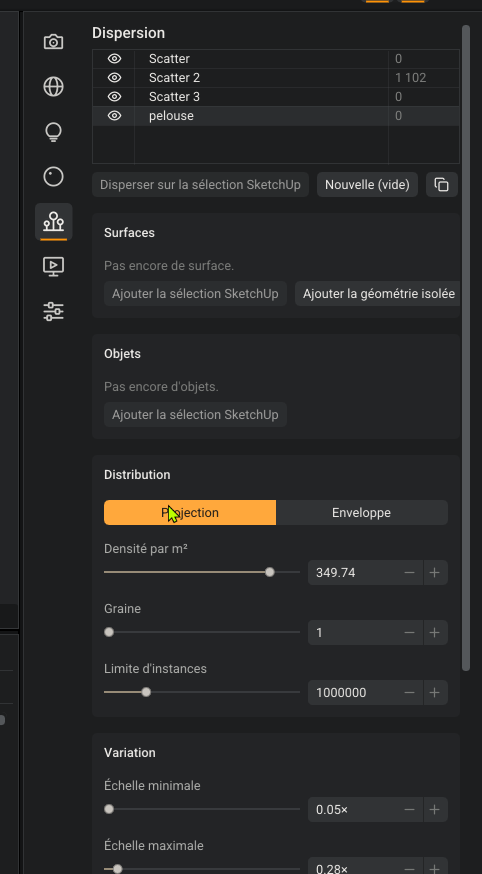
                            That looks excellent to me! But I don’t understand how to remove or delete a scatter from the list?
                            SketchUp_bDbKEzregO.png

                            Krass

                            pixelcruncherP 1 Reply Last reply
                            Reply Quote 0
                            • pixelcruncherP
                              pixelcruncher Extension Creator @Krass
                              last edited by

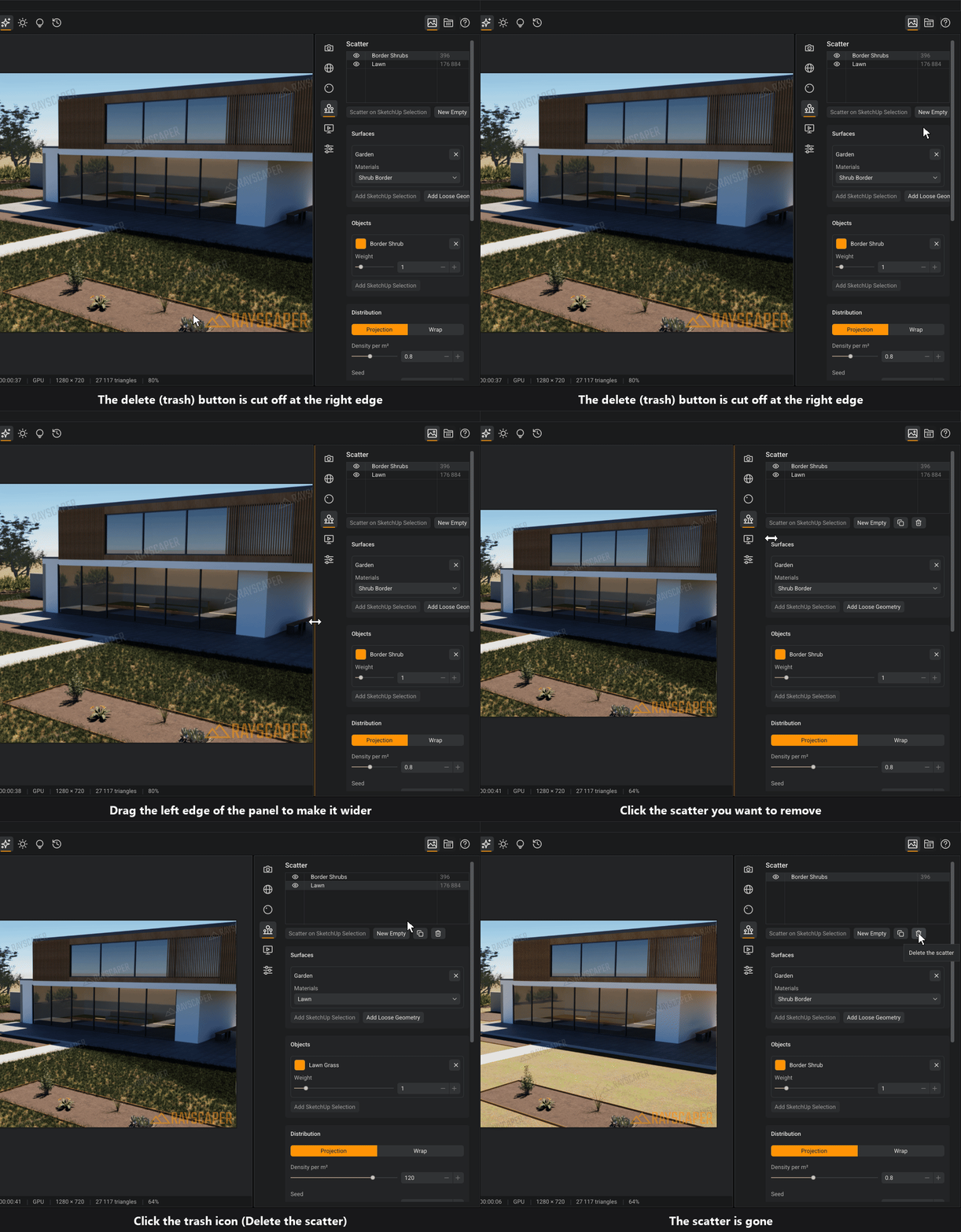
                              @Krass Ugh, you found a bug. The buttons are falling off the scatter editor. You can make it wider for now to work around it. I will fix it for the next release.
                              delete_scatter.gif

                              BTW, how are the French translation? It's AI, I kinda spot checked it but I don't know enough French to see if they actually make sense. And I don't use French software so for sure I don't know the specific terms.

                              Cheers,
                              Thomas

                              I'm the developer of Rayscaper: https://rayscaper.com/ - Fast and easy rendering for SketchUp.

                              1 Reply Last reply
                              Reply Quote 0
                              • pixelcruncherP
                                pixelcruncher Extension Creator @Alattab
                                last edited by

                                @Alattab said:

                                In the materials name list, how can I select multiple materials at once so that I can apply the same type of settings to them?

                                Good suggestion, will add it to the feature list.

                                I'm the developer of Rayscaper: https://rayscaper.com/ - Fast and easy rendering for SketchUp.

                                1 Reply Last reply
                                Reply Quote 0
                                • KrassK
                                  Krass
                                  last edited by

                                  Thanks,
                                  The translation is pretty good. I did consider switching it back to English, as technical terms and software-related language can often lead to misunderstandings, but I’ll leave it in French for now.
                                  I’ll keep an eye out and let you know if I spot any incorrect or ambiguous translations.
                                  Your grass material is truly excellent—it’s a significant milestone for this version. And the customizable shortcuts are a big deal for me, so I’m really happy about that. Well done!

                                  Krass

                                  KrassK 1 Reply Last reply ♥
                                  Reply Quote 1
                                  • KrassK
                                    Krass @Krass
                                    last edited by Krass

                                    Rayscaper

                                    The grass settings are absolutely perfect. I'm now going to try to repurpose this function to generate carpets. The presets are good; the hue is very natural, whereas in many other programs you get an unrealistic, vivid green.


                                    Krass

                                    1 Reply Last reply ♥
                                    Reply Quote 1

                                    Hello! It looks like you're interested in this conversation, but you don't have an account yet.

                                    Getting fed up of having to scroll through the same posts each visit? When you register for an account, you'll always come back to exactly where you were before, and choose to be notified of new replies (either via email, or push notification). You'll also be able to save bookmarks and upvote posts to show your appreciation to other community members.

                                    With your input, this post could be even better 💗

                                    Register Login
                                    • 1
                                    • 2
                                    • 13
                                    • 14
                                    • 15
                                    • 16
                                    • 17
                                    • 32
                                    • 33
                                    • 15 / 33
                                    • First post
                                      Last post
                                    Buy SketchPlus
                                    Buy SUbD
                                    Buy WrapR
                                    Buy eBook
                                    Buy Modelur
                                    Buy Vertex Tools
                                    Buy SketchCuisine
                                    Buy FormFonts

                                    Advertisement