sketchucation logo sketchucation
    • Login
    Oops, your profile's looking a bit empty! To help us tailor your experience, please fill in key details like your SketchUp version, skill level, operating system, and more. Update and save your info on your profile page today!
    Mac User? | Join the Rayscaper Beta for Mac Learn More

    Rayscaper New Releases

    Scheduled Pinned Locked Moved Extensions & Applications Discussions
    rayscaperrender
    584 Posts 13 Posters 260.0k Views 14 Watching
    Loading More Posts
    • Oldest to Newest
    • Newest to Oldest
    • Most Votes
    Reply
    • Reply as topic
    Log in to reply
    This topic has been deleted. Only users with topic management privileges can see it.
    • KrassK
      Krass @pixelcruncher
      last edited by Krass

      @pixelcruncher
      My lights are back

      I’m having a bit of trouble getting back into Animator... I need to figure out how to hide the editing bar during a preview.
      Still, I managed to put together this little animation. The orange in the logo isn’t rendering correctly—not sure why. Make sure to set the quality to 1080p in the YouTube settings!
      And if you’d like an animation for your YouTube channel to showcase this feature, I’d be happy to create one based on your instructions.

      Krass

      1 Reply Last reply
      Reply Quote 0
      • pixelcruncherP
        pixelcruncher Extension Creator
        last edited by pixelcruncher

        @krass Good to hear that the lights are back!

        I think it's a cool concept video to show off the capabilities of Rayscaper and Fredo6 Animator! I'd definitely share it on my YouTube channel. One thing that's a bit off putting is the ugly fonts and the botched Rayscaper colors. But aside from that, I think it's pretty cool to see everything animated in this room. Also like the ambient music!

        I'm the developer of Rayscaper: https://rayscaper.com/ - Fast and easy rendering for SketchUp.

        KrassK 1 Reply Last reply
        Reply Quote 0
        • KrassK
          Krass @pixelcruncher
          last edited by

          @pixelcruncher said:

          I think it's a cool concept video to show off the capabilities of Rayscaper and Fredo6 Animator! I'd definitely share it on my YouTube channel. One thing that's a bit off putting is the ugly fonts and the botched Rayscaper colors. But aside from that, I think it's pretty cool to see everything animated in this room. Also like the ambient music!

          yes, I was looking for an Animator logo and did not find aything... And the "Fredo6 plugin text" is terrible.
          I should find the courage to redo this animation—I was in too much of a rush to release it back when I was testing out Animator.

          Krass

          1 Reply Last reply
          Reply Quote 0
          • KrassK
            Krass
            last edited by

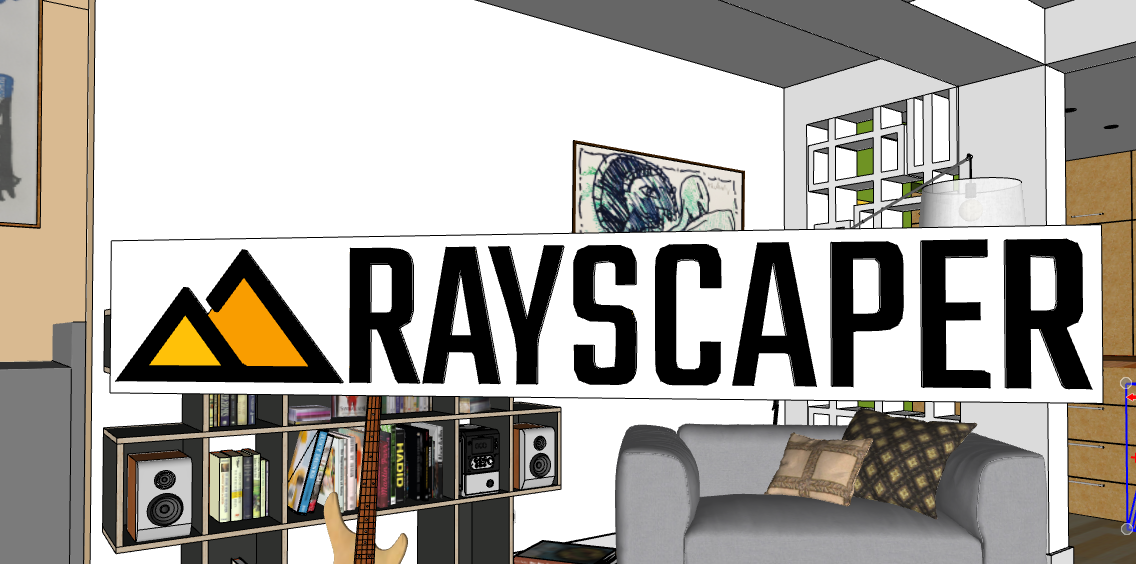
            strange difference of the color in sketchup and after rendering
            SketchUp_5ap460rBTh.png

            SketchUp_4GqhRwXMFD.png

            Krass

            pixelcruncherP 1 Reply Last reply
            Reply Quote 0
            • pixelcruncherP
              pixelcruncher Extension Creator @Krass
              last edited by

              @Krass I suspect that the colors are fine, but that it's overexposed. The letters' black is grey as well. Can you try to turn down the light power, or fix the exposure in post-processing?

              I'm the developer of Rayscaper: https://rayscaper.com/ - Fast and easy rendering for SketchUp.

              1 Reply Last reply
              Reply Quote 0
              • pixelcruncherP
                pixelcruncher Extension Creator @Alattab
                last edited by

                @Alattab There's an issue with uploading RBZ files to SketchUcation right now. You can download it here: https://releases.rayscaper.com/SketchUp/Windows/Rayscaper_Win_0.9.104_Beta.rbz

                I'm the developer of Rayscaper: https://rayscaper.com/ - Fast and easy rendering for SketchUp.

                1 Reply Last reply
                Reply Quote 0
                • A
                  Alattab @pixelcruncher
                  last edited by

                  @pixelcruncher Even though the "Ground" option in the SketchUp style is set to "unchecked," I still see a green ground plane, and I cannot see the swimming pool basin.

                  pool water surface modeled as surface plan benath sketchup ground level , skimmer type

                  1 Reply Last reply
                  Reply Quote 0
                  • pixelcruncherP
                    pixelcruncher Extension Creator
                    last edited by

                    @alattab, can you provide screenshots or a scene? Now I'm just guessing.

                    I'm the developer of Rayscaper: https://rayscaper.com/ - Fast and easy rendering for SketchUp.

                    1 Reply Last reply
                    Reply Quote 0
                    • A
                      Alattab
                      last edited by

                      I apologize; there was an issue with the SketchUp model. I have two requests: could the watermark be made more transparent, or could the text be removed while keeping just the logo? I would prefer the text to be taken out, leaving only the logo/watermark in the corner of the screen—that would be sufficient. Also, could you create a detailed PDF document covering all the software's settings? I will continue to provide further feedback as we move forward.

                      One more thing: I would like a light theme option.

                      Attached is an image of a scene; I haven’t adjusted anything other than the water and a bit of the lighting.

                      1 Reply Last reply
                      Reply Quote 0
                      • A
                        Alattab
                        last edited by

                        test.PNG

                        1 Reply Last reply
                        Reply Quote 0
                        • KrassK
                          Krass
                          last edited by

                          Hello,
                          you. Can read official manual and help pages on Rayscaper site. Much better and easy to use than a pdf.


                          Krass

                          1 Reply Last reply 👍
                          Reply Quote 0

                          Hello! It looks like you're interested in this conversation, but you don't have an account yet.

                          Getting fed up of having to scroll through the same posts each visit? When you register for an account, you'll always come back to exactly where you were before, and choose to be notified of new replies (either via email, or push notification). You'll also be able to save bookmarks and upvote posts to show your appreciation to other community members.

                          With your input, this post could be even better 💗

                          Register Login
                          • 1
                          • 2
                          • 3
                          • 4
                          • 5
                          • 29
                          • 30
                          • 2 / 30
                          • First post
                            Last post
                          Buy SketchPlus
                          Buy SUbD
                          Buy WrapR
                          Buy eBook
                          Buy Modelur
                          Buy Vertex Tools
                          Buy SketchCuisine
                          Buy FormFonts

                          Advertisement