sketchucation logo sketchucation
    • Login
    Oops, your profile's looking a bit empty! To help us tailor your experience, please fill in key details like your SketchUp version, skill level, operating system, and more. Update and save your info on your profile page today!
    Mac User? | Join the Rayscaper Beta for Mac Learn More

    How to curt hole in log wall

    Scheduled Pinned Locked Moved SketchUp Discussions
    28 Posts 4 Posters 2.4k Views 4 Watching
    Loading More Posts
    • Oldest to Newest
    • Newest to Oldest
    • Most Votes
    Reply
    • Reply as topic
    Log in to reply
    This topic has been deleted. Only users with topic management privileges can see it.
    • N
      numerobis
      last edited by

      @ntxdave said:

      Thanks for the link. That plugin is not available via the Sketchucatiob Plugin store.

      Link Preview Image
      Releases · Eneroth3/eneroth-solid-tools

      Solid operations for SketchUp. Contribute to Eneroth3/eneroth-solid-tools development by creating an account on GitHub.

      favicon

      GitHub (github.com)

      1 Reply Last reply
      Reply Quote 0
      • BoxB
        Box
        last edited by

        @box said:

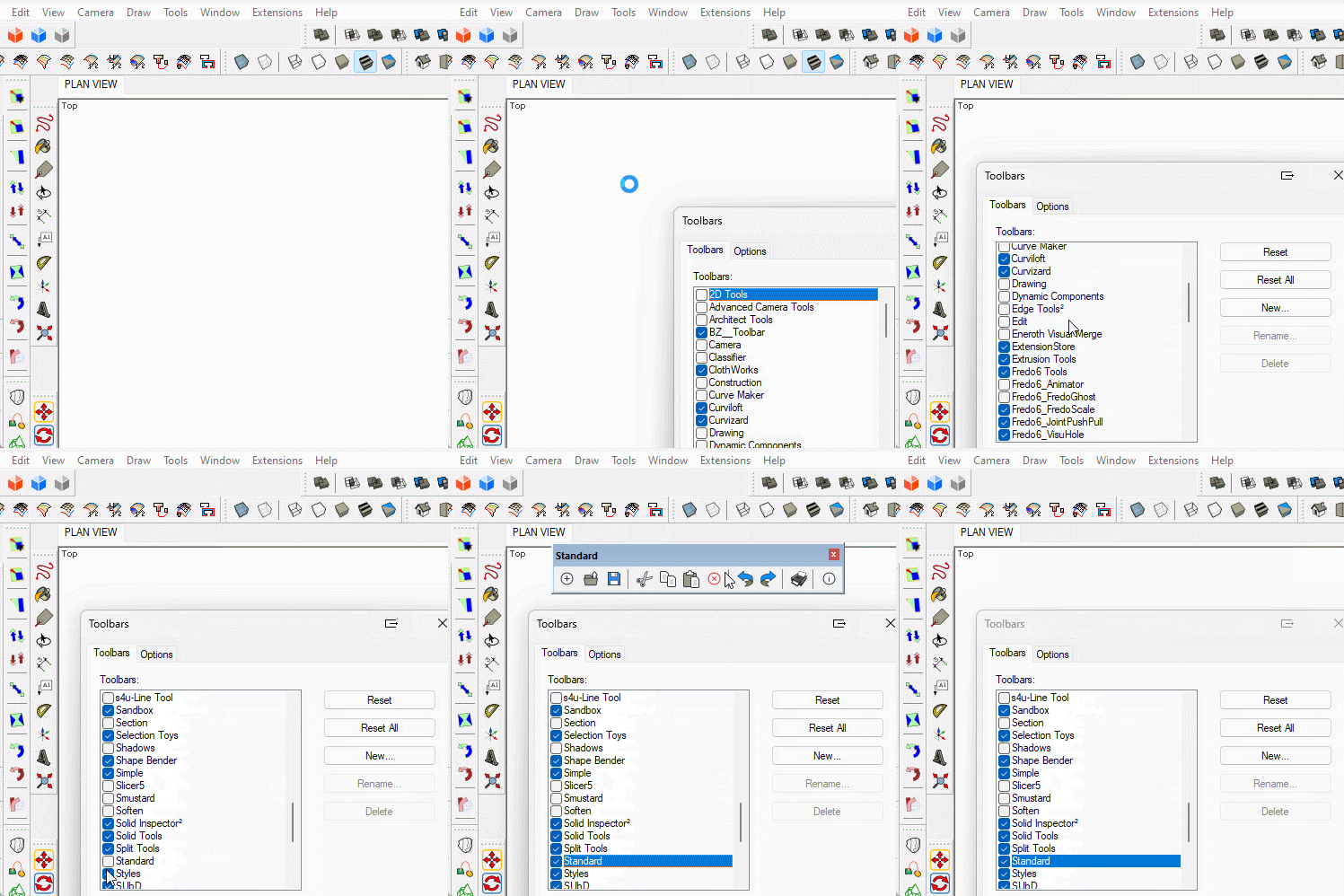
        That Icon is Delete from the 'Standard' toolbar.

        @ntxdave said:

        Thanks for the link but I could not find a toolbar that had the delete icon.


        GIF 25-09-2023 10-27-57 AM.gif

        1 Reply Last reply
        Reply Quote 0
        • ntxdaveN
          ntxdave
          last edited by

          Thanks Box, I will have a look.

          BTW, is there a way to add the bottom view to a toolbar?

          Press F1...thank me later

          1 Reply Last reply
          Reply Quote 0
          • BoxB
            Box
            last edited by

            @ntxdave said:

            BTW, is there a way to add the bottom view to a toolbar?

            Not in the older versions, but you can make a keyboard shortcut.

            1 Reply Last reply
            Reply Quote 0
            • ntxdaveN
              ntxdave
              last edited by

              Again, thank you very much. I make a new small toolbar that has the Erase, Undo, Redo and Model Info icons. I wanted to place it along the side bar. I also tried to set it do double wide but it would not allow me to do it in that position. Am I missing something?

              I will also add a shortcut for the Bottom view. 😄

              Press F1...thank me later

              1 Reply Last reply
              Reply Quote 0
              • BoxB
                Box
                last edited by

                @ntxdave said:

                I also tried to set it do double wide but it would not allow me to do it in that position. Am I missing something?

                No you aren't missing something, the toolbar won't do double wide when docked, even though the Large Toolset does. It has been a complaint for many years. And you can't put the large toolset across the top.
                Far be it for us to question the design gods of the UI, they obviously know something we don't.

                1 Reply Last reply
                Reply Quote 1
                • ntxdaveN
                  ntxdave
                  last edited by

                  Added.........Alt+Shift+B

                  Again, many thanks. I had a bad day on the SketchUp forum so this was something very positive. 😄

                  Press F1...thank me later

                  1 Reply Last reply
                  Reply Quote 0
                  • ntxdaveN
                    ntxdave
                    last edited by

                    Box, thanks to your advice/info I was able to modify the Large Toolbar and add some functions (including the erase tool). Here is what I now have in the top section of the Large Toolbar.
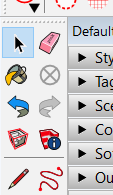
                    Modified Large Toolbar.png

                    Also downloaded the Eneroth Solid Tools plugin for dealing with cutting window and door wholes in my log cabin walls. Like it better than the standard tools (for this situation).

                    Again, thanks for your feedback and assistance. 👍

                    Press F1...thank me later

                    1 Reply Last reply
                    Reply Quote 0

                    Hello! It looks like you're interested in this conversation, but you don't have an account yet.

                    Getting fed up of having to scroll through the same posts each visit? When you register for an account, you'll always come back to exactly where you were before, and choose to be notified of new replies (either via email, or push notification). You'll also be able to save bookmarks and upvote posts to show your appreciation to other community members.

                    With your input, this post could be even better 💗

                    Register Login
                    • 1
                    • 2
                    • 2 / 2
                    • First post
                      Last post
                    Buy SketchPlus
                    Buy SUbD
                    Buy WrapR
                    Buy eBook
                    Buy Modelur
                    Buy Vertex Tools
                    Buy SketchCuisine
                    Buy FormFonts

                    Advertisement