Lords of toolbars
-
Hi Guys,
Is anybody have a solution to this problem?
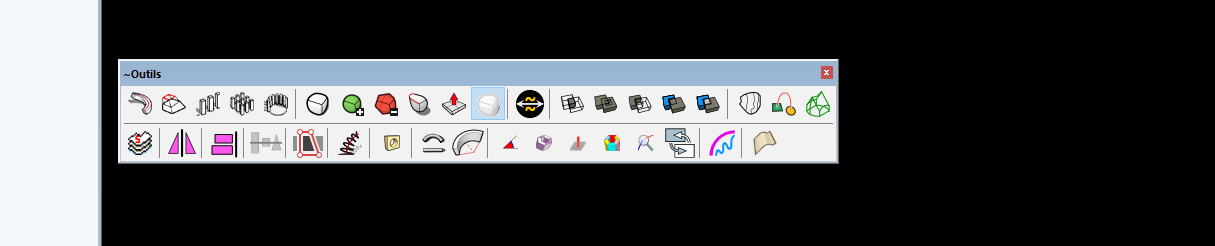
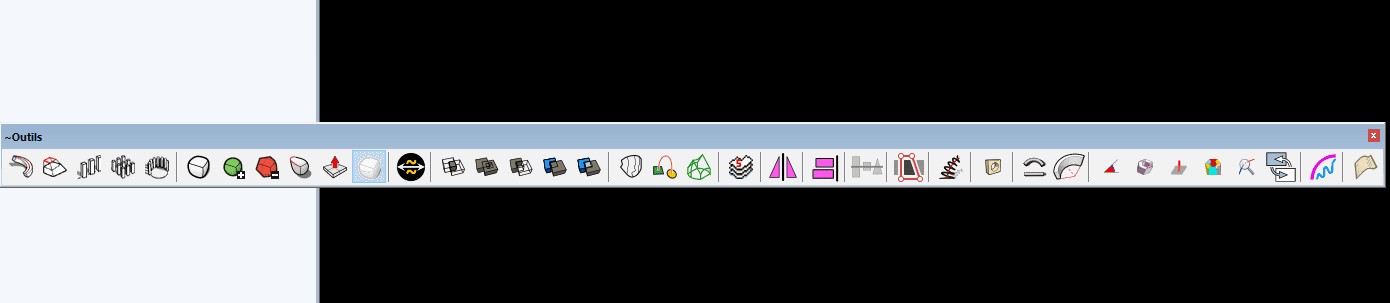
I do not find the way to put a custom toolbar in 2 lines. Each time I open again Sketchup, my custom toolbar is only 1 line.
Do you know how to avoid that?Thanks a lot every one

C.real
-
Is this with the Lord of the Toolbars extension or the native custom toolbar feature?
-
It is with Fredo6 Lords of Toolbar.
I joined with this message 2 pictures to be more clear.
Than kyou for your reply
-
I forgot to mention that first picture is what I want, and the second one is what I get after closing Sketchup and open it again.
-
What happens if you decrease the width of the custom toolbar?
-
Thanks for your answer Fredo

Where can I find the way to do that please? -
A new issue for me:
The favorites pallets appear above the buttons despite being told to go down in the default parameters.
This is my display setup BTW:
-
@creal said:
Thanks for your answer Fredo
Where can I find the way to do that please?Its just like resizing any window. On another note, did you add a line break after a particular tool like this:




Hello! It looks like you're interested in this conversation, but you don't have an account yet.
Getting fed up of having to scroll through the same posts each visit? When you register for an account, you'll always come back to exactly where you were before, and choose to be notified of new replies (either via email, or push notification). You'll also be able to save bookmarks and upvote posts to show your appreciation to other community members.
With your input, this post could be even better 💗
Register Login


Advertisement